Burrow
Burrow is a blygger client.
It’s a native studio for Blygger blogs, on macOS and Windows, built to be as fast as Notational Velocity. Burrow was called Blygger Desktop up to 0.6.0 (see the rename).
What’s a blyg?
Blygger is an open protocol for personal blogs
that you own. A blog that speaks it is a blyg: your own site, on your
own domain, holding short fragments (up to 1000 characters) and longer
threads. Posts have public versions. A version can be pinned, which
means it’s served unchanged forever, and published posts are never deleted,
only withdrawn, visibly. Blygs quote each other by id (![[id]]), reply
with stubs, fork each other’s pinned posts, and follow each other
privately. There are no follower counts, likes or handles: the domain is the
name, and responses are shown as a list, never a count.
The reference server is a Cloudflare Worker with a web studio. Burrow is a second studio, on your Mac.
What Burrow is
There’s one window: type to search, press ⏎ to create, and nothing ever waits on the network. It’s local-first: everything you write is saved on your Mac first and synced to your blyg in the background, so it works offline. It’s written in Rust with GPUI, the UI framework behind Zed.
- Write fragments and threads in plain Markdown, with a live preview that matches what your blyg publishes. There’s no save button. See Writing and publishing.
- Read everything you follow as one stream, or in a three-pane reader, and quote, reply, fork or link from any post. See Reading, quoting and responses.
- Collect as you go: a global quick-capture panel, a notes drawer for reading notes, and a built-in browser with ad blocking. See Notes and the browser.
- Get help from AI, if you want it. It’s off until you switch it on, you bring your own accounts, and generated text is always disclosed. See AI helpers.
- Configure it in one plain-text file, Ghostty-style. See Configuration.
Burrow works with a stock blyg: an unmodified blygger-studio 0.47 or later needs no server patches (see Server requirements). You can try it without one: the first launch offers sample data.
Disclaimer
Burrow is entirely vibecoded: it was written with AI assistance. It’s provided as is, with no warranty or guarantee of any kind, and you use it at your own risk. That includes the risk of losing or corrupting posts on your blyg. Keep backups.
The source code is under the MIT license, and the documentation, mockups and screenshots under CC BY 4.0. See the repository for the details.
A tour in screenshots
Install and update
Burrow runs on macOS 11 (Big Sur) or later, on Apple silicon or Intel, and on 64-bit Windows 10 or 11 (see Windows).
Install (recommended: one line in Terminal)
curl -fsSL https://raw.githubusercontent.com/aneeshsathe/blygger-desktop/main/scripts/install.sh | bash
This downloads the latest release, checks it against the release’s
SHA256SUMS, and puts Burrow.app in /Applications, or in
~/Applications if you can’t write to /Applications. To launch it, run
open /Applications/Burrow.app or find it in Spotlight. If a Blygger.app
from before the rename is in the same folder, the installer replaces it with
Burrow.app (your posts, settings and sign-ins aren’t in the app, so they
carry over).
Why Terminal? Releases aren’t notarized by Apple yet. Files downloaded with
curl don’t get macOS’s quarantine flag, so Gatekeeper doesn’t block the app.
The script also clears the flag explicitly, in case a future macOS adds it.
To read the script before running it:
curl -fsSL -o install.sh https://raw.githubusercontent.com/aneeshsathe/blygger-desktop/main/scripts/install.sh
less install.sh
bash install.sh
Or install by hand, verifying the checksum yourself:
cd "$(mktemp -d)"
base=https://github.com/aneeshsathe/blygger-desktop/releases/latest/download
curl -fLO "$base/Burrow-macos-universal.zip" -fLO "$base/SHA256SUMS"
grep ' Burrow-macos-universal.zip$' SHA256SUMS | shasum -a 256 -c -   # must print "OK"
ditto -x -k Burrow-macos-universal.zip /Applications
open /Applications/Burrow.app
BLYGGER_VERSION=0.1.0 installs a specific version, and BLYGGER_DEST=<dir>
installs somewhere else.
Downloading from the Releases page in a browser
The Releases page
has a .dmg and a .zip. Files downloaded in a browser are quarantined, and
because the app is only ad-hoc signed (not notarized), macOS blocks the first
launch. On macOS 15 (Sequoia) and later, you see a dialog saying “Burrow”
Not Opened, with the message that Apple could not verify it is free of
malware, and only Done and Move to Trash buttons. Control-click →
Open no longer gets around this on macOS 15 and later. To allow it:
- Drag Burrow to Applications and try to open it once. Click Done.
- Open System Settings › Privacy & Security and scroll down to Security. It says “Burrow” was blocked to protect your Mac. Click Open Anyway. The button only appears for about an hour after the blocked attempt.
- Confirm with Open Anyway in the next dialog and enter your password. After that, Burrow opens normally.
Or skip all that with Terminal:
xattr -dr com.apple.quarantine /Applications/Burrow.app
On macOS 14 and earlier, Control-click → Open → Open still works.
Updates
From 0.3.0 on, Burrow updates itself. About once a day it checks the Releases page, downloads a new version in the background, and shows Burrow X is ready · Restart to update in the status bar (quitting installs it too). Burrow › Check for Updates… checks right away.
Updates are signed: the app installs a release only if its SHA256SUMS carries
a valid Ed25519 signature from the project’s release key (built into the app),
the download matches that file, and the new app is Burrow (the same bundle
ID, org.blygger.desktop, as before the rename), newer, and passes
codesign --verify. Downloads come only from GitHub, over HTTPS. The one-line
installer checks the same signature when OpenSSL 3 is installed.
auto-update = notify in the config only tells you a new version is out, and
auto-update = off stops the automatic checks (see
auto-update). If Burrow can’t replace itself (say,
the folder it’s in isn’t writable), it says so and links to the release page.
On 0.2.0 or earlier? Those versions can’t update themselves. Run the one-line installer above once more; after that, updates are automatic.
Burrow › About Burrow shows the version, commit, update status and what your blyg’s server supports. Its Copy build info button copies all of that (no paths, no token) for a bug report.
The rename
The app was called Blygger (Blygger Desktop) up to 0.6.0. Only the name you
see changed: the menus (Burrow › Settings…, Burrow › Check for Updates…,
Help › Burrow Tutorial), the About window, the window title and the app’s
messages say Burrow, and new installs are Burrow.app. The bundle ID
(org.blygger.desktop), the config file (~/.config/blygger/config), the
BLYGGER_* environment variables, the blygger command, the data folder and
database, the Keychain items and the key-binding contexts are all the same, so
nothing needs migrating.
Blygger.app → Burrow.app
Updating from 0.6.0 or earlier: the in-app update works as usual. The app
replaces itself where it is, so it stays Blygger.app on disk (Finder and
Spotlight show that name) while being Burrow inside. That’s expected. To get
Burrow.app:
- run the one-line installer,
which replaces a
Blygger.appin the same folder (posts, settings and sign-ins carry over), or - rename the app yourself while it isn’t running.
A Dock shortcut to the old name may need re-adding.
For a transition period, each release also publishes
Blygger-<version>-macos-universal.zip and Blygger-macos-universal.zip (the
same signed app in a folder called Blygger.app), so 0.6.0 and earlier can
still update. The signed SHA256SUMS covers them too.
Windows
The Windows build is the same app, from the same code, with a few Windows-specific touches. The port was contributed by Patrick Atwater (@patwater).
Install
Download Burrow-windows-x64.zip (or Burrow-<version>-windows-x64.zip)
from the Releases page,
check it against SHA256SUMS if you like, unzip it anywhere, and run
Burrow\blygger.exe. In PowerShell:
$base = "https://github.com/aneeshsathe/blygger-desktop/releases/latest/download"
Invoke-WebRequest "$base/Burrow-windows-x64.zip" -OutFile Burrow-windows-x64.zip
Invoke-WebRequest "$base/SHA256SUMS" -OutFile SHA256SUMS
(Get-FileHash Burrow-windows-x64.zip -Algorithm SHA256).Hash.ToLower()  # compare with its line in SHA256SUMS
Expand-Archive Burrow-windows-x64.zip -DestinationPath "$env:LOCALAPPDATA\Programs"
& "$env:LOCALAPPDATA\Programs\Burrow\blygger.exe"
The build isn’t code-signed yet, so the first launch shows Microsoft Defender SmartScreen’s Windows protected your PC. Choose More info, then Run anyway; once per version.
Posts and the full editor need the Microsoft Edge WebView2 Runtime. Windows 11 includes it, and most Windows 10 machines have it through Edge. If posts say “The preview couldn’t start”, install the runtime from Microsoft’s WebView2 download page.
What’s different from the Mac
- Keys. Every ⌘ shortcut is Ctrl on Windows: Publish is Ctrl+Enter, search is Ctrl+L. The one exception is Versions, Ctrl+Shift+Y rather than Ctrl+Y, which is Redo on Windows. Tooltips, the menu, the tour and the app’s own messages show the Windows keys. The shortcut tables are written the Mac way.
- Menu. Windows has no menu bar, so a Menu button at the top left of the window lists every menu item, including the ones without a key (Subscribe…, Site Settings…, Open Config File).
- Title bar. The window keeps the normal Windows title bar.
- Sheets. Their keys (⏎, esc, 1, 2) are buttons too, and Settings › AI has Save and Done buttons.
- Where things live. The config file is
%USERPROFILE%\.config\blygger\config, as on the Mac (Menu › Open Config File creates it and opens it in Notepad);%APPDATA%\Blygger\configis read after it, in place of the Mac’s~/Library/Application Supportone, and user themes go in%USERPROFILE%\.config\blygger\themes\. The local database, caches and media are in%LOCALAPPDATA%\Blygger\. Sign-ins and AI keys are in Windows Credential Manager underorg.blygger.desktop, wherever the Mac app says Keychain. - A refused token. When your blyg starts refusing your sign-in (401), the app says so once, rather than only “sync error”.
- Fonts. The macOS system fonts become their nearest Windows ones: New York → Georgia, Charter → Cambria, SF Pro → Segoe UI, Menlo → Consolas. A theme or config file that names a macOS font gets its Windows equivalent too, so Fortress uses Consolas. The bundled fonts, including the defaults, are the same everywhere.
- About. Menu › About Burrow names Windows as the system, and opens Explorer where the Mac app opens Finder.
- The browser pane is macOS only for now: links open in your default browser.
- Updates. The Windows build doesn’t update itself yet. Download new versions from the Releases page; your posts, settings and sign-ins aren’t in the folder, so they carry over.
- AI helpers. Local Claude Code and Codex are found on your
PATH, in%USERPROFILE%\.local\bin, and in npm’s global folder (%APPDATA%\npm).
If it crashes
A crash shows a message and writes what happened to
%LOCALAPPDATA%\Blygger\crash.log (the latest crash only). Please attach it
when you report the bug.
Known gaps
No installer, auto-update or code signing yet. Keyboard focus between the preview and the editor is simpler than on the Mac: when the preview hides or the window regains focus, the keyboard goes back to the editor.
Uninstall on Windows
Delete the Burrow folder. To remove everything else: %LOCALAPPDATA%\Blygger\
(the local copy), %USERPROFILE%\.config\blygger\ (and
%APPDATA%\Blygger\ if you made one), and the org.blygger.desktop
entries in Credential Manager (Control Panel › Credential Manager › Windows
Credentials).
Uninstall
Quit Burrow and move Burrow.app (or Blygger.app) to the Trash. Your posts
live on your blyg; the local copy, settings and sign-ins stay on your Mac
until you remove them:
- the data folder,
~/Library/Application Support/org.blygger.desktop/(Burrow › Disconnect… can also delete the local copy); - the config file,
~/.config/blygger/config; - the Keychain items, under the service
org.blygger.desktop(search Keychain Access forblygger).
Getting started
First launch
The first launch opens a short setup: a welcome, Connect your blyg (or
Skip, just try it with sample data), AI (off until you switch a provider
on; installed claude / codex CLIs are detected), and Buttons or
keyboard? (show-buttons). esc skips it at any step.
Then comes an optional interactive tour of the real window: each step
highlights a part of it and waits for you to press the key (⌘N, ⌘T, ⌘⏎, ⌘3,
⌘G, ⌘Y, ⌘R, ⌘J, ⌘K, ⇧⌘C, ⇧⌘P…). It covers writing, reading, lineage, the
notes drawer, the browser pane, and extensions: the bundled markdown-notes,
reading-time and inspect run on sample notes during the tour, even if yours
are off. The tour runs on sample data, so your own blyg isn’t touched, nothing
it does changes your config file, and your posts come back when it ends.
Replay it from Help › Burrow Tutorial or Settings (⌘,) › Help, or set
tutorial-on-launch = true to see it every time.
After an update, the first launch opens the tour on a What’s new card: ⏎ starts at the steps that teach the new things (each says NEW IN its version), Take the whole tour starts at the beginning, and esc skips it. If your read marks stop syncing between Macs after an update, see the FAQ.
Coming from another feed reader? Blyg › Import Subscriptions from OPML… brings its feeds along (see the FAQ).
Connecting your blyg
Burrow works with any blyg running blygger-studio 0.47 or later, stock and unmodified: no server patches. On an older blyg everything syncs except posts with labelled links, which wait until the blyg is updated, and Burrow tells you so (see Server requirements). No blyg yet? Try the app on the sample data.
The Connect step asks for your blyg’s address (such as
https://blyg.example.com, including any path it lives under) and how to sign
in:
- Sign in with browser (the default, studio 0.28 or later): your browser opens your studio’s sign-in and asks you to allow Burrow. Burrow keeps the grant in your Keychain and renews it in the background; after 30 days, or if you revoke it in the studio (More › Client access), it asks you to sign in again.
- API token: make one in your studio under More › Client access (REST API, with every permission; allow reading:state, on studio 0.39+, so read marks sync) and paste it. It lasts 30 days.
- Studio password, as a fallback.
It checks them with the server before saving anything, and says plainly what’s wrong:
- the address can’t be reached;
- the password or the token is wrong, or the token lacks a permission (it names which);
- there’s no studio sign-in at that address;
- the server is older than blygger-studio 0.9.
The sign-in, token or password then goes in your Keychain and the address into the
config file as blyg-url, and the app loads your posts. If the blyg runs a
studio older than 0.47, Burrow says “Your blyg needs updating” as it connects
(and when it starts), keeps a notice in the status bar with an Update your
blyg link, and holds back only posts with labelled links until it’s updated. Burrow › Disconnect… forgets
both, and can also delete the local copy.
If your blyg later refuses Burrow’s sign-in (a token expired or was revoked, or the server changed), Burrow stops syncing instead of retrying, keeps every change waiting on your Mac, and opens the sign-in sheet to say why. Signing in again sends what waited.
The window
There’s one window. At the top is the omnibar: type to filter your posts,
↑/↓ to preview each one, ⏎ to open it, and ⏎ with no match to start a new
draft with what you typed. ⌘N opens an empty editor for a new post (a
scratch note until you make it a draft). esc goes back to the omnibar. The status bar
at the bottom shows the post’s kind (◦ fragment or ≡ thread, click to
switch), the character count, the sync state (synced, saved on this Mac,
syncing…, offline · N changes waiting) and the version (draft,
public v3, public v3 · unpublished edits).
A quiet toolbar in the title bar has New, Make draft, Publish, the three
views (Write, Preview, Full editor), Versions, Generate, Delete or Withdraw,
and Quick capture. Every tooltip shows the shortcut, so the buttons teach the
keys, and a greyed-out button says why (“Too long for a fragment. ⌘T makes it
a thread”). Narrow windows get icons only. show-buttons = false (or
Settings, ⌘,) gives the keyboard-only window.
⌘R switches to reading, and ⌘R again comes back to your posts. Every shortcut is listed in Keyboard shortcuts.
Settings
Settings (⌘,) covers the common options: the writing and interface fonts and size, theme, layout, the quick-capture hotkey, buttons, AI accounts, and the tutorial (Help). Everything is also in the plain-text config file, which Settings writes back to without touching your comments.
Burrow comes with a Tufte-style light and dark look that follows macOS (see
Themes), and switchable writing and interface fonts: Literata,
Inter, Source Serif 4, iA Writer Quattro and ET Book are bundled, and system
fonts such as New York, Charter, SF Pro and Menlo work too
(blygger +list-fonts lists them). ⌘+ and ⌘− change the text size.
Offline, and conflicts
Nothing waits on the network. Every keystroke is saved on your Mac first; edits sync shortly after you stop typing, and queue up while you’re offline. The status bar shows how many changes are waiting.
When the server changed under you (say, you edited the same post in the web studio), a side-by-side sheet shows On this Mac and On the server: press 1 to keep yours, 2 to take the server’s, or 3 to keep both.
Writing and publishing
Search is the interface
The omnibar filters your posts as you type. ↑/↓ previews each post, ⏎ opens it, and ⏎ with no match starts a new draft seeded with what you typed. ⌘L comes back to the omnibar from anywhere, and so does esc from the editor.
⌘N (Post › New Post) opens an empty editor with the caret in it. Your
search and the list stay as they were. What you type is a scratch note,
kept on this Mac and saved as you go; the status bar says “New note · saved
locally · ⌘D draft · ⌘⏎ publish”. ⌘D makes it a draft on your blyg, and ⌘⏎
publishes it. If you leave without typing anything, nothing is kept. With
new-note = draft, ⌘N starts a draft instead.
Posts are plain Markdown, and there’s no save button. Every keystroke is saved on your Mac and synced shortly after you stop typing. A post’s title is its first line of text (a leading heading is the title), never a quote it starts with.
Fragments and threads
A blyg holds two kinds of post:
- a fragment is short: up to 1000 characters. A live counter in the status bar turns amber past 900 and red past 1000;
- a thread is long, with no limit, and can quote other posts.
⌘T switches a post between them (or click ◦ fragment / ≡ thread in the
status bar). An over-long fragment can’t be published: the status bar says
“Too long for a fragment · ⌘T makes it a thread”. The AI helper Shorten to
fit 1000 (⇧⌘G) is the other way out; see AI helpers.
Publishing and versions
⌘⏎ publishes. A sheet drops from the title bar, “Publish … as v2”, with an optional version note; ⏎ publishes and esc cancels. A toast shows the result and its address, and ⌘O opens the post on the web.
Every publish makes a new public version (v1, v2, …); editing a published
post leaves it public v3 · unpublished edits until you publish again, and
its row in Posts gets the edit mark. Hover either to see both ways out: ⌘⏎
publishes the edits as v4, ⌥⌘Z discards them. The published and pinned marks
say what they mean on hover too.
Versions (⌘Y) lists every version of your post with its note. Open any of
them and Restore it into the editor; publishing it makes a new version,
since versions never go backwards.
Discard changes
Changed your mind about the edits to a published post? Discard changes puts the editor back to the version your blyg has published. Use ⌥⌘Z, Post › Discard Changes…, the toolbar’s eraser button, or Discard changes… on the current version in ⌘Y. A sheet asks first (“Discard unpublished changes? … The editor goes back to v3 as published. You can’t undo this.”): ⏎ discards, esc keeps the edits. Then a toast says “Back to v3 as published”.
The public post doesn’t change: only your unpublished edits go. Discard is unavailable, with the reason on hover, for a draft or scratch note (delete those instead), a withdrawn post, a post with no edits, and while you’re offline, since it needs the blyg. If v3 disclosed generated text, the blyg keeps the post marked unpublished after a discard, and the toast says so: ⌘⏎ publishes it again as v4.
On Windows Discard changes has no key (Ctrl+Alt+Z is AltGr+Z on some layouts): use Menu › Post › Discard Changes… or the toolbar.
A version can be pinned: a pin is served unchanged forever, and it’s what other blygs can fork. Pinning can’t be undone, so it asks you to type to confirm.
Delete and withdraw
Drafts and scratch notes can be deleted: ⇧⌘⌫ (Post › Delete Draft…) asks first. Published work is never deleted. Post › Withdraw… withdraws a published post instead, with an optional note. Withdrawn posts stay listed as withdrawn, and you can’t undo it, so Withdraw has no key on purpose.
Quick capture and scratch notes
A global hotkey (⌃⌥B by default, capture-hotkey) opens a small panel over
any app. esc, ⌘S or clicking away keeps what you wrote as a scratch note:
it stays on this Mac, is never synced and never published, until you decide.
⌘D makes it a draft on your blyg, and ⌘⏎ publishes it (as a fragment if it
fits, otherwise as a thread).
Scratch notes show in the main list with a scratch pill, are searchable and
editable, and ⌘D or ⌘⏎ there promotes them too. Images pasted into a scratch
note stay on your Mac until it’s promoted, when they’re uploaded.
capture-default = draftmakes esc save a draft instead.new-note = scratchmakes the omnibar create scratch notes too, andnew-note = draftmakes ⌘N start drafts. Unset, ⌘N starts a scratch note and the omnibar creates a draft.
Links, mentions, images and spelling
- Paste a link over text. Select some text and paste a web address to link
it, as in WordPress: the text becomes
[text](address). - Mentions. Type
@to pick from the blygs you know (subscriptions, blogroll, authors you read). It inserts a plain link to that blyg, since Blygger has no handles. - Images. Paste or drop an image to upload it; it goes into the text where you pasted it, and the preview shows it. Until a published post shows it, an upload is private on studio 0.28 or later: only you (and Burrow, signed in as you) can see it.
- Spellcheck with the macOS spell checker, your languages and learned
words: a red wavy underline, and right-click for suggestions, Learn Spelling
and Ignore. Code, links, quotes and TK markers are skipped, and checking
runs in the background after you pause, so typing stays instant.
spellcheck = falseturns it off.
The preview and the full editor
A live preview beside the editor shows the post exactly as your blyg will publish it, in your blyg’s own theme: quotes, links, AI-written spans, images and video. Click a paragraph in the preview to jump to it.
- ⌘1 Write: the list and the editor.
- ⌘2 Preview: the list, the editor and the preview.
- ⌘3 Full editor: the editor and the preview, with the list hidden.
- ⌘E toggles the preview in place.
Quoting other posts
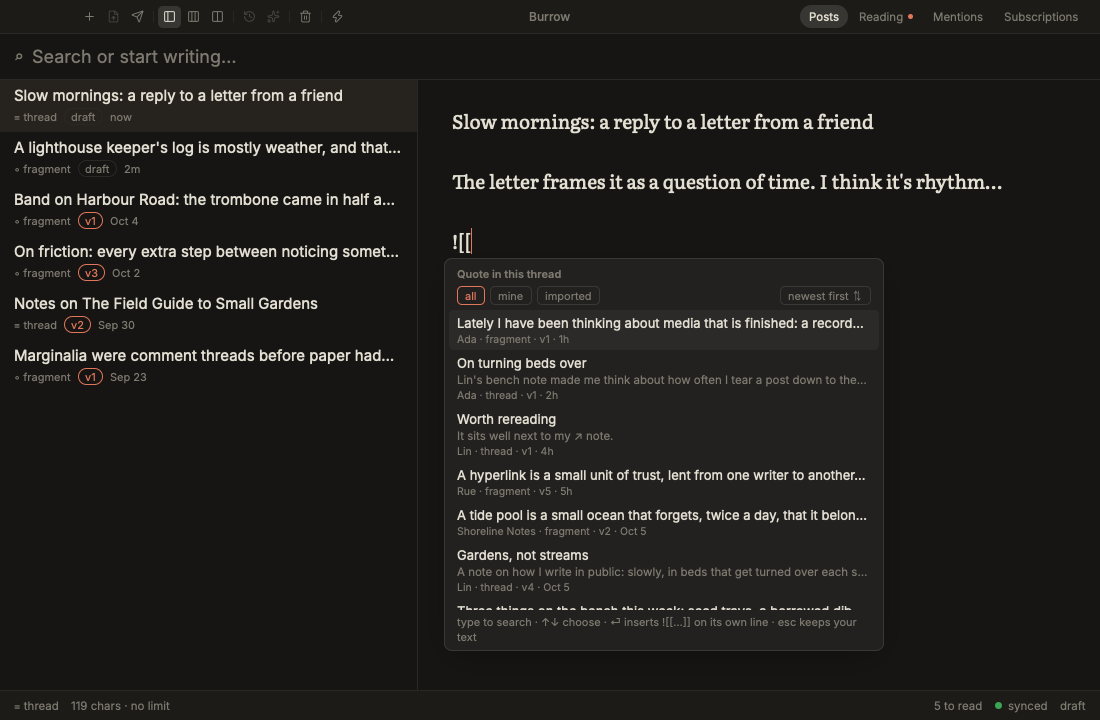
In a thread, ![[id]] alone on a line quotes a post: yours, or one from a
blyg you follow. The quote is a snapshot taken when you publish; later edits
to the original never rewrite it. ⌘K (or typing ![[ at the start of a line)
opens a picker of the posts you hold, and ⏎ inserts the line with a note,
![[id | note]] (see labelled links below). The picker
searches every word of your published posts and the blyg posts you read, on
your Mac, and filters by source (all, mine, imported) and blyg, newest or
oldest first. Where you type the search is the blyg’s picker typing
setting: after the brackets in the editor (the default on a Mac), or in the
picker’s own box. Quotes only go
in threads: in a fragment, Burrow says so and leaves the text alone.
Partial quotes
![[id]] followed directly by > lines quotes just that passage of the
post:
![[01J9ZK3Q7T5V8X2B4N6M0PQRST]]
> The passage you want, exactly as it is in the post.

What you have to say about it.
A blank line between ![[id]] and the > lines makes it a whole quote
followed by your own blockquote instead. The preview flags a passage that
isn’t in the quoted post, and publishing refuses it. In the stream, a partial
quote shows only its passage.
The easy way to write one is to select the passage while reading and press ⇧⌘D, or to reply and choose quote a passage instead in the stub; see Reading, quoting and responses.
[[id]] links
An inline [[id]] links to one of your posts or one you read, without
quoting it:
As I said in [[01J9ZK3Q7T5V8X2B4N6M0PQRST]], the lighthouse is the point.
The preview shows it as the published page will: the target’s first words in quotes, linked. Links inside code stay as text. A link that can’t be resolved is flagged in the preview, the status bar and the publish sheet, as quotes are; publishing refuses it (“one or more references do not resolve”).
Labelled links
A link can carry its own text after a |:
As I said in [[01J9ZK3Q7T5V8X2B4N6M0PQRST | Gardens, not streams]], the
lighthouse is the point.
The label is what the link says on the published page, in place of the
target’s first words. To rename a link, edit the words after |; the id
before it is what the link points at, so leave that alone. A quote takes a
label too, ![[id | note]], but there it’s a note for you: the published
quote shows the quoted post, not the note. The preview renders labels as
blygger-studio 0.47 does.
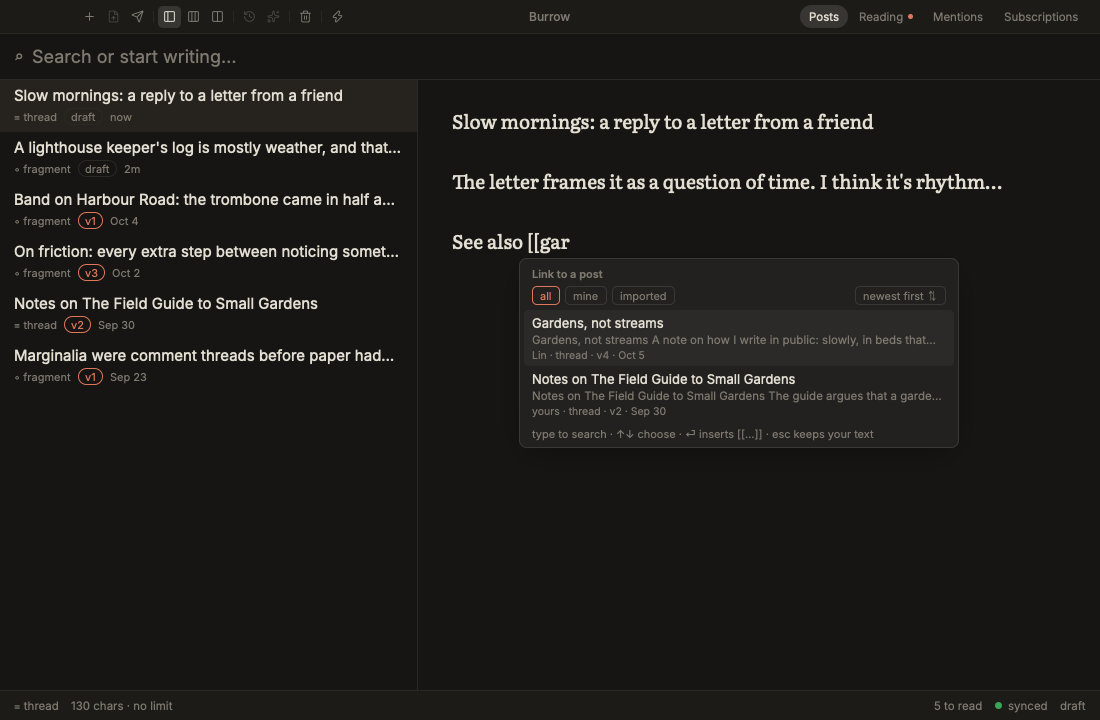
Typing [[ anywhere outside code opens the same picker as ![[, for a link.
Each row leads with the post’s title. ⏎ writes the labelled form, and the
footer says so: “⏎ inserts [[… | label]]” for a link, “⏎ inserts ![[… |
note]] on its own line” for a quote. The label the picker writes is:
- the post’s heading, when it opens with one;
- else its title (its first line),
[[id | Gardens, not streams]]; - else, when the title is longer than 80 characters or the post has no text, a quoted excerpt of its first words.
When that label isn’t the title, the row shows it on a muted line, links as “…”, so you know what the page will say. (For a post with no heading the web studio writes a quoted excerpt of its first 60 characters; Burrow writes the title, which is what you searched for and what a reader should see. Either way the label is just your text, and you can change it.) Quote into a thread from Reading writes the labelled form too.
Labelled links need blygger-studio 0.47 or later. On an older blyg the
pickers write bare links ([[id]], ![[id]]), and a post that already has a
label waits, unsent, until the blyg is updated. Publishing it offers ⏎ to
write its links bare and publish. See Server requirements.
| 
Link post (next to Fork on a post you’re reading) starts a new fragment
holding [[id]]: a plain link, not a response. Reply is the one way to
respond.
Replying to, quoting and linking your own posts
A published post of yours has a row of chips above its text in Posts: “Your
post · v3 ·” then Reply · new stub (⌥⌘R), Quote into a thread (⌥⌘Q)
and Link post · new fragment (⌥⌘L). They’re in the Post menu too, and do
what the same actions do on a post you’re reading: Reply starts a stub thread
of your own post, Quote puts ![[id | label]] in a thread, and Link post
makes a fragment holding [[id]]. Drafts and scratch notes have no row.
There’s no Fork there: your own post forks only from a pin. Open ⌘Y, pick a pinned version, and choose Fork this pin for a new draft that descends from it. On an unpinned version it’s greyed out (“Pin one in ⌘Y to fork it”). Your posts are also a source in Reading; see Your blyg.
TK: gaps for later
Write [TK]instruction[/TK] where something is still to come:
The harbour was quiet. [TK]one sentence on why, in my voice[/TK]
With the caret inside it, ⌘G fills it with AI (if you’ve switched a provider
on), written in place as [TK]instruction[=]output[/TK]. ⌘G inside it again
regenerates. The preview tints generated text, and it’s always disclosed as
generated when you publish; an unfilled gap shows as ⚠ ungenerated in the
preview. See AI helpers.
A quote the AI added. In a thread, a ![[id]] on its own line inside a
gap’s generated text is a real quote once you publish: it’s baked into the
post and notifies that post’s author. If the gap’s instruction didn’t name
that post (a model sometimes echoes a quote it saw), the preview shows it as
the quote publishing will make, and the publish sheet warns before you
publish. Delete the line, or name the post in the instruction if you meant
it.
Highlighting generated text (studio 0.27 or later): the blyg’s public pages can tint generated passages and mark them with a small robot that says what you disclosed. Your blyg’s settings (in the Reader’s site settings) set the default; the ⌘G palette sets it per post (default, on or off; H cycles it), and the preview shows the post as its page will.
Reading, quoting and responses
⌘R opens reading: the posts from the blygs and feeds your blyg follows. ⌘R again goes back to your own posts. Subscriptions (⇧⌘S, or Blyg › Subscribe…) are kept on your blyg, so every studio sees the same list.
The stream
Reading opens as the stream (⌥⌘1): one timeline of everything you follow, newest first, drawn natively so it stays fast with hundreds of posts. Fragments show in full; threads show a few lines and Read more (⏎ or Space) opens the whole post in a side pane. j/k (or ↑/↓) move; esc closes the pane and the stream keeps its place.
A post counts as read after a second on screen, and unread posts get a dot,
never a count. Posts are dated by when their author published or last edited
them, and an edit updates the post in place rather than adding a new one.
Quotes show as grey boxes with the quoted text, and [[id]] links read as
the post they point to.
The Reader
The Reader (⌥⌘2) has three panes, like NetNewsWire: sources on the left (All unread, Today, Thumbed, All, then Your blyg, your folders and the rest), the posts from that source in the middle, and the post on the right.
- Folders stay on your Mac. Drag a subscription onto one to file it, or use its context menu; Blyg › New Folder… makes one.
- ←/→ move between the panes, j/k go to the next or previous post from anywhere, and Space scrolls the post, then moves to the next unread one.
- ⌥⌘S hides the sources pane, and its edge drags to resize.
Your blyg
Your own published posts are in Reading too. They sit among everyone else’s by date in All, Today and the stream, and alone under Your blyg in the sources pane (once you’ve published something). They read as “You”, with the same reading pane, lineage and actions: Quote into a thread, Reply · new stub, Link post, Open on web and → Notes. There’s no AI reply to yourself, and no Fork here: your own post forks from a pin in ⌘Y (see Replying to, quoting and linking your own posts).
Your posts are never unread: they get no dot, never count in All unread or any folder’s count, and have no 👍 / 👎. Nothing about them is sent as read state. Opening one shows your current version and your pins, and, when you have unpublished edits, the text as it’s published.
Search (⌘F, or / with the list focused) filters whatever you’re reading
as you type, over the title, the author, the blyg and the text of the posts
already on your Mac. Nothing is fetched to search.
Mark read or unread. ⌘-click and ⇧-click pick several posts, ⌘A picks every post in the list, and esc lets go. r marks the picks (or the open post) read, u unread; the right-click menu says how many (Mark 3 Unread).
Read state syncs between your Macs through your blyg on blygger-studio 0.39 or later, when your sign-in allows reading:state (see Server requirements), and marking unread syncs too. Otherwise it stays on this Mac, and a post you marked unread stays unread here until you read it again.
Subscriptions take their name from the blyg or feed, and follow it when it changes. Right-click one for Rename… (your own name, kept as you set it), Use the Blyg’s Own Name to hand it back, and Check Now. ⇧⌘R (Blyg › Check All Feeds Now) asks your blyg to poll every subscription at once.
Import and export subscriptions (OPML)
Moving from another feed reader? Export an OPML file there (Feedly, NetNewsWire, Inoreader, Miniflux, Reeder and most others can), then choose Blyg › Import Subscriptions from OPML…, or Import OPML… on the Subscriptions screen (⇧⌘S).
- Burrow lists the file’s feeds, grouped under the folders they had in the other reader. Feeds you already follow say already following and start unticked, and a feed listed twice appears once.
- 1–9 or Space tick and untick, ⌘A ticks all or none, ⏎ imports the ticked ones, and esc cancels.
- Every feed is subscribed on your blyg, as if you’d added it by hand. The import goes slowly, about 30 feeds a minute, because each new subscription makes your blyg fetch that feed’s archive. Esc stops it after the feed in progress, and what’s done stays done.
- Imported feeds go into a folder named Imported feeds in the Reader, made the first time you import (file them elsewhere whenever you like). Feeds you already followed stay where you filed them. The other reader’s folders are only shown in the list; they don’t become folders here.
- Imported feeds aren’t added to your public blogroll.
- At the end Burrow says how many were added, already followed, or failed, with each failure’s reason: not a feed (nothing at that address your blyg could read as a blyg or a feed), unreachable (Burrow couldn’t reach your blyg), or refused. r retries the failed ones.
Blyg › Export Subscriptions as OPML… (or Export OPML… on the
Subscriptions screen) saves every subscription to an OPML file
(burrow-subscriptions.opml) that other readers can import. Your blyg’s
public blogroll.opml lists only the subscriptions you put in your blogroll;
the export lists them all.
Both need a connected blyg, since your subscriptions live there. From a
terminal: blygger +import-opml <file> (add --dry-run to see what would be
added) and blygger +export-opml <file>.
Acting on a post
The selected post shows its actions. Each says what it makes:
-
Quote into a thread:
![[id | label]]in a thread of yours, labelled with the post’s heading or title (on a blyg older than studio 0.47,![[id]]; see labelled links). -
Reply · new stub: a new thread that responds to the post (a stub, Blygger’s reply). It starts quoting the whole post. A line above the editor says what the stub is doing; quote a passage instead shows the post’s text, and the passage you select there becomes the quote (
>lines under![[id]]). Once there is one, the next passage goes after the caret as its own quote, for a running commentary; quote whole post goes back. -
AI reply · new stub: the same, with a first draft from AI.
-
Link post · new fragment: a fragment that links to the post (
[[id]]) without responding to it. -
Fork: a new thread from a pinned version of the post. Forking only descends from pins, so on the current version Fork is greyed out and its tooltip says where to find a pin.
-
→ Notes: adds the post to your notes.
-
Open on web, and 👍 / 👎.
Versions of other people’s posts
The version pill in a post’s header, ‹ vN ▾ ›, steps through the current
version and the pinned ones (unpinned past versions of other people’s
posts are never shown). On a pin you can Quote this version, Fork this
pin, or Diff vs now. When an author edits a post you’ve read, it shows
“edited”, with the author’s version notes since you read it.
Universal quoting
Highlight text anywhere you read, then press ⇧⌘D (Post › Quote Selection in Draft):
The passage goes into the draft open in the editor, at the caret, or into a new draft if none is open, with where it came from:
- a passage from a post on a blyg you follow, quoted into a thread, becomes a
partial quote of that post,
![[id]]with the passage under it as>lines (see Partial quotes); - anything else becomes a blockquote followed by a link to the page.
Nothing selected? You get a short message, and nothing is made.
The “Quote in draft” pill. While you have text selected in the reading pane or the preview, a small Quote in draft pill appears beside the selection; clicking it does what ⇧⌘D does. The selection stays until you quote it, and dragging inside a quote no longer opens the original. ⌘C copies a selection in the reading pane. In the browser, the → Draft button reads ❝ Quote → Draft while text is selected. In the stream, dragging over or double-clicking a post opens it where its text can be selected.
Quotes, stubs and forks you can follow
Click a quote’s text to open the post it quotes, at the quoted version, or its author’s name for their profile. The “↳ stub of” and “⑂ forked from” lines under a post work the same way.
Each post lists who quoted, stubbed or forked it, from the blygs you follow and your own published posts: a list, never a count. A post that both stubs and quotes another is one response, listed as the stub, and a reply to a passage says so. A post whose generated text used this one as a source is listed as drew on this.
Generated text
A blyg can mark text in its posts as AI-generated. In the stream’s side pane and the Reader, marked text is tinted, hovering it says it’s marked as generated, and the post ends with a short note: the mark is the publisher’s own disclosure, and Burrow can’t verify it. Text without a mark may have been generated too; a mark only says what the publisher chose to disclose.
Lineage
Beside each post’s name, in the stream and in Reader, a small glyph shows
its lineage: lines coming in on the left are the kinds of post it draws on,
lines going out on the right the kinds that draw on it. Each kind has its own
place (fork at the top, reply in the middle, quote at the bottom) and colour,
and a dotted line means only a passage. Beside it, 2 · 3 says how many:
the posts it draws on, then the posts known here that draw on it. Hover for
the counts by kind in words. These are the same numbers the web Studio’s
lineage glyph shows: when your blyg runs blygger-studio with the
lineage-glyph extension turned on, Burrow asks it for them; otherwise it
counts what this Mac holds, by the same rules. The lineage glyph is the one
place Burrow shows counts: responses and mentions stay lists.
⌘J (Post › Lineage…), or a click on the glyph, opens the lineage view. The post sits in a hexagon, what it draws on above it and what draws on it below. The arrow keys move between them, ⏎ makes a neighbour the centre so you can walk a conversation one step at a time, ⌫ walks back, o opens the selected post in the reader (marking it read, as opening it from the list does), and esc closes. Beside the hexagon it says how many each way. Responses are what your blyg knows when it serves the lineage, else what this Mac holds: posts in your reading list, your own posts, and verified mentions of your posts.
Space (or ⏎) on the post in the middle opens the ring of the reader’s actions, always in the same places: F fork, R reply, Q quote, L link post, V versions, O open on the web. A letter previews the action: a dashed node shows what it would make, and the panel answers the same four questions for each (is it a response, is the author told, are their words in yours, does it show under their post). Fork, reply and quote also say how many of that kind are already known (R · 2). ⏎, or the same letter again, does it; esc backs out. An action that can’t be done (a fork of a post with no pinned version, say) says why.
Reading time and inspect
Two bundled extensions, off until you turn them on, add to each post: reading-time ends its byline with · 4 min (the word count on hover), and inspect adds ⋯ to its actions, with the record Burrow holds for it (ids, versions, references, hashes, and its JSON).
Mentions and responses
Mentions (⇧⌘M) lists the verified responses to your own posts: who quoted, stubbed or forked which post, and when. You can hide one, and your own posts list their mentions under them in ⌘Y and in the reading pane.
Your blyg decides whether a post’s public page shows its responses. In Site settings (Blyg › Site Settings…), Show responses by default sets it for the whole blyg, on blygs that report it. On the Mentions screen, each post can follow site setting (the default), or show or hide its responses itself. Site settings also hold the site’s title, author, bio and links, the time zone for dates on your pages, and Accept mentions, on blygs that report them.
Profiles
⌘I on a post (or a click on its author’s address, its “↳ stub of” / “⑂ forked from” line, a mention, or a blogroll entry) shows who wrote it: name, bio, links, their blogroll, recent posts, and the blygs they quote, stub and fork. Follow in one click (private; nobody is told), or add them to your own public blogroll. ⇧⌘O opens any address, and Blyg › My Profile shows yours as visitors see it.
Profiles are fetched from the blyg’s public files without your token, only when you open one, and kept for offline use. There are no follower counts anywhere.
Notes and the browser
The notes drawer
Notes while you read (⇧⌘N, or View › Notes). A drawer slides in over the
right edge of the window, over the stream, the Reader, the browser pane or
your posts, with one rolling scratchpad, “Reading notes”. Like any
scratch note it stays on your
Mac until you make it a draft (⌘D), and it’s listed in your posts with a
scratch pill. esc or a click outside slides it away again.
Adding to it:
- → Notes on a post adds a quote of it (
![[id]]for a blyg post, a link for a feed post); - → Notes in the browser adds the page’s link;
- with text selected in a post or a web page, ⇧⌘N (or → Notes) adds it as a quote with its source.
The drawer’s header has ⌘D → draft, Open in editor, and ⋯ › New notes page (a fresh page; the old one stays in your posts). ⌘⏎ opens it in the editor with the publish sheet. The drawer’s editor has @-mentions, spellcheck and paste-a-link-over-a-selection, and its footer says when ⇧⌘D will quote your selection into your draft (see Universal quoting).
Your Markdown notes: the Notes tab
With the bundled markdown-notes extension turned on, the drawer has two tabs: Reading notes and Notes. The Notes tab opens folders of Markdown notes (Obsidian vaults, say), as many as you like:
- a chip per folder switches between them (a folder Burrow isn’t allowed to use yet shows in the warning colour, with Allow…);
- Add folder… picks more (several at once), and Remove from Burrow, beside the chosen folder’s path, forgets it: the folder and its notes stay where they are;
- search, browse, open a note to edit it, or Quote into post / Copy verbatim to put it (or the selected part) in your draft.
There’s no default folder. Until you choose one, the tab says so and offers Choose a folder…. Settings › Notes folders lists the same folders, each with Remove, and has its own Add folder….
The browser pane
A link in a post opens in a pane that slides in from the right, over the reading view. ⌘-click opens it over the whole area, ⌥-click opens your default browser instead, and esc closes it. ⇧⌘B brings back the last page.
The pane has back, forward and reload (⌘[ ⌘] ⌘R), an address field (⌘L), 🛡 (content blocking on or off for this site), ↗ (open in your default browser), → Notes, → Draft (which reads ❝ Quote → Draft while text is selected on the page), and ✂ Clip.
-
✂ Clip (⇧⌘C, or Post › Clip Page to Draft) quotes the passage you selected on the page, or else the page’s main article, in your draft, with the page’s title and link. With no draft open it starts a new one (a thread when the clip is longer than a fragment).
-
Extensions run here too. A macro, such as the bundled cross-post, uses this same side pane. You can fold the pane (esc, ×, ⇧⌘B) while it runs: the run goes on and the status bar shows macro running · show pane; click it or press ⇧⌘B to unfold. While a macro runs, the pane’s bar has ■ Stop.
-
Content blocking. Ads and trackers are blocked with uBlock Origin’s default filter lists, as WebKit content blockers, downloaded about once a week (a small built-in list until then). 🛡 turns blocking off for one site.
-
Privacy. The pane has its own cookies and no access to the app: pages never see your token or keys. On macOS 14 and later, sign-ins in the pane survive a relaunch.
-
Downloads go to your default browser.
open-links = browser makes links open in your default browser (⌥-click then
opens the pane), and content-blocking = false turns blocking off
everywhere. See Configuration.
AI helpers
AI is optional and off until you turn it on: Burrow uses no provider, not
even an installed claude or codex CLI, until you enable one (ai-enable in
the config file) or sign in to one in Settings. Generation happens while you
write, you review it, and generated text is always disclosed when you
publish.
Providers
You use your own accounts:
| Provider | How you sign in |
|---|---|
| Anthropic API | API key (stored in the Keychain) |
| OpenAI API | API key (stored in the Keychain) |
| Cloudflare Workers AI | Account ID and API token. Defaults to Gemma 4. |
| Local Claude Code or Codex | Uses your installed claude or codex CLI and whatever account it’s signed in to |
| Your blyg server | Its /generate endpoint, if enabled |
| ChatGPT account | Sign in with ChatGPT. Unofficial: this uses the same sign-in as OpenAI’s Codex CLI, which OpenAI doesn’t offer to third-party apps. It may break or be blocked at any time. |
Not offered: signing in with a claude.ai (Pro/Max) subscription. Anthropic’s terms don’t allow third-party apps to use claude.ai logins. To use a Claude subscription, install Claude Code and pick the local Claude Code provider.
Connecting and generating
-
Turn a provider on. Either open Settings › AI (⌘, then “AI accounts…”) and switch on Claude Code or Codex, paste an API key, or sign in, or add it to the config file:
ai-enable = codex
ai-enable = claude-code
ai-provider = codex        # which one ⌘G uses (optional)
API keys go straight to the Keychain and are never shown again: Settings shows “key saved” and a Remove button.
-
In a post, write a gap:
[TK]one sentence on why, in my voice[/TK]. -
With the caret inside it, press ⌘G. The status bar shows
generating… (codex); esc cancels. The answer is written in place as[TK]instruction[=]output[/TK]. Press ⌘G inside it again to regenerate.
The config keys ai-model and ai-provider-model pick models, and
ai-style-prompt adds your own instructions to every prompt (“Write plainly.
British spelling.”). See Configuration.
The helpers
⌘G anywhere outside a gap opens the helpers:
| Helper | What it does |
|---|---|
| Fill a gap here | Inserts an empty [TK][/TK] at the caret for you to fill in. |
| Shorten to fit 1000 | Also ⇧⌘G. Rewrites a fragment to fit, shown as a word diff: ⏎ accepts, esc rejects. |
| Continue this thought | Writes on from the caret. |
| Outline a thread | Drafts the outline of a new thread. |
| Proofread | Typos and grammar only, applied as a plain edit. |
| AI reply | From a post you’re reading: a reply stub with a first draft. |
Each generating helper writes its text as a TK span, so the preview tints it and it’s disclosed like any gap.
Disclosure
Generated text is always disclosed as generated when you publish. Burrow records which model wrote each gap and sends it to your blyg with the text (blygger-studio 0.28 or later; see Server requirements). If your blyg’s studio is older, Burrow warns you before publishing generated text, and Cancel is the default. Proofreading isn’t generated prose and isn’t disclosed.
If generated text in a thread holds a quote (![[id]] on its own line) that
the gap’s instruction didn’t ask for, the publish sheet warns you: publishing
would quote that post and notify its author (see
TK: gaps for later).
When you read other blygs, text they mark as generated is the publisher’s own disclosure: Burrow shows it, and says it isn’t verified (see Generated text).
How the providers, sign-in, prompts and provenance work inside is in blyg-ai.
Burrow’s look is a theme: its colours, fonts and small ornaments. Pick one of the built-in themes, or write your own in a plain-text file.
Themes
The app ships ten themes: the two plain looks, four woody ones (place:
warm, enclosed, textured) and four oceanic ones (space: horizon, charts,
salt). A theme is a plain-text file in the config file’s key = value
syntax, so you can copy one, edit it and share it.
Themes change the app around your writing: the window, the lists, the editor
and the reader’s fallback style. The studio preview is never themed. It shows
your blyg’s own style.css, which is what readers see.
The Reading screens take the theme too. In the reader, a post’s text is set
in the theme’s writing font (yours, if you set font-family-writing), and
its quote boxes, selected text, highlights and diff marks take the theme’s
colours (color-quote-bg, color-quote-rule, color-text-selection,
color-ins, color-del, color-accent). Small labels (bylines, dates,
chips) use the theme’s font-chrome, as the posts list does.
Choosing a theme
In Settings (⌘,), under Theme, the themes are grouped into Plain, Woody and
Oceanic, each with a small swatch. Clicking one writes theme = <name> to the
config file.
In the config file (~/.config/blygger/config):
theme = cutaway
theme-dark = fortress
| Key | Values |
|---|---|
theme | system (the default: follows macOS light and dark), light (Paper), dark (Ink), a built-in theme, or the name of a file in ~/.config/blygger/themes/ |
theme-dark | Optional. The theme to use while macOS is dark, whatever theme says. With it unset, theme = system switches to dark and every other theme stays as it is. |
blygger +list-themes lists every theme, built in and yours. An unknown name
shows in the config problems banner (with its line number), and the app falls
back to system.
For screenshots and development, BLYGGER_THEME=<name> overrides the theme
for one run without saving it.
The built-in themes
| Name | Family | Ornaments |
|---|---|---|
light (Paper) | plain | none: the original cream-paper look |
dark (Ink) | plain | none: the original dark look |
cutaway | woody | a meadow-green title bar; a soil cross-section behind the posts list (a grass band, then earth strata with pebbles) with root hairlines along its top; the selected post is a lit burrow room with a warm glow; arched quote boxes; a root line under the editor |
kumiko | woody | an asanoha lattice in the title bar; hinoki woodgrain on the posts list; a shoji grid in the editor’s margins; hairline-boxed rows and quotes; a gold kintsugi crack under the editor; Source Serif 4 for writing |
shola | woody | soft moss cushions on a forest-green posts list, with mist at its foot; moss-cushion rows and quotes; laterite pitting in the editor’s margins; a laterite status bar |
fortress | woody | a dark stone floor; ☼ on published posts, Δ on unpublished edits and * on unread posts; a ≈≈≈ water line under the editor; box-drawing corners ╔ ╝ on quotes; your last two weeks of posts as a block-character strip ▁▃·█ in the status bar; Menlo for the interface, Literata for writing |
portolan | oceanic | a chart’s paper; compass roses with rhumb lines and depth soundings in the editor’s margins; double-ruled quotes and sheets; ET Book throughout |
aizome | oceanic | an indigo-dyed title bar and status bar; seigaiha waves on the posts list and under the editor; sashiko-stitched quotes |
saltspace | oceanic | corrosive greys, never pure black or white; a horizon line through the title bar; salt grain on the posts list and the editor’s margins; tide lines under the editor; squared quotes with a buoy-orange top edge |
konkan (Konkan harbour) | oceanic | a night sea with contour lines and soundings behind the posts list; the editor as a lit harbour, warm paper glowing in the sea; lantern rows; a tide sparkline of your last two weeks’ writing in the status bar |
Screenshots of each are in docs/screenshots/themes/.
Fonts
A theme can suggest fonts (font-writing, font-ui, font-chrome). They are
used only when your config doesn’t set font-family-writing or
font-family-ui: your settings always win. Picking a font in Settings sets it
in the config, and from then on it wins over every theme.
Themes can use the fonts the app bundles (Literata, Source Serif 4, Inter,
iA Writer Quattro, ET Book) or the ones macOS has (New York, Charter, Menlo,
SF Pro). blygger +list-fonts lists them.
Make your own theme
-
Copy a built-in theme into your themes folder:
blygger +copy-theme saltspace sea-glassThis writes
~/.config/blygger/themes/sea-glass. Without a new name (blygger +copy-theme saltspace), the copy keeps the built-in’s name and replaces it.+copy-themenever overwrites an existing file. -
Point the config at it:
theme = sea-glass. -
Edit the file and save it. The app watches the config files and the themes folder, and reloads within a second. ⌘⇧, reloads by hand. Problems show in the banner at the top of the window, with the file and line.
A theme doesn’t have to be a full copy. This file is a complete theme:
# ~/.config/blygger/themes/sea-glass
name = Sea glass
inherit = saltspace
color-accent = #2a9d8f
quote.frame = buoy(#2a9d8f)
divider = tide-line(#9fc4bd #cfe3df)
Everything it doesn’t set comes from saltspace.
The file format
One key = value per line, and # starts a comment at the beginning of a
line (so #fbf3e2 in a value is fine). A theme’s name is its file name:
lowercase letters, digits and -. An empty value (texture =) resets a key
to what the layers below say.
A theme is resolved in layers, each overriding the one before:
- the plain theme for its
base(lightordark), - the built-in named by
inherit, if any, - the file itself.
Colours a theme leaves unset are derived from others. For example, the sidebar takes the background, and selected text takes the accent at 20% opacity.
Identity, shape and fonts
| Key | Meaning |
|---|---|
name | The name Settings shows. Defaults to the file name. |
family | plain, woody or oceanic: where Settings lists it. |
base | light or dark: what unset keys fall back to, and whether the app is dark (for the reader and the browser pane). |
inherit | A built-in theme to start from. |
font-writing | The editor’s font. |
font-ui | The lists’ and sheets’ font. |
font-chrome | The status bar’s and small labels’ font (default Inter). |
radius | Corner radius in points, 0 to 32 (rows, quote boxes). Default 8. Small corners (buttons, fields, banners, the Stream/Reader toggle) scale with it: square on a chart, soft on moss. |
sheet.radius, toast.radius, chip.radius | Those corners. Defaults: radius + 4, radius, and a pill. Chips include the reading screens’ action chips (“Quote into a thread”, “Reply · new stub”, …); sheets include the reading sheets (Subscribe, New Folder, the quote picker, Open profile). |
sheet.border, chip.border, toast.border | solid, dashed, double or none. |
Colours
Colours are #rgb, #rrggbb or #rrggbbaa.
| Key | What it colours | Unset: same as |
|---|---|---|
color-bg | the window, sheets, the reader | (base) |
color-ink | body text | (base) |
color-muted | dates, hints, labels | (base) |
color-line | hairlines and borders | (base) |
color-accent | links, the caret, highlights | (base) |
color-sel | the selected row | (base) |
color-sel is picked for the sidebar. Lists on the page (the Reader’s posts, the stream, Subscriptions, versions, profiles) use it too when page text reads on it and it stands apart from the page; otherwise (Konkan’s dark lantern row, Aizome’s row the colour of the page) they use a tint of the page toward it, or toward the sidebar.
| color-bar | the title bar | (base) |
| color-warn, color-over, color-green, color-amber, color-grey | the length counter and the sync dot | (base) |
| color-shadow | sheet and toast shadows | (base) |
| color-edited, color-edited-bg | the “edited” badge in the reading list (and color-edited the unpublished-edits mark in the posts list) | (base) |
| color-notice, color-notice-bg | notices in the reader (a withdrawn post) | (base) |
| color-edited-rule | the rule beside an author’s edit notes | edited |
| color-editor | the editor’s paper | bg |
| color-text-selection | selected text | accent at 20% |
| color-ins, color-del | inserted and deleted text in a diff | green, over, translucent |
| color-divider | dividers between panes | line |
| color-side, color-side-ink, color-side-muted, color-side-accent, color-side-line | the posts list, its text, marks and edge | bg, ink, muted, accent, divider |
| color-sel-ink, color-sel-muted | text in the selected row | side-ink, side-muted |
| color-bar-ink, color-bar-line | the window title, the title bar’s edge | muted, divider |
| color-status, color-status-ink, color-status-line | the status bar | bar, muted, divider |
| color-quote-bg, color-quote-rule | a quote box | sel, accent |
| color-toast, color-toast-ink | a toast | ink, bg |
When the title bar or status bar is dark, the buttons and tabs on it take
their colour from color-bar-ink and color-status-ink.
Sheets, menus, popups, fields and chips are drawn from the same colours, and
Burrow adjusts them where a theme’s choice wouldn’t read there: an accent,
warning or error colour used as text is darkened (or lightened) until it
reaches 4.5:1 on its ground, status bar text and links against
color-status too; a menu’s chosen row uses color-sel only when body text
reads on it (a dark selected row, meant for a dark sidebar, becomes a tint of
the page there); borders of fields and popups are kept visible on dark
grounds; and the veil behind a setup card always darkens. Tooltips take
color-toast and color-toast-ink.
Ornament slots
A slot takes one ornament from the vocabulary below, optionally with colours
and arguments: name, or name(#colour #colour, opacity=0.5). Commas and
spaces both separate arguments, and double quotes keep a glyph together.
| Slot | Where |
|---|---|
titlebar.band | behind the title bar |
sidebar.ground | behind the posts list and the Reader’s subscriptions column |
sidebar.top | along the top of the posts list and the Reader’s subscriptions column |
row.selected | the selected row’s shape: the posts list, and on the reading side the subscriptions column and the posts list (in the pane with the keys), the stream’s selected post, Subscriptions and a profile’s lists |
editor.frame | around the editor’s text column, in its margins only |
quote.frame | a quote box in the stream |
divider | the band under the editor and between posts in the stream |
status.ornament | a mark at the right of the status bar |
marker.pinned | the mark after a published post’s version, and beside a pinned version in ⌘Y |
marker.new | the mark on an unread post in the stream, an unread subscription and a new mention |
marker.edited | the mark on a post with unpublished edits in the posts list (unset: a dot in color-edited); its tooltip says how to publish or discard them |
texture | a faint texture on the posts list, the Reader’s subscriptions column and the editor’s margins |
scroll.edge | a fade at the bottom of the posts list and the Reader’s subscriptions column |
empty.art | a small picture above an empty posts list, and above the reading side’s empty states (nothing to read, all read, no subscriptions, no mentions) |
Ornaments never sit behind the text you’re writing: the editor’s ornaments are clipped to its margins, and the divider takes its own row under the text.
The vocabulary
| Ornament | Slots | Colours | Notes |
|---|---|---|---|
none | any | none | the plain look |
gradient | titlebar.band, sidebar.ground | 2 to 3 | top to bottom; three colours run across |
strata | sidebar.ground | 2 to 6 | grass, then earth strata |
roots | sidebar.top, divider | 1 | root hairlines |
lit-cell | row.selected, empty.art | 1 to 2 | a lit burrow room |
lattice | titlebar.band, sidebar.ground, empty.art | 1 to 2 | variant=asanoha (default) or variant=kumiko |
woodgrain | sidebar.ground, texture | 1 | fine vertical grain |
shoji-grid | editor.frame | 1 | a shoji paper grid |
kintsugi | divider | 1 | a gold repaired crack |
moss | sidebar.ground, empty.art | 1 to 3 | soft moss cushions |
mist | scroll.edge | 1 | a thickening mist |
laterite-speckle | texture | 1 | rusty pitting |
stone-speckle | texture | 1 | a rough stone floor |
salt-grain | texture | 1 | weathered grain |
glyph-divider | divider | 1 | a row of one glyph, default "≈" |
box-corners | quote.frame | 1 | ╔ ╝ corners |
rhumb-lines | editor.frame | 1 to 2 | compass roses with rhumb lines |
compass-rose | editor.frame, empty.art | 1 to 2 | a compass rose |
soundings | texture | 1 | depth numbers in the editor’s margins |
seigaiha | sidebar.ground, divider, empty.art | 1 to 3 | waves; on the sidebar, colours 2 and 3 are the ground |
sashiko | quote.frame, divider | 1 | a running stitch |
indigo-dye | titlebar.band, sidebar.ground | 2 | a dye gradient |
horizon | titlebar.band, divider | 1 | a line fading at both ends |
tide-line | divider | 1 to 2 | two wavering lines |
contours | sidebar.ground, empty.art | 1 to 3 | sea contours with soundings; colours 2 and 3 are the ground |
harbour-glow | editor.frame | 2 | the editor as lit paper in a sea (sea, glow) |
tide-sparkline | status.ornament | 1 to 2 | your writing over the last two weeks (line, buoy) |
block-sparkline | status.ornament | 1 | your writing over the last two weeks as block characters ▁▂▃▅▇█ (· for a day with none); z-level, its predecessor, still loads as this, with a warning |
glyph | marker.pinned, marker.new, marker.edited, empty.art | 0 to 1 | one glyph: glyph(#e0a33a, "☼") |
dot | marker.pinned, marker.new, marker.edited | 0 to 1 | a small dot |
arch | quote.frame | 1 | an arched room |
cushion | row.selected, quote.frame | 1 | a moss-cushion shape |
outline | row.selected, quote.frame | 1 | a hairline box |
double-rule | quote.frame | 1 | a chart’s double rule |
buoy | quote.frame | 1 | squared, with a coloured top edge |
inset-bar | row.selected, quote.frame | 1 | a bar down the left edge |
lantern | row.selected | 1 to 2 | an outline with a warm glow |
rule | quote.frame | 0 to 1 | a left rule on the quote colours |
line | divider | 0 to 1 | a plain hairline |
svg | titlebar.band, sidebar.ground, sidebar.top, editor.frame, divider, texture, empty.art | 0 to 1 | your own art (below) |
Every ornament takes opacity= (0 to 1).
Your own SVG
Any picture slot can take your own art:
empty.art = svg(~/.config/blygger/themes/art/my-burrow.svg, #b0562a)
The path may start with ~/, or be relative to the theme file. The SVG is
drawn in one colour (the one given, or a quiet default), like an icon: its
shapes are the mask. To keep a bad file from hanging the app, an ornament SVG
must be under 256 KB with at most 2,000 elements, and may not contain
entities, a DOCTYPE, scripts, embedded or linked images, foreignObject,
filters or more than 64 <use> elements. A file that breaks a rule is
reported in the banner, and the slot stays empty.
Checking a theme
blygger +validate-config reports problems in the config and in every theme
file, with file and line: unknown keys (with a suggestion), bad colours,
ornaments in the wrong slot, a wrong number of colours, unknown fonts and SVGs
that break the rules. Unknown keys are warnings; bad values are errors that
leave that key as the layers below set it. Nothing in a theme file can stop
the app from starting.
The built-in themes are tested: each parses cleanly, copies out with
+copy-theme and reads back the same, and keeps body text at a contrast of at
least 4.5:1 against its background (and the sidebar’s and selected row’s text
against theirs, as well as the reading side’s: selected rows on the page,
badges, notices, quote boxes and the reader’s paper).
Extensions
An extension adds commands, or a library of documents, to Burrow. It’s a separate program that Burrow starts and talks to. Nothing runs unless your config file names it, and an extension gets only the permissions you grant it.
Burrow comes with four extensions, all off until you turn them on: markdown-notes, cross-post, reading-time and inspect. You can also install extensions other people write, or write your own.
⇧⌘P (Post › Extensions…) opens the Extensions palette: the commands your running extensions offer on this screen, Browse for each notes folder, and Manage extensions… (what’s installed, whether it’s on, and what it’s allowed). Manage is also where you turn one on or off; see Turning an extension off.
The tour (Help › Burrow Tutorial) shows markdown-notes, reading-time and inspect running on sample notes, even when yours are off; nothing it does changes your config file.
markdown-notes
markdown-notes reads and writes folders of Markdown notes, such as Obsidian vaults, as many as you like. It’s kept apart from your blyg, so it works with no blyg connected, and it never links notes to posts.
- The notes panel (the notes drawer’s Notes tab) switches between your folders, lists the one you pick, searches titles and bodies, and opens a note to read or edit. Add folder… adds more; Remove from Burrow forgets a folder (its notes stay where they are).
- Copy into post puts the selection, or the whole note, into your draft at the cursor, as a quote or as it is (you pick).
- Save selection to notes, in the Extensions palette (⇧⌘P), makes a new note from the text you’ve selected.
It never adds frontmatter to a note (any frontmatter it finds is left as it is), and it never deletes a note. If a note changed on disk after you opened it, your save is refused, so it never overwrites the other change.
Turning it on
The easy way: Settings › Notes folders › Add folder…, then pick one or more folders. Burrow writes the config lines for you and asks for permission to use those folders.
Or add the lines to the config file (Burrow › Open Config File) yourself, then reload it (⇧⌘,):
extension = markdown-notes
extension-setting = markdown-notes vault=~/Notes
extension-setting = markdown-notes vault-work=~/Work/Vault
vault is your first folder of notes, and each vault-<label> adds another
(the label is lowercase letters, digits and dashes). There’s no default: with
no folder, the Notes tab offers Choose a folder…, and Burrow never reads a
folder you didn’t pick. It has two more settings:
# where new notes go, inside each folder (default: the top of the folder)
extension-setting = markdown-notes folder=Inbox
# how often it looks for changed notes, in milliseconds (default 2000)
extension-setting = markdown-notes poll-ms=5000
cross-post
cross-post puts a post you’ve published on Substack Notes too: its opening paragraph and the link back to your blyg. It runs in Burrow’s browser pane, where you’re signed in to Substack, and it never posts without you clicking Post.
Turning it on
extension = cross-post
extension-allow = cross-post items.read
extension-allow = cross-post ui
extension-allow = cross-post browser.automate:https://substack.com
The last line is the one that matters: it lets cross-post fill in, and when
you confirm, click Post on substack.com, signed in as you. It names that one
site exactly, so it can’t act anywhere else. If you leave the extension-allow
lines out, Burrow asks for them the first time it starts cross-post.
Sign in to Substack once, by hand, in the browser pane: press ⇧⌘P and
pick Open Substack Notes (or View › Open Browser… and type
substack.com). The pane remembers it (on macOS 14 or
later; on older macOS, sign in before each run). cross-post never
signs in for you, never sees your sign-in, and stops with “Sign in to Substack
in this pane” if you’re signed out.
Cross-posting
With a published post open, press ⇧⌘P and pick Cross-post to Substack Notes…. Every run shows two confirmation sheets, and no setting skips them:
- The text. You see the note it will post, and can edit it. Continue opens your Substack home feed in the pane, clicks “What’s on your mind?”, and puts the text in the note composer that opens.
- Post this to Substack Notes? You see what the notes box now holds. Post clicks Substack’s Post button; you can also click Post yourself, or cancel.
The run uses the same side pane as a link you click, with the sheets beside it so you can see the page. You can fold the pane (esc, ×, or ⇧⌘B) while it runs: the run keeps going, and the status bar shows macro running · show pane. Click that, or press ⇧⌘B, to bring the pane back. The pane comes back by itself before the text goes in, and for the second sheet. Afterwards it’s folded again if it was folded before, unless you folded or unfolded it during the run, or you still need the page (you chose to click Post yourself, or the run stopped with a problem).
The note is the post’s first paragraph of prose (headings, quotes, images and code are skipped, and Markdown marks are taken out), a blank line, and the link. The whole note is at most 280 characters, the link included, counted as a reader counts them (an emoji is one, and is never cut in half); the paragraph is cut on a word boundary with “…” to fit. Two settings change it:
# the note: {{excerpt}}, {{title}} and {{permalink}}; \n is a line break
extension-setting = cross-post template={{title}}\n\n{{excerpt}}\n\n{{permalink}}
# the longest note, link included (default 280)
extension-setting = cross-post max-chars=500
Before you rely on it
- The recipe was last checked on 2026-10-09 (
tested = "2026-10-09"): it opens Substack’s home feed, clicks “What’s on your mind?”, pastes into the composer that opens, and clicks its Post button. Substack can change its page at any time. When a step doesn’t find what it looks for, the run stops, says which step, and nothing is posted.blygger +list-extensionsshows each macro’stestedvalue. The extension’smacro.log(in Burrow’s data folder, underextensions/cross-post/) then lists the text boxes and buttons the page did have (tags, classes, labels such as “Post”; never the page’s text or yours), so the recipe can be fixed. Start Burrow withBLYGGER_MACRO_TRACE=1to log that after every step. - One post per click. cross-post posts once each time you confirm. It never posts on a schedule, in the background, or again by itself, and it waits at least 60 seconds between two runs.
- It’s your account. cross-post acts as you on Substack, the same as if you typed and clicked yourself. If Substack limits or acts on an account for automated posting, that’s your risk; check its terms.
reading-time and inspect
Two small extensions for what you read, ports of blygger-studio 0.39’s extensions of the same names, so the web Studio and Burrow agree:
- reading-time ends each post’s byline, in the stream and in Reader, with an estimated reading time (· 4 min); hover over it for the word count. It describes the text, not its audience.
- inspect adds ⋯ to each post’s actions. Click it, then inspect: the record Burrow holds for the post (ids, versions, references, hashes), and its JSON with the bodies left out, with a Copy button. It’s for people building clients, or checking why a mention or an import looks wrong.
Both need only reading.read, fetch nothing and use no network:
extension = reading-time
extension-allow = reading-time reading.read
extension = inspect
extension-allow = inspect reading.read
Or turn them on in ⇧⌘P › Manage extensions… (Turn on, then Allow).
Permissions and consent
The first time Burrow starts an extension, it shows what the extension asks
for, such as “markdown-notes wants to: read and write files in ~/Notes · show
messages”. You can untick any item (or press its number). Allow (⏎)
writes your answer into the config file as extension-allow lines, and
starts the extension; Not now (esc) leaves it waiting, with a notice in
the status bar that brings the sheet back; Turn off (⌘⌫) says you don’t
want it after all and turns it off:
extension-allow = markdown-notes ui
extension-allow = markdown-notes fs:~/Notes
You can also write these lines yourself, or delete one to take a permission back. Each line grants one capability:
| Capability | Lets the extension |
|---|---|
items.read | read your own posts, drafts and scratch notes |
items.write | create drafts and scratch notes, and edit their text (it can never publish) |
reading.read | read the posts held from your subscriptions |
blyg.identity | know your blyg’s address (never your sign-in) |
ui | show messages, and select a post in the list |
hooks:itemPublished, hooks:itemSaved, hooks:itemCreated | be told when you publish, edit or create a post, with its text |
browser.capture | read the page open in the browser pane when you run one of its commands (never cookies or sign-ins) |
browser.automate:<site> | fill in and, when you confirm, click Post on that one site, signed in as you |
fs:<folder> | read and write files in that folder |
net | use the network |
Burrow enforces the first ten: without the grant, the extension’s request
is refused. fs: and net are the extension’s own promise. An extension
is a program that runs as you, so Burrow can’t stop it from reading other
files or using the network. Only install extensions you trust.
Whatever it’s granted, no extension can publish, withdraw, pin, delete or fork a post, change your blyg’s settings, or see your sign-in, your Keychain or Burrow’s database.
Turning an extension off
In ⇧⌘P › Manage extensions…, each extension that’s on has:
- Turn off: removes its
extensionline, so it stops. Itsextension-allowandextension-settinglines stay, so Turn on later brings it back as it was, without asking again. - Forget permissions (on any extension that’s been allowed something,
on or off): turns it off and removes its
extension-allowlines too, so the next Turn on asks again.
Turn off works in any state: running, waiting for permission, or stopped
after crashing. Any question or notice about the extension goes with it.
Editing the config file does the same: delete the extension line to turn it
off, or its extension-allow lines to take permissions back.
Checking your extensions
blygger +list-extensions
lists every extension, bundled and installed, whether it’s on, what it’s
granted and what it still asks for, and any installed folder Burrow couldn’t
read. blygger +validate-config warns about an extension line that names
no installed extension, a permission an extension asks for but hasn’t been
granted, a grant it never asks for, and a setting it doesn’t have.
If an extension crashes, Burrow restarts it after 1, 5 and then 30 seconds.
After three failures in ten minutes it stays stopped until you reload the
config. Its error output is kept in a log in Burrow’s data folder, under
extensions/<name>/stderr.log.
Installing someone else’s extension
An extension is a folder with an extension.toml file in it. Copy the folder
into ~/.config/blygger/extensions/, so that you have
~/.config/blygger/extensions/<name>/extension.toml, and then turn it on with
extension = <name> like markdown-notes. There’s no store, download or
automatic update: you choose what to copy.
Writing an extension
An extension can be written in any language: a Python or Node script, a
shell script, or a compiled program. Burrow runs the command in its
manifest from the extension’s folder, and the two talk over its standard
input and output, one JSON-RPC 2.0 message per line. A small one:
name = "hello"
version = "0.1.0"
protocol = 1
description = "Says hello."
command = ["python3", "main.py"]
capabilities = ["ui"]

[[commands]]
id = "hello"
title = "Say hello"
when = "always"
The full protocol (the manifest, every method, the errors, the timeouts and
how Burrow restarts an extension) is in
Extensions (BXP), from docs/EXTENSIONS.md in the
repository.
For an extension in Rust, the blyg-ext crate has the protocol types and a
serve loop, and markdown-notes (crates/blyg-ext-notes) is a worked
example.
Submit your extension
Wrote an extension? List it on the
Community extensions page. The page is
made from one file in the repository, extensions/community.toml, every time
the documentation site is built, so a merged entry shows up on its own.
Community extensions are used at your own risk. The Burrow maintainers do not review, verify, audit or endorse them. An extension is a program that runs with your user’s rights, and
fs:andnetare its own declarations, not something Burrow can enforce. Read the source before you install one. To report a malicious or misleading listing, open an issue and it will be removed.
To submit one, open a pull request that adds an [[extension]] table to
extensions/community.toml, in alphabetical order by name:
[[extension]]
name = "wordcount"                  # the name in your extension.toml
title = "Word count"
description = "Shows the word count and reading time of the open draft."
repo = "https://github.com/example/burrow-ext-wordcount"
homepage = "https://example.com/wordcount"   # optional
author = "example"                  # your GitHub handle, not an email
capabilities = ["items.read", "ui"] # exactly what your manifest asks for
platforms = ["macos", "windows"]
added = 2026-10-09                  # a date, without quotes
If you’d rather not open a pull request, fill in the extension submission form and a maintainer will add the entry for you.
CI runs scripts/community-extensions.py check on the pull request (you can
run it yourself first). It checks that:
- the file is valid TOML, and every entry has all the fields above and no
others (only
homepageis optional); nameis lowercase kebab-case (word-count), at most 40 characters, not already listed, and not the name of an extension that comes with Burrow;title(at most 60 characters) anddescription(one line, at most 160) are plain text, with no HTML or Markdown code;repoandhomepagearehttps://addresses;authoris a GitHub handle, and no field holds an email address;- each capability is one Burrow knows (see
Permissions and consent), and
platformsismacos,windowsor both; - the entries are sorted by
name.
A maintainer merges an entry after a light look at its format, and nothing
more: the source code isn’t read, run or tested. List the source code’s
repository, keep capabilities in step with your manifest, and open another
pull request when the details change, or to take the entry down.
Community extensions
Use at your own risk. These are third-party extensions, written and published by other people. The Burrow maintainers do not review, verify, audit or endorse them: a listing only means its entry is in the right format. An extension is a program that runs with your user’s rights. Burrow enforces most of the permissions you grant it, but
fs:andnetare only the extension’s own declarations, so it can read and change your files and use the network whatever it declares. Read the source before you install one, and install only what you trust. If a listing is malicious or misleading, open an issue and it will be removed.
Extensions other people have written for Burrow. To install one, follow Installing someone else’s extension; to list yours here, see Submit your extension.
No community extensions yet — be the first.
Configuration
Settings live in a plain-text file in the style of Ghostty’s config:
~/.config/blygger/config, with one key = value per line. Every option is
optional. Most options can also be changed in Settings (⌘,), which writes
them back to the file and keeps your comments. Burrow › Open Config File
opens it, and ⇧⌘, reloads it after you edit it by hand.
Secrets never go in this file. Your blyg sign-in (browser grant, API token or password) and AI API keys are stored in the macOS Keychain, and the app never logs them.
The file format
# a comment
key = value
key = "a quoted value, with  spaces kept"
repeatable-key = one
repeatable-key = two
config-file = ?optional/extra.config
#starts a comment only at the beginning of a line, so#fffin a value is fine.- Values may be double-quoted; inside quotes,
\",\\,\nand\tare escapes. - An empty value (
key =) resets a key to its default, and a repeatable key to an empty list. - Unknown keys are warnings; malformed lines and bad values are errors. Neither stops the rest of the file from loading.
Files are loaded in this order, later ones overriding earlier ones:
$XDG_CONFIG_HOME/blygger/config(by default~/.config/blygger/config);~/Library/Application Support/org.blygger.desktop/config;- any file named by
config-file.
BLYGGER_CONFIG=<file> replaces both of the first two, for testing.
From the command line
The app’s executable doubles as a command-line tool, Ghostty-style. From a
standard install, it’s /Applications/Burrow.app/Contents/MacOS/blygger.
/Applications/Burrow.app/Contents/MacOS/blygger +show-config --default --docs
| Command | What it prints |
|---|---|
+show-config | the effective config (only what you changed) |
+show-config --default --docs | every option with its default and documentation |
+show-config --changes-only=false | every option, not just the ones you set |
+validate-config | problems in the config file(s) |
+list-fonts | fonts for font-family-writing / font-family-ui |
+list-keybinds | every keyboard shortcut, and the ones reserved |
+import-opml <file> [--dry-run] | subscribes to every feed in an OPML file you don’t follow yet (Import and export subscriptions); --dry-run only lists them |
+export-opml <file> | saves every subscription as an OPML file |
+version | the version |
+help | this list |
Every option
This list is generated from the app’s own key table
(crates/blyg-core/src/config/keys.rs), the same one +show-config --default --docs prints, so it matches the version of Burrow this site was built from.
blyg-url
- Values: an
http(s)://address - Default: unset
The blyg this app writes to, e.g. https://blyg.example.com. There is no default: with no blyg-url the app starts by asking you to connect one.
Your sign-in for this blyg is kept in the macOS Keychain, never in this file.
theme
- Values:
system,light,dark, a built-in theme (cutaway,kumiko,shola,fortress,portolan,aizome,saltspace,konkan) or a theme file’s name (see Themes) - Default:
system
Colour theme: system (follow macOS light and dark), light (Paper), dark (Ink), one of the built-in themes (woody: cutaway, kumiko, shola, fortress; oceanic: portolan, aizome, saltspace, konkan), or the name of a theme file in ~/.config/blygger/themes/. blygger +list-themes lists them all, and blygger +copy-theme <name> copies a built-in there to edit. Theme files reload when you save them.
theme-dark
- Values:
system,light,dark, a built-in theme (cutaway,kumiko,shola,fortress,portolan,aizome,saltspace,konkan) or a theme file’s name (see Themes) - Default: unset
The theme to use while macOS is dark, whatever theme says, e.g. theme = cutaway with theme-dark = fortress. Unset, theme = system switches to dark and every other theme stays as it is.
layout
- Values:
side,stacked - Default:
side
Window layout: side puts the list to the left of the editor; stacked puts it above.
show-buttons
- Values:
trueorfalse - Default:
true
Show the toolbar buttons in the title bar (New, Make draft, Publish, the views, Versions, Generate, Quick capture) and the Scratch · Draft · Publish row in quick capture. Every button’s tooltip shows its shortcut. false keeps the window keyboard-only and minimal. Settings (⌘,) toggles it.
spellcheck
- Values:
trueorfalse - Default:
true
Check spelling while you type, with the macOS spell checker (your system languages and the words you’ve taught it). Misspelled words get a red wavy underline; right-click one for suggestions, Learn Spelling and Ignore. Code, links, addresses and blyg markup are never checked. Edit › Spelling › Check Spelling While Typing toggles it.
auto-update
- Values:
install,notify,off - Default:
install
Updates from the project’s GitHub releases. install downloads a new release in the background, checks its signature, and shows “Restart to update” in the status bar (quitting installs it too); notify only says a new release is available; off never checks on its own. Burrow › Check for Updates… always checks. An update is refused unless it’s signed with the project’s release key.
open-links
- Values:
app,browser - Default:
app
Where a link clicked in a post opens: app opens it in Burrow’s browser pane (from the right, over the reading view; esc closes it), browser opens your default browser. ⌘-click opens the pane over the whole reading area, and ⌥-click does the other one (the default browser with app, the pane with browser).
content-blocking
- Values:
trueorfalse - Default:
true
Block ads and trackers in the browser pane, with uBlock Origin’s default filter lists (downloaded about once a week; a small built-in list until then). The shield button turns it off for one site. false turns it off everywhere.
font-family-writing
- Values: text
- Default:
Literata
Font for the editor and preview. Run blygger +list-fonts to see the choices.
font-family-ui
- Values: text
- Default:
Inter
Font for the list, the omnibar and sheets. Run blygger +list-fonts to see the choices.
font-size
- Values: a number from 12 to 32
- Default:
19
Writing font size in points, from 12 to 32. ⌘+ and ⌘− change it and write it back here.
capture-hotkey
- Values: a key combination, such as
ctrl+alt+b - Default:
ctrl+alt+b
Global hotkey for the quick-capture panel. Modifiers are ctrl, alt (option), shift and cmd, joined with +, e.g. ctrl+alt+b or cmd+shift+space.
capture-default
- Values:
scratch,draft - Default:
scratch
What quick capture keeps when you press esc or ⌘S, or click away: scratch keeps a scratch note that stays on this Mac (never synced, never published, until you make it a draft with ⌘D or publish it with ⌘⏎); draft saves a draft on your blyg.
In the capture panel, ⌘D always saves a draft and ⌘⏎ always publishes.
new-note
- Values:
draft,scratch - Default: unset
What a new post starts as: scratch (a scratch note that stays on this Mac until ⌘D makes it a draft or ⌘⏎ publishes it) or draft (a draft on your blyg).
It applies to ⌘N (Post › New Post), which opens an empty editor, and to the omnibar’s create (⏎ when the search finds nothing). Unset, ⌘N starts a scratch note and the omnibar creates a draft.
edited-posts
- Values:
top,stay - Default:
top
What happens to a reading-list post when its author edits it: top moves it to the top of the list; stay leaves it where it was.
ai-provider
- Values:
claude-code,codex,chatgpt,openai,anthropic,cloudflare,server,none - Default:
none
The AI provider the writing helpers use by default: claude-code or codex (your locally installed CLI), chatgpt, openai, anthropic, cloudflare, server (your blyg’s own generate endpoint), or none.
none picks the first ready provider listed in ai-enable, in the order claude-code, anthropic, chatgpt, openai, codex, cloudflare, server.
API keys and sign-ins live in the macOS Keychain, never in this file.
ai-model
- Values: text
- Default: unset
Model for ai-provider. Unset uses that provider’s default.
ai-provider-model
- Values:
provider=model - Default: none
- Repeatable: yes, one value per line
Model for one particular provider, as provider=model, e.g. anthropic=claude-sonnet-5. Repeat the key for more providers.
ai-enable
- Values:
claude-code,codex,chatgpt,openai,anthropic,cloudflare,server - Default: none
- Repeatable: yes, one value per line
Providers that are switched on. Repeat the key for each one. None by default: Burrow uses no AI (not even a locally installed claude or codex CLI) until you enable a provider here or sign in to one in Settings, which updates this list. An empty ai-enable = switches every provider off again.
cloudflare-account-id
- Values: text
- Default: unset
Cloudflare account ID for Workers AI. Not a secret; the API token is in the Keychain.
ai-style-prompt
- Values: text
- Default: unset
Extra instructions appended to every generation prompt, e.g. “Write plainly. British spelling.”
ai-disclose
- Values:
always - Default:
always
Generated text is always disclosed as generated when published. This is fixed: always is the only value.
tutorial-on-launch
- Values:
trueorfalse - Default:
false
Show the interactive tutorial every time Burrow opens. The very first launch always shows it; after that it follows this setting.
extension
- Values: text
- Default: none
- Repeatable: yes, one value per line
An extension to run, by name (lowercase kebab-case), e.g. extension = markdown-notes. Repeat the key for each one. None by default: nothing runs until you name it here. Extensions are the bundled markdown-notes and folders in ~/.config/blygger/extensions/; blygger +list-extensions lists them.
An extension is a separate program that talks to Burrow over its standard input and output. It never sees your blyg sign-in, API keys or the database: Burrow makes every call for it, and only the ones extension-allow grants.
extension-allow
- Values: text
- Default: none
- Repeatable: yes, one value per line
A permission granted to an extension, as <name> <capability>, e.g. extension-allow = markdown-notes items.read. One capability per line. Burrow writes these when you click Allow in the permission sheet.
Capabilities: items.read (read your posts, drafts and scratch notes), items.write (create drafts and scratch notes and edit their text; an extension can never publish, withdraw, pin or delete), reading.read (read posts from your subscriptions already on this Mac), blyg.identity (your blyg’s address, never the token), ui (show messages and open a post), hooks:itemPublished, hooks:itemSaved and hooks:itemCreated (be told when you publish, save or create a post), browser.capture (read the page open in the browser pane when you run one of its commands: address, title, selection and article text, never cookies or sign-ins), browser.automate:<origin> (fill in and, when you confirm, post on that one website, signed in as you, e.g. browser.automate:https://social.example.com; exact origin, no path or wildcards), net (uses the network) and fs:<path> (reads and writes files under path, e.g. fs:~/Notes).
net and fs: are declarations you agree to, not a sandbox: an extension runs as a program with your user’s rights.
extension-setting
- Values: text
- Default: none
- Repeatable: yes, one value per line
A setting for one extension, as <name> key=value, e.g. extension-setting = markdown-notes vault=/Notes. Keys are lowercase kebab-case. Repeatable; a later line for the same key wins. An extension sees its own settings and no other part of this file. markdown-notes reads one folder of notes per vault key: vault=/Notes is the first, and each vault-<label>, e.g. extension-setting = markdown-notes vault-work=~/Work/Vault, adds another (Settings › Notes folders writes these). With no vault it uses no folder at all.
config-file
- Values: a file path (
~/is expanded; a leading?makes it optional) - Default: none
- Repeatable: yes, one value per line
Load another config file after this one. Relative paths are relative to this file. A leading ? makes the file optional (no error if it’s missing), e.g. config-file = ?local.config. Repeatable.
Keyboard shortcuts
Burrow is keyboard-first. Every toolbar button’s tooltip shows its key, and
blygger +list-keybinds prints this list from the app itself.
On Windows, read every ⌘ as Ctrl (⌘⏎ is Ctrl+Enter, ⇧⌘, is
Ctrl+Shift+,), with two exceptions: Versions is Ctrl+Shift+Y, because Ctrl+Y
is Redo there, and Discard changes has no key (Ctrl+Alt+Z is AltGr+Z, which types
a letter on some layouts): use Menu › Post › Discard Changes… or the toolbar.
The app’s tooltips, menu and +list-keybinds show the Windows
keys.
⌥⌘R, ⌥⌘Q and ⌥⌘L (Reply · new stub, Quote into a thread, Link post) act on the post in front of you: in Reading the open post, else the selected one; in Posts your own published post.
The main table
This part is generated from the app’s key table
(crates/blyg-app/src/keymap.rs), the one that binds the keys and builds the
menus and toolbar buttons.
Anywhere
| Key | What it does | Menu |
|---|---|---|
| ⌘, | Settings | Burrow › Settings… |
| ⇧⌘, | Reload the config file | Burrow › Reload Config |
| ⌘< | Reload the config file | |
| ⌘Q | Quit | Burrow › Quit Burrow |
| ⌘D | Make draft (a scratch note → a draft on the blyg) | Post › Make Draft |
| ⌘S | Quick capture: keep it (scratch, or a draft per capture-default) |
In the main window
| Key | What it does | Menu |
|---|---|---|
| ⌘L | Search / the omnibar | Post › Find… |
| ⌘N | New post | Post › New Post |
| ⌘⏎ | Publish… (focus outside a text field) | |
| ⌘T | Fragment ⇄ thread | Post › Fragment ⇄ Thread |
| ⌘E | Preview on/off, in place | View › Preview |
| ⌘O | Open the post on the web | Post › Open on the Web |
| ⌘= | Bigger text | View › Bigger |
| ⌘+ | Bigger text | |
| ⌘- | Smaller text | View › Smaller |
| ⌘0 | Actual size | View › Actual Size |
| ⌘1 | Write: list + editor | View › Write |
| ⌘2 | List + editor + preview | View › List + Editor + Preview |
| ⌘3 | Full editor: editor + preview | View › Full Editor |
| ⌘G | Generate: fill the [TK] under the caret, or open the AI helpers | Post › Generate (TK) |
| ⇧⌘G | Shorten to fit 1000 (AI; you accept or reject) | Post › Shorten to Fit 1000 |
| ⌘R | Reading list (again: back to posts) | Blyg › Reading |
| ⇧⌘M | Mentions & responses | Blyg › Mentions |
| ⇧⌘S | Subscriptions | Blyg › Subscriptions |
| ⌘Y | Versions of this post | Post › Versions… |
| ⌘J | Lineage: what this post draws on and what draws on it | Post › Lineage… |
| ⌘K | Quote a post in this thread | Post › Quote… |
| ⌥⌘R | Reply · new stub: a thread of yours that’s a stub of this post (yours too) | Post › Reply · New Stub |
| ⌥⌘Q | Quote this post into a thread (![[…]]; the draft open, or a new one) | Post › Quote into a Thread |
| ⌥⌘L | Link post · new fragment: [[…]] to this post, no stub_of | Post › Link Post · New Fragment |
| ⌥⌘1 | Reading as a stream (the default) | Blyg › Stream |
| ⌥⌘2 | Reading as a list with the post beside it | Blyg › Reader |
| ⌥⌘S | Show or hide the Reader’s sources pane (smart feeds, folders) | Blyg › Sources Pane |
| ⇧⌘R | Check all feeds now (your blyg polls every subscription) | Blyg › Check All Feeds Now |
| ⇧⌘⌫ | Delete this draft or scratch note (asks first) | Post › Delete Draft… |
| ⌥⌘Z | Discard unpublished changes: back to the published version (asks first) (no key on Windows, where it would be AltGr+Z) | Post › Discard Changes… |
| ⌘I | Profile of this post’s author (yours on your own post); again closes it | Blyg › Profile |
| ⇧⌘O | Open a profile: paste a blyg, a post or a feed | Blyg › Open Profile… |
| ⌥⌘→ | Tutorial: next step | |
| ⌥⌘← | Tutorial: previous step | |
| ⇧⌘B | Browser pane: close it, or bring back the last page (none yet: open it to type an address) | View › Show/Hide Browser Pane |
| ⇧⌘N | Notes drawer: open or close it (quotes a selected passage) | View › Notes |
| ⇧⌘D | Quote the highlighted passage (a page, a post or your notes) in the draft | Post › Quote Selection in Draft |
| ⇧⌘P | Extensions: run an extension’s command, browse its notes, manage them | Post › Extensions… |
While typing in the editor or a text field
| Key | What it does | Menu |
|---|---|---|
| ⌘⏎ | Publish… | Post › Publish… |
In the browser pane
| Key | What it does | Menu |
|---|---|---|
| ⌘[ | Browser pane: back | |
| ⌘] | Browser pane: forward | |
| ⌘R | Browser pane: reload (or stop) | |
| ⌘L | Browser pane: edit the address | |
| ⇧⌘C | Browser pane: clip the page (or the passage selected on it) into the draft | Post › Clip Page to Draft |
On a browser macro’s Preview and Post sheets
| Key | What it does | Menu |
|---|---|---|
| ⌘⏎ | Macro Preview sheet: continue | |
| ⏎ | Macro Post sheet: post | |
| esc | Macro Preview or Post sheet: cancel |
In the menus, without a key
| What it does | Menu |
|---|---|
| Check spelling while typing (on/off; the spellcheck config key) | Edit › Spelling › Check Spelling While Typing |
| Disconnect from this blyg | Burrow › Disconnect… |
| Open the config file | Burrow › Open Config File |
| Check for a new release now (whatever auto-update says) | Burrow › Check for Updates… |
| Quick capture (the global hotkey, capture-hotkey) | Burrow › Quick Capture |
| Subscribe to a blyg or feed | Blyg › Subscribe… |
| Import subscriptions from another reader’s OPML file | Blyg › Import Subscriptions from OPML… |
| Save every subscription as an OPML file | Blyg › Export Subscriptions as OPML… |
| The blyg’s site settings (title, bio, links) | Blyg › Site Settings… |
| A new folder for your subscriptions (on this Mac only) | Blyg › New Folder… |
| Withdraw this published post (asks first; permanent and visible) | Post › Withdraw… |
| Your own profile, as visitors see it | Blyg › My Profile |
| The interactive tutorial (on sample data) | Help › Burrow Tutorial |
| Version, build, updates and connection info | Burrow › About Burrow |
| Version, build, updates and connection info | Help › About Burrow |
| Browser pane: open it with the address field ready (macOS) | View › Open Browser… |
Keys in context
These belong to one screen or sheet, so they aren’t in the table above.
The omnibar and the editor
| Key | What it does |
|---|---|
| ↑ / ↓ | Move through the posts, previewing each one |
| ⏎ | Open the selected post, or start a draft when nothing matches |
| esc | Clear the search; from the editor, back to the omnibar |
| ⌃⌥B | Quick capture, from any app (capture-hotkey) |
⌘K, or ![[ at the start of a line | Quote a post (threads only); ⏎ inserts ![[… | note]] on its own line |
[[ | Link a post; ⏎ inserts [[… | label]] |
| @ | Mention a blyg |
Quick capture and the notes drawer
| Key | What it does |
|---|---|
| esc, ⌘S | Keep it (a scratch note, or a draft with capture-default = draft) |
| ⌘D | Make it a draft on your blyg |
| ⌘⏎ | Publish it (from the notes drawer: open it in the editor to publish) |
Reading
| Key | What it does |
|---|---|
| j / k, ↑ / ↓ | Next / previous post |
| ⏎, Space | Open the post (stream); Space pages through it, then the next unread one (Reader) |
| ⌘-click, ⇧-click, ⌘A | Pick posts in the Reader’s list (esc lets go) |
| r / u | Mark the picked posts, or the open one, read / unread |
| ← / → | Move between the Reader’s panes |
| [ / ] | Step through a post’s versions (current and pinned) |
| ⌘F, / | Search what you’re reading |
| esc | Close the post or the search |
Sheets
| Key | What it does |
|---|---|
| ⏎ | Confirm (publish, delete, discard changes, accept) |
| esc | Cancel or close |
| 1 / 2 / 3 | In a conflict: keep mine, take the server’s, keep both |
| ⇥, F, ← | In a profile: switch tabs, follow the selected entry, go back |
Server requirements
Burrow talks to a blyg’s owner API. Since studio 0.9, the upstream reference Worker
(https://github.com/blygger/blygger-studio) documents that API as an OpenAPI contract
(openapi.json; route guide in its docs/api.md). Burrow 0.13 and later need
blygger-studio 0.47 or later; it is tested end to end against studio 0.47.0 (and 0.46.1, below the floor).
Every route the app shares with upstream is checked against openapi.json in its tests
(crates/blyg-core/tests/fixtures/).
Why 0.47. Burrow’s [[ picker writes labelled links, [[id | label]], and a studio
older than 0.47 doesn’t understand the label: published there, the link would come out
as literal text or broken. On an older blyg (studio 0.9 or later) everything syncs as
usual except posts with labelled links, which wait until the blyg is updated. It says
so once, keeps a status-bar notice with an Update your blyg link, and shows the same
in the About window. See Labelled links on an older blyg
and Updating an older server.
A stock blygger-studio is fully supported. Nothing in this app needs a patched server: writing, publishing, versions, pins, subscriptions, mentions, settings, the reading list, read state across Macs, lineage and AI disclosure all run on upstream’s own routes.
How Burrow checks the version
When it connects, and once a session after that (then every minute, or on a manual sync, while the blyg is too old):
GET {blyg-url}/blyg.json, the public manifest. A studio’s saysgenerator: "blygger-studio/<version>"; Burrow compares that version with 0.47.0. It is the only manifest key that tells 0.46 from 0.47: both sendblyg: "0.4". Upstream says the same: “Your running version is thegeneratorinblyg.json”.- Another implementation’s generator, a version Burrow can’t read, or no manifest:
one
GET /api/search?limit=1. Since 0.47 each hit carries alabel(the text the picker writes); a hit without one is an older studio. - No hit to look at (an empty blyg), or no search route: Burrow can’t tell, and doesn’t lock the blyg out on a guess. It is treated as new enough.
A failed check (offline, a 5xx) decides nothing: changes wait for a verdict.
Labelled links on an older blyg
Below 0.47 a post waits when its text holds a labelled link or quote, [[id | label]]
or ![[id | label]], with a label that isn’t empty and outside code (inline, fenced or
indented code is text to the studio too). Burrow reads that with the studio’s own
grammar (blyg_core::floor::has_labels).
- What waits: that post’s edits (its creation and saves stay in the outbox) and its
publish. The list shows it with a tooltip on its pill, “Waiting: labelled links need
studio 0.47”. Publishing it opens a sheet: “This post has labelled links, which your
blyg can’t show until it’s updated to studio 0.47.” ⏎ writes them as bare
[[id]]/![[id]](which every studio understands; code is left alone) and publishes. esc leaves the post as it is. - What goes: every other post, as usual. Withdraw and pin of any post go too: they don’t send the text. So do restore, image uploads (into a post that hasn’t reached the blyg yet, unattached), forks (the blyg copies the source itself; the fork then waits like any post if its text has labels), subscriptions, read marks and settings.
- Generated text: a
[TK]scope’s output is part of the post and the studio renders it like the rest, so a labelled link there holds the post too. So does a labelled source in a[TK]instruction. - Checked on every flush, from the text as it is now: removing the labels releases the post, and the next sync sends it. When the blyg is updated, Burrow notices within a minute (or at once on a manual sync) and sends what waited.
- New links: on such a blyg the
[[picker and ⌘K write the bare form, so nothing new waits.
Signing in
- Sign in with the browser (studio 0.28+, the default): Burrow registers itself as an OAuth client of your blyg, opens the studio’s consent page, and keeps the grant (a one-hour access token, renewed with a rotating refresh token until the grant ends, at most 30 days after your studio sign-in) in your Keychain. Signing out revokes it.
- Or make an API token in Studio → More → Client access (REST API, every permission: read, draft,
publish, manage, and on studio 0.39+
reading:state; it lasts 30 days) and paste it. A token missing a permission gets a 403 that names it. - On an older studio, or as a fallback, the studio password: Burrow signs in at
{blyg-url}/studio/loginlike the browser does, keeps the session cookie in memory only (the password is in your Keychain), and signs in again when the session ends.
A stock studio has no owner token in its environment: that was the old Worker fork’s
extension 1 (BLYG_OWNER_TOKEN). When a blyg stops taking a saved credential (a revoked
or expired token, an ended sign-in, or such an owner token after the blyg moved to a
stock studio), every call answers 401. Burrow then stops syncing (no retries), keeps
every queued change, and opens the sign-in sheet once, browser first. Signing in again
sends what waited.
What each studio version brings
| Feature | Stock studio |
|---|---|
| Reading list | 0.40+: GET /api/reading/imported (listImportedReading): every imported post with its Markdown, author, thumb, hoppers, read state, transclusions and lineage, keyset-paged by an opaque cursor, 100 a page. 0.9–0.39: built from GET /api/reading (which posts there are) plus GET /api/imports/{sub}/{id} for each new or changed one, with thumbs and hoppers from /api/signals and each hopper; slower. |
| Read state across Macs | 0.39+ (reading:state scope), unread too; see Read-state sync. Older: stays on each Mac. |
| Who a post replies to, or forks | 0.18+ sends it with each post (on 0.40+ with its cited). Older: Burrow fetches it from the author’s blyg, a few posts per sync. |
| AI disclosure for text generated in Burrow | 0.28+: each TK scope’s provenance goes with the text (PATCH /api/items/:id {content_md, provenance}, and on POST /api/items); on 0.41+ a remote source carries its origin. Older: before publishing such text Burrow says it will go out without the disclosure, and lets you cancel. Generation on the blyg’s own server records its disclosure itself. |
| Removing an image you pasted, then deleted | 0.26+. Older: it stays on the server. |
| Syncing every 15 s on change counters | 0.32+ (GET /api/changes). Older: read whole every 60 s. |
Below 0.47 the “Older” columns still apply to what syncs. Burrow 0.12 and earlier also showed a sheet listing a pre-0.40 studio’s limits; 0.13’s floor replaced it with the update notice.
Shapes worth knowing (studio 0.40+)
GET /api/reading/imported?limit=1..100&cursor=…→{items, next, limit}. Rows are camelCase (subscriptionId,remoteId,withdrawn,l0,version,readVersion,observedAt,contentMd,contentHtml(sanitized),author{name, url},page,sourceUrl,thumb,hoppers,transclusions,stubOf,forkedFrom,generated), newestobservedAtfirst, with no drops or repeats across pages. Alimitout of range or a cursor the server didn’t issue is400;beforeis not accepted. There are no page-level flags: read state is advertised onGET /api/reading(read_state,read_state_clear), and each row’s lineage is the origin’s own (null when none).GET /api/settingscarries many keys Burrow doesn’t use (custom_theme*,font,feed_order,front_page,posts_path,links_*,setup,defaults,feed_orders, …). Burrow ignores them, and itsPATCHsends only the keys it owns.- Mentions may have
relation: "source"(0.41: generated text drew on your post). - Hopper routes take
~ownas the subscription with your own item’s id (0.45).
Legacy: the old Worker fork’s extensions
Before upstream had all of the above, the maintainer’s Worker fork carried extensions. Burrow still speaks them where it is cheap, so a fork keeps working, but a stock studio needs none of them.
| # | Extension | Now |
|---|---|---|
| 1 | Bearer-token owner auth with the Worker secret BLYG_OWNER_TOKEN. | Superseded by studio 0.28’s OAuth and manual tokens. Such a token still goes in the “API token” field on a fork; a stock studio refuses it (401, see above). |
| 2 | Owner JSON reads. | Upstream since 0.9; retired. |
| 3 | GET /api/reading/imported?limit&before=<cursor> → {items, next, read_state, read_state_clear, lineage} with snake_case rows, at most 500 a page. | Upstream since 0.40 under the same path with its own shape (above). Burrow tells them apart on the walk’s first page (which sends only limit=100, taken by both): a page with the fork’s read_state flag is the fork’s, and later pages use before; otherwise cursor. |
| 4 | PUT /api/items/:id/tk-provenance. | Retired by studio 0.28’s provenance on PATCH /api/items/:id; used only when a server refuses that field. |
| 5 | Read-state sync. | Upstream since 0.39 (below), same write routes and bodies. |
Upstream’s scoped tokens may not reach a fork’s own extension routes.
Read-state sync
Upstream since studio 0.39, read and unread (clearing read state leaves a tombstone against stale reads); before that it was the fork’s extension 5, with the same write routes and bodies. The server keeps, per reading row, the highest version the owner has read. It never lowers that value on a read, so every read write is idempotent and replay-safe; only a clear resets it.
Capability.
- Upstream:
GET /api/readinganswers with top-levelread_state: true(andread_state_clear: true), and each imported entry carriesreadVersion(an integer, ornullwhen unread) andversion, the version held. On 0.40+ the samereadVersionis on everyGET /api/reading/importedrow; Burrow reads the flags fromGET /api/reading?limit=1once a session. - The fork:
GET /api/reading/importedanswers{items, next, read_state: true}, and each item carriesread_version.
The app reads the read version only when read_state is true.
Writes (owner auth, like every /api call). Scope: these four writes
(markRead, markUnread, markReadBatch, markUnreadBatch) need the bearer scope
reading:state; owner:manage alone is refused with 403 insufficient_scope. The
app spells the name in one place, READ_STATE_SCOPE in
crates/blyg-core/src/api/oauth.rs. The browser sign-in asks for it when the studio
lists it in scopes_supported (an older studio would refuse the whole request for a
scope it doesn’t know). A client registered before (Burrow 0.10) is reused; the studio
grants it the new scope.
| Call | Body | Success | Errors |
|---|---|---|---|
PUT /api/reading/:sub/:remoteId/read | {version: integer ≥ 1, read_at?} | 200 {ok: true, stored: bool, read_version: n | null}. Stores max(existing, version). For an unknown subscription or item, or a read older than the row’s last clear: stored: false, nothing written. | 400 bad body, 401, 403 |
POST /api/reading/read | {items: [{sub, remote_id, version, read_at?}]}, at most 500 | 200 {ok: true, received: n}. The same max-merge per row. Unknown or stale rows are skipped. | 400 for any malformed entry or more than 500 entries (nothing is written), 401, 403 |
DELETE /api/reading/:sub/:remoteId/read | none | 200 {ok: true, stored: false, read_version: null}. Clears the row and records unread_at (the server’s time). Idempotent. | 401, 403 |
POST /api/reading/unread | {items: [{sub, remote_id}]}, at most 500 | 200 {ok: true, received: n}, all or nothing. | 400, 401, 403 |
read_at (ISO-8601 with an offset, e.g. 2026-10-06T12:00:00Z) is sent only to a
server that advertises read_state_clear: a read earlier than the row’s unread_at is
ignored, so a queued read can’t undo a later “mark unread” from another device. Upstream
bodies are strict, so the app never sends read_at to a server that doesn’t
advertise the flag. Upstream’s 400 body is {error, issues: [{path, message}]}.
Unknown rows are acknowledged, never 404, because the app reads a 404 from these
endpoints as “this server doesn’t keep read state”.
What the app does:
- Marking posts read or unread is instant and local: one post, a selection (⌘-click, ⇧-click, ⌘A in the Reader’s list; r / u, or the row’s menu), or the open post. On a server with the capability it also queues one op per reading row (duplicates of the same post, too) in the outbox, so marks survive going offline and restarting. A row has at most one waiting op, and the last action wins: an unread replaces a waiting read and the other way round; repeated reads coalesce to the highest version.
- Several waiting ops go as one
POST /api/reading/reador/unread(500 per call), so marking a whole list is one write against the owner budget; a single mark is onePUTorDELETE. - A read carries
read_at: when it was marked on this Mac, kept with the row until the server confirms it (reads from before this was tracked count as the epoch, so any clear wins over them). APUTthe server answersstored: falsebecause of a later clear takes the server’s state: the row is unread here too. - A pull sets the local value to
max(local, server), except that a row marked unread here ignores server read versions at or below the one it was read at (its floor). On a server withread_state_clear, a row this Mac had confirmed but the server now reports lower or unread was cleared on another device, and it becomes unread here; a row read here that the server hasn’t got is queued again (with itsread_at). - Unread without
read_state_clear(the fork’s extension 5) stays on this Mac: no unread op is sent, and the floor keeps the server’s old read version from re-marking the row read on every pull. Reading the post again ends it. If the server later gainsread_state_clear, those local unreads are sent then. - The first time a database sees the capability, the app batch-uploads every read version
it holds (500 per call) and records that in its
metatable. - A
403on a write (a sign-in or token withoutreading:state, such as one made before studio 0.39) holds read state for the rest of the session: the ops stay queued (nothing is dropped), new marks keep queueing, and the rest of the outbox syncs as usual. The app says so once, with the server’s reason: sign in with the browser again (or make a new token withreading:state). It doesn’t retry until the next sign-in or launch, which sends what waited. - Without the capability, read state stays on this Mac. The app makes no requests to
these endpoints and shows no errors. A
404from them turns sync off and drops anything queued.
Privacy. Read state is owner-only. No public page, feed, blyg.json, item document
or export reads it. It holds only numbers (and the time of a clear) keyed by subscription
and item, never text. A change, including a clear, advances the reading revision of
GET /api/changes, so a mark on one device shows on another’s next pull.
Also used when present
POST /api/mediaanswering200 {…, duplicate: true}for identical bytes on the same item. Not upstream (upstream issue #7).DELETE /api/media/:id(removes an upload) is upstream since studio 0.16, answering{ok, outcome: "deleted" | "detached"}. On an older server it 404s, and an abandoned paste leaves its file there.
What the app uses from upstream
These follow openapi.json exactly. The differences from the pre-0.9 API that
mattered here:
- Collections answer
{items, total, offset, limit}; the app pages withoffset/limit(100 a page). - Items are created with
POST /api/items {mode: "blank" | "fork", …}, which answers201with the item.POST /api/forkis gone. - Edits are
PATCH /api/items/:id {content_md?, kind?, responses?}. A draft’s kind changes in place until its first publish, so changing it no longer makes a new draft. Unknown fields are a 400. - Pins are
PUT /api/items/:id/versions/:version/pin, with no body. - An item’s
responsesis"default" | "show" | "hide". The app works out whether a page shows responses from that and settings’show_responses_default. - Items carry no permalink. The app uses
{blyg-url}/f/{id}(t/for threads);blyg-urlincludes any mount path. - Pause and resume are
PATCH /api/subscriptions/:id {paused}. Settings, mention hiding and subscription edits arePATCHtoo. - Errors are
{error, errors?, issues?}. The app showsissues(validation failures) as details.
Degrading gracefully
- A saved credential the blyg refuses (
401): sync stops (no retries), queued changes stay queued, and the sign-in sheet opens once, browser first. - Older than studio 0.47: Burrow says “Your blyg needs updating” once (on connecting, or when Burrow starts), with a status-bar notice and an Update your blyg link while it lasts, and the same in the About window. Posts with labelled links wait in the outbox; everything else syncs. See Labelled links on an older blyg.
- A server older than studio 0.9: the connect sheet refuses it, and a blyg already
connected isn’t read from either: on such a server a new route’s 404 would read as
“deleted” and duplicate your posts. Burrow recognises it by
GET /api/itemsanswering withouttotal(or 404). - Studio older than 0.40: the reading list is built from upstream’s older routes (see above).
- Older than studio 0.28: before publishing text that was generated in the app, the app warns that it will go out without AI disclosure, and lets you cancel.
- Studio 0.32+ (
GET /api/changes): each sync first reads the change counters and fetches only the collections whose domains moved (everything, every 10 minutes), so the app syncs every 15 s instead of every 60 s. An older server is read whole every 60 s. - Work budgets (studio 0.28+): a
429keeps the change queued and retries afterRetry-After; the app says “The blyg asked Burrow to slow down”. Autosave pushes for one post are at least 3 s apart, about 20 writes a minute at most. - Older than studio 0.39: read state stays on each Mac.
Updating an older server
Follow upstream’s Releases and upgrading: read the changelog entries between your version and 0.47 (or later), each with its Migrations: line. Coming from 0.8 or earlier, start with Upgrading to Blygger Studio 0.11, which covers source and Worker-archive installs, the database migration, and path-mounted blygs. A fork that carries the legacy extensions doesn’t need them: a stock studio is fully supported. Once the blyg is updated, Burrow notices within a minute (or at once on a manual sync) and sends what waited; there’s nothing else to do in the app.
Optional: server-side generation with Gemma 4
A Worker with a Workers AI binding ("ai": {"binding": "AI"}) can run TK generation on
@cf/google/gemma-4-26b-a4b-it with no API key. The app’s “Generate on my blyg server” provider
uses whatever the Worker is configured to use.
Status
Upstream’s plan (its docs/migration.md §3) was for this app to run on the documented
API alone, with OAuth in place of extension 1. As of studio 0.40 it does: reading rows
(#11, #61), lineage in them (#12) and read state are upstream. Only the media
duplicate reply (#7) is still a fork’s.
FAQ
Why is it called Burrow, when everything says “blygger”?
Burrow is a blygger client: a client for the Blygger protocol. It was called
Blygger Desktop up to 0.6.0. Only the name you see changed. The bundle ID, the
blygger command, the config path (~/.config/blygger/config), the
BLYGGER_* environment variables, the data folder and the Keychain items kept
the old name, so existing installs carry on without migrating. See
The rename.
My app is still called Blygger.app in Finder.
That’s expected if it updated itself from 0.6.0 or earlier: the updater
replaces the app where it is, so the file keeps its name while being Burrow
inside. Run the one-line installer to get Burrow.app, or
rename it while it isn’t running. See
Blygger.app → Burrow.app.
Can I use Burrow with a stock Blygger blog?
Yes. Burrow 0.13 needs blygger-studio 0.47 or later, stock and unpatched.
Sign in with your browser, an API token from the studio’s Client access page,
or your studio password. On an older blyg everything syncs except posts with
labelled links ([[id | label]]), which an older studio doesn’t understand:
they wait until the blyg is updated, and publishing one offers to write the
links bare. See
Server requirements.
Is my data safe? Where is it?
Your posts live on your blyg; Burrow keeps a local copy in
~/Library/Application Support/org.blygger.desktop/, so everything works
offline. Scratch notes and the notes drawer stay on your Mac until you make
them drafts. Your sign-in (browser grant, token or password) and AI keys are in the macOS Keychain, never in
a file, and never logged.
Burrow is vibecoded and provided as is, with no warranty. Keep backups of your blyg.
Does Burrow send anything anywhere else?
Only what a feature needs, when you use it:
- your blyg, with your sign-in;
- other blygs’ public files, without your token, when you open a profile or a quoted post you don’t hold;
- GitHub, about once a day, to check for updates (
auto-update = offstops it); - the AI provider you switched on, only when you ask it to generate;
- the filter lists for the browser pane’s content blocking, about once a
week (
content-blocking = falsestops it); - the sites behind links you open, images in posts, and YouTube (through
youtube-nocookie.com) when you click a video.
Burrow has no analytics or telemetry.
Why can’t I delete a published post?
Blygger doesn’t delete published work. Post › Withdraw… withdraws it: the post stays listed as withdrawn, visibly, and that can’t be undone. Drafts and scratch notes can be deleted (⇧⌘⌫).
Why can’t I fork this post?
Forking descends only from pinned versions. Pick a pin in the post’s
version pill (‹ vN ▾ ›, or press [), then Fork this pin. If the post has
no pins, it can’t be forked. Your own posts fork the same way, from ⌘Y: pick
a pinned version, then Fork this pin.
How do I undo my edits to a published post?
Discard changes (⌥⌘Z, Post › Discard Changes…, or the toolbar’s eraser) puts the editor back to the version your blyg has published, after asking. The public post doesn’t change. On Windows it has no key: use the Post menu or the toolbar. See Discard changes.
What’s the text after | in a link?
The link’s label: [[id | Gardens, not streams]] reads “Gardens, not
streams” on the published page. Edit it to rename the link. The [[ picker
writes it for you, from the post’s heading or title. In a quote,
![[id | note]], it’s a note only you see. Labels need blygger-studio 0.47;
on an older blyg the picker writes bare links. See
Labelled links.
Why is a post waiting with “labelled links need studio 0.47”?
Your blyg runs a studio older than 0.47, which can’t show labelled links, so Burrow holds that post (and only that post) until the blyg is updated. Publishing it offers ⏎ to write its links bare and publish now. Burrow’s status bar has an Update your blyg link. See Server requirements.
Why won’t my quote go in?
Quotes (![[id]], or ![[id | note]]) only go in threads; ⌘T makes a
fragment a thread. A
partial quote’s passage must be in the quoted post exactly as written; the
preview flags one that isn’t, and publishing refuses it.
Why doesn’t Burrow show follower counts or likes?
Blygger shows responses as a list, never a count, and following is private. Burrow follows the protocol’s rules: no counts anywhere social. The one exception is the lineage glyph, which says how many posts a post draws on and how many draw on it, the same numbers the web Studio shows.
Do I need to sign in again after updating?
Usually not. Only if your sign-in was made before your blyg ran
blygger-studio 0.39, and you read on more than one Mac: studio 0.39 keeps read
state behind its own permission (reading:state), which an older sign-in
doesn’t have. Until you sign in again, posts you read are marked read on
this Mac and wait to be sent; everything else syncs as usual, and Burrow says
once that read state is waiting. To sign in again: Burrow › Disconnect…
(keep the local copy), then connect with Sign in with browser and allow
every permission. With an API token, make a new one in the studio’s More ›
Client access that includes reading:state.
Why did Burrow open the sign-in sheet by itself?
Your blyg refused Burrow’s sign-in: an API token expired (they last 30 days) or was revoked, a browser sign-in ended, or the server changed (a blyg that moved from the old patched Worker to a stock studio no longer takes the old owner token). Burrow stops syncing rather than retrying, keeps every change on your Mac, and says why. Sign in with your browser, or paste a new token from the studio’s More › Client access, and what waited is sent.
Can I bring my feeds from another reader?
Yes. Blyg › Import Subscriptions from OPML… (or Import OPML… on the Subscriptions screen, ⇧⌘S) reads the OPML file most feed readers export: tick the feeds you want, and Burrow subscribes them a few at a time, files them in an Imported feeds folder in the Reader, and keeps them out of your public blogroll. Blyg › Export Subscriptions as OPML… goes the other way. See Import and export subscriptions.
Can I sign in with my Claude Pro/Max subscription?
Not directly: Anthropic’s terms don’t allow third-party apps to use claude.ai logins. Install Claude Code and switch on the local Claude Code provider instead. See AI helpers.
macOS says Burrow “can’t be opened” or “Not Opened”.
Releases aren’t notarized yet. The one-line installer avoids this; for a browser download, see Downloading from the Releases page.
How do I report a bug?
Burrow › About Burrow › Copy build info copies the version, commit, update status and what your server supports (no paths, no token). Paste it into a GitHub issue.
Changelog
All notable changes to Burrow (called Blygger Desktop up to 0.6.0) are documented here. The format follows Keep a Changelog, and the project uses Semantic Versioning. Before 1.0, minor versions may break things.
To cut a release: rename [Unreleased] to [x.y.z] - YYYY-MM-DD, bump
version in the root Cargo.toml, commit, and merge to main: the release
workflow sees the untagged version, tags the commit, and publishes that
section as the release notes. If the release
teaches something new in the tour, set the newest entry’s version in
crates/blyg-app/src/onboarding/whats_new.rs to the release’s.
[Unreleased]
[0.13.1] - 2026-10-19
Fixed
- Labels render as Blygger Studio 0.48 renders them. The preview now matches studio 0.48.0, which fixed six label bugs that Burrow had copied on purpose from 0.47.0: a label in a generated block is escaped once (not
&lt;), a backtick in a label no longer turns a later link on the line into plain text, a&in a labelled link inside a web address is escaped in the link, a label made of]characters can no longer cut a link short, and choosing a passage in a stub keeps the quote’s note (![[id | note]]).
[0.13.0] - 2026-10-18
Changed
- Labelled links need Blygger Studio 0.47. The
[[picker writes labelled links,[[id | label]], which an older studio shows as literal text or a broken link. On an older blyg everything syncs as usual except posts whose text has a labelled link or quote (outside code, generated text included): they wait until the blyg is updated or the labels go. Publishing one offers ⏎ to write the links bare ([[id]]) and publish. Withdraw and pin always go, since they don’t send the text. On such a blyg the pickers write the bare form. Burrow says “Your blyg needs updating” once, on connecting or at launch, keeps a status-bar notice with an Update your blyg link, shows the same in About, and a waiting post’s pill says why on hover. Burrow reads the version from the blyg’sblyg.jsongenerator. For another server it checks whether search results carry alabel, and when it can’t tell, it doesn’t hold anything back. The “older than 0.40” limits sheet and its About section are gone, since every blyg that would have seen them now gets this notice. Server requirements. - The
[[and![[pickers write labelled links. A pick writes[[id | label]](a quote,![[id | note]]), studio 0.47’s grammar: the label is the link’s text on the published page, so editing the words after|renames the link, and a quote’s note is only for you. The label is the post’s heading, else its title, else a quoted excerpt. Picking a post with no heading labels the link with its title,[[id | Title]], rather than a quoted excerpt (a deliberate difference from the studio). Quote into a thread from Reading writes the labelled form too. The preview renders labels as studio 0.47.0 does. - The
[[and![[pickers lead each row with the post’s title again; a link’s row adds “links as “…”” when the label differs from the title. - The picker footer says what a pick writes: “⏎ inserts [[… | label]]”, “⏎ inserts ![[… | note]] on its own line”.
- Hovering “unpublished edits” in the status bar, or the edit mark in Posts, says how to publish (⌘⏎) or discard (⌥⌘Z) them.
- Unpublished edits have their own mark in Posts (
marker.edited): a dot in the theme’s edited colour, Δ in Fortress. The published and pinned marks have tooltips. - Fortress’s status bar shows your last two weeks of posts as a block-character strip instead of the z-level. Themes naming z-level still load, with a warning.
Added
- Discard changes. A published post with unpublished edits can go back to the version it has published: ⌥⌘Z, Post › Discard Changes…, the toolbar’s Discard, or “Discard changes…” on the current version in ⌘Y. A sheet asks first, then “Back to vN as published”. The public post doesn’t change. The toolbar’s Discard button is an eraser.
- Your own posts in Reading and Posts. “Your blyg” is a Reading source: your published posts sit in All, Today and the stream by date, and alone under Your blyg, and they are never unread or counted. A published post in Posts has a row of chips above the text: Reply · new stub (⌥⌘R), Quote into a thread (⌥⌘Q) and Link post · new fragment (⌥⌘L), also in the Post menu. Your own post forks only from ⌘Y, with Fork this pin on a pinned version.
- Windows wording in newer app text. Lineage, the stub bar, the sources pane, Subscriptions, the stream, the notes drawer and About say Windows keys and “this PC” where they said ⌘ or “this Mac”.
- Windows: Discard changes has no default key (Ctrl+Alt+Z is AltGr+Z). Use the Post menu or the toolbar.
Fixed
- Fixed a run of spaces in the “still marked unpublished” toast.
[0.12.0] - 2026-10-13
Changed
- Works with a stock blyg. Burrow now runs fully against an unmodified Blygger Studio (0.40 and later, checked against 0.46.1), with no server patches. Reading syncs from the studio’s own imported feed (
GET /api/reading/imported, paged by cursor), read marks sync through its read-state routes, and lineage, citations, the full author and disclosed generation sources come with each post. Servers running the older owner-API extensions keep working. Server requirements anddocs/SERVER.mddescribe what’s needed. - Sign in with a studio token or the browser. The server owner token from the old extensions is gone from sign-in. Use Sign in with browser, or a token from Studio → More → Client access (allow
reading:stateso read marks sync). If your blyg dropped the old owner token, Burrow opens the sign-in sheet after updating; sign in once and everything queued is sent. - Preview matches the studio 0.46.1 renderer. Embeds are no longer baked into the HTML (the poster still shows), and
[TK],[=]and[/TK]inside code anywhere in a scope are plain text (studio 0.41.1). - “Drew on this”. A mention whose relation is
source(a post that used yours as a generation source) shows as “drew on this”.
Added
- Publish warns about quotes in generated text. If a TK block’s output holds an own-line
![[id]]that its instruction didn’t name, the publish sheet says so before you publish: publishing turns it into a quote and notifies that blyg. Preview now shows it as the quote publish will make (decision #60). - Generated text is marked as the publisher’s own claim. In the Reader, text a blyg marks as generated gets a tooltip, and the post ends with a short note that the disclosure is the publisher’s own and isn’t verified.
Fixed
- Reading sync against studio 0.40 and later. Burrow asked for 500 rows a page in the old shape, which a stock studio refuses, so reading never synced there.
- A refused sign-in stops syncing cleanly. When the blyg rejects Burrow’s token (for example after a server change), Burrow stops sending and pulling, keeps every queued change, and opens the sign-in sheet with an explanation, instead of retrying.
- Authors and citations come through whole. The full author object is kept, and
citedsurvives on replies (stub_of) and remote references.
[0.11.0] - 2026-10-09
Added
- Turn an extension off. Manage extensions (⇧⌘P › Manage extensions…) has Turn off for any extension that’s on, whatever state it’s in. It stops the extension and keeps what you allowed, so Turn on brings it back as it was. Forget permissions turns it off and clears what you allowed, so the next Turn on asks again. The consent sheet gains ⌘⌫ turn off, so you can back out the moment you see what an extension asks for.
- Several notes folders. markdown-notes can open any number of folders (Obsidian vaults, say). The Notes tab in the notes drawer has a chip for each folder, plus Add folder… and Remove from Burrow (which only removes the folder from Burrow and never touches your files), and remembers the folder you were in. Settings › Notes folders lists them, and you can add several at once. ⌘K’s notes chip searches every folder. In the config they are
vault=for the first andvault-<label>=for each one after. - Reading time and Inspect, two bundled extensions ported from Blygger Studio 0.39, both off until you turn them on. reading-time puts an estimated reading time at the end of each post’s byline in the Stream and the Reader (“· 4 min”; hover for the word count), counted the way the studio counts. inspect adds a ⋯ chip to each post you read, with an Inspect sheet showing the record Burrow holds (ids, versions, references, hashes) and its JSON with the bodies left out, with Copy JSON.
- Extensions can add to what you read. Two new slots in the extension protocol, behind the
reading.readpermission: a short marker at the end of each post’s byline, and rows in a post’s ⋯ sheet. See Extensions. - Import and export subscriptions as OPML. Blyg › Import Subscriptions from OPML… (or Import OPML… on the Subscriptions screen) reads an export from another feed reader, lists its feeds with the ones you already follow marked, and subscribes your blyg to the ones you tick, at a steady pace, filing them in an Imported feeds folder in the Reader, with a summary and Retry for any that fail. Imported feeds stay out of your public blogroll. Blyg › Export Subscriptions as OPML… saves all of them.
blygger +import-opmland+export-opmldo the same from a terminal. - Community extensions. The docs now list extensions other people have made, from
extensions/community.toml; submit yours with a pull request or the issue form. Burrow’s maintainers don’t review or vouch for them: an extension runs with your user’s rights, so read its source and use it at your own risk.
Changed
- The lineage glyph shows counts. Beside the kinds, the glyph shows how many posts a post draws on and how many known here draw on it (“2 · 3”). The ⌘J view and the action ring show the same numbers, by kind. On a blyg that runs the studio’s lineage-glyph extension, Burrow uses the blyg’s own counts; elsewhere it works them out from what it holds, using the same rules. Opening a post from ⌘J marks it read, as opening it from the list does.
- Read state needs the
reading:statepermission (Blygger Studio 0.39 moved marking posts read and unread there). Burrow now asks for it. After updating, sign in again once (Burrow › Disconnect…, then Sign in with browser, and allow every permission) so read marks sync between your Macs. Until then they’re kept on this Mac and wait to be sent, and everything else syncs as usual. Studios before 0.39 are unaffected. - Cross-posting stays beside your work. A cross-post run opens the browser in the usual foldable side pane, not over the whole window, and its Preview and Post sheets sit beside the page so you can see it. Fold the pane mid-run and the run carries on (“macro running · show pane” in the status bar). The pane unfolds itself before Burrow types into the page.
- The tour teaches what’s new. After an update, “Show me what’s new” starts at the first step for that release (NEW IN 0.11.0), and the tour now walks through extensions, Turn off, notes folders, reading time and inspect, OPML import, ⌘N, ✂ Clip and cross-post, on sample data, without changing your config. It also covers what 0.10.0 added, which its tour skipped.
- markdown-notes no longer assumes
~/Notes. With no folder chosen it asks only to show messages, and the Notes tab offers Choose a folder…, so the consent sheet only ever names folders you picked. A config withvault=works as before.
[0.10.0] - 2026-10-09
Added
- Burrow runs on Windows. A 64-bit Windows build, from the same code, ships with every release as
Burrow-<version>-windows-x64.zip: unzip it and runblygger.exe. Shortcuts use Ctrl where the Mac uses ⌘ (Versions is Ctrl+Shift+Y), a Menu button stands in for the menu bar, posts and the editor show in WebView2, and sign-ins are kept in Windows Credential Manager. It doesn’t update itself yet, the browser pane is macOS only, and the build isn’t code-signed. See Windows. The port is by Patrick Atwater (@patwater); thank you! - CI checks every change on Windows too (fmt, clippy, tests and a release build).
- Extensions. Burrow can run extensions: separate programs that speak a small JSON-RPC protocol over stdio (BXP, documented in Extensions). Nothing runs until you turn an extension on with
extension = <name>, and the first time it starts a sheet asks for each capability in plain words; what you allow is written to your config asextension-allowlines. An extension never sees your token and has no way to publish, withdraw or delete; reading files or going online is its own promise, which the sheet says. ⇧⌘P opens the Extensions palette (its commands, plus Manage extensions…), andblygger +list-extensionsshows what’s installed, on and allowed. - markdown-notes, the first bundled extension, opens a folder of Markdown notes (an Obsidian vault, say) in a Notes tab of the notes drawer: browse, search, open, edit and save a note (its frontmatter is kept as it is, and a note changed on disk is never overwritten), and make new ones. Quote into post or Copy verbatim puts the selection or the whole note in your draft, Save selection to notes goes the other way, and ⌘K’s quote picker gains a notes chip. It adds nothing to your notes and works with no blyg connected. Choose the folder in Settings › Markdown notes folder….
- Clip page (✂ Clip in the browser pane, ⇧⌘C): the selection, or the page’s main article, becomes a quote in your draft with its title and link.
- cross-post, a second bundled extension, puts a published post on Substack Notes: its opening paragraph and the link, at most 280 characters (
max-chars,template). It runs in the browser pane where you signed in by hand, shows the text to edit and then what the notes box holds, and posts only when you click Post. It’s off untilextension = cross-post, needsextension-allow = cross-post browser.automate:https://substack.com, and its recipe was checked against the live site on 2026-10-09.blygger +list-extensionsnow lists each extension’s sites and macros, with when the macro was last checked. See Extensions.
Changed
- ⌘N opens a new post (Post › New Post, was New Draft). Instead of putting you in the search, it opens an empty editor with the caret in it, and leaves your search and the list as they were. What you type is a scratch note, saved on this Mac as you go (“New note · saved locally · ⌘D draft · ⌘⏎ publish”); ⌘D makes it a draft and ⌘⏎ publishes it. Leave without typing and nothing is kept.
new-note = draftmakes ⌘N start a draft instead; the omnibar’s ⏎-to-create is unchanged. - The preview matches studio 0.36.1 byte for byte. An
[[id]]link to a post that opens with a heading is labelled with that heading, without quotes; other links still show a quoted excerpt. A TK scope at the very start or end of a post shows as a block even with a stray newline or spaces between it and the edge. A link to, or quote of, a post whose blyg gives it a full permalink (a templated blyg) goes to that permalink. The Reader labels links in a post the same way.
[0.9.0] - 2026-10-06
Changed
- Burrow follows blygger-studio 0.32’s owner API. The tests check against 0.32.1’s
openapi.json, and the end-to-end tests run against a real local studio 0.32.1. - Sign in with browser. On studio 0.28 or later, connecting opens your studio’s sign-in in the browser and asks you to allow Burrow (OAuth). Burrow keeps the grant in your Keychain and renews it; after 30 days, or if you revoke it under Client access, it asks you to sign in again. An API token from the studio’s Client access page works too, as does a server’s own owner token; the password stays for older studios. Studio 0.28 signed every session out, so a password sign-in has to happen once more.
- Reply is the one response action. A stub starts quoting the whole post; in the stub, quote a passage instead shows the post and the passage you select becomes the quote, and further passages go in as their own quotes. “Reply with this” is gone from the selection pill; “Quote in draft” (⇧⌘D) stays, and into a stub of the same post it sets or adds a passage.
- Cheaper, quicker sync. On studio 0.32, Burrow asks the blyg what changed before reading anything, so a pull with nothing new is one small request, and it checks every 15 seconds.
- AI disclosure works on any studio 0.28 or later. Text generated in Burrow is recorded with the post through the studio’s own API; the Worker extension for it is only a fallback now.
- Generated text from your blyg’s own AI goes straight into the editor.
- The preview matches studio 0.32.2 byte for byte again, including its sanitizer for threads. A TK scope’s sources are the posts its instruction names, not ones its output adds, as studio 0.32.2 records them.
- The stock-server notice is shorter. On a current studio, only read state across Macs needs an extension; AI disclosure (0.28), removing deleted images (0.26) and replies and forks (0.18) are upstream now.
Added
- Mark read and unread, several at once. In the Reader, ⌘-click, ⇧-click and ⌘A pick posts; r and u (or the right-click menu) mark them read or unread. Marks sync in batches; unread syncs on a server that supports clearing read state, and otherwise stays on this Mac.
- Subscription names follow their source (studio 0.30). Rename… gives one your own name, and Use the Blyg’s Own Name hands it back. Check Now checks one; ⇧⌘R (Blyg › Check All Feeds Now) has your blyg check them all.
- Highlight generated text (studio 0.27): set your blyg’s default in its site settings and override it per post from the ⌘G palette (H cycles default, on, off). The preview shows it as the page will.
- A full-text picker for
[[and![[. Every word of your published posts and the blyg posts you read, searched on your Mac, filtered by source and blyg, newest or oldest first. Typing[[now opens it for links too. The blyg’s picker typing setting chooses whether you type in the editor or in the picker.
Fixed
- A change the server rate-limits is no longer dropped. Studio 0.28’s work budgets answer 429; Burrow waits as asked and sends it then. Typing saves at most every three seconds per post.
- A change your token lacks the access for waits instead of being dropped, and Burrow says which permission it needs.
- Images in drafts show again on studio 0.28 or later, which keeps unpublished uploads private: Burrow reads them as you, from your blyg only.
[0.8.2] - 2026-10-04
Fixed
- A long title no longer runs past the hexagon in the lineage view: it fits two lines, broken between words.
[0.8.1] - 2026-10-04
Fixed
- The “What’s new” card and the lineage view’s side panel wrap their text instead of running past the edge.
- The lineage glyph shows in Reader mode too: on each list row and in the open post’s header line.
[0.8.0] - 2026-10-04
Changed
- Burrow follows blygger-studio 0.26’s owner API. Nothing it used changed; the tests now check against 0.26’s
openapi.json. - Who a post replies to, or forks, comes with the post from studio 0.18 or later (and from the reading rows of a server with Burrow’s extensions that say
lineage: true), so Burrow no longer fetches each post’s own document for it. Older servers work as before. - One response per post. A reply that also quotes the post it replies to is listed once, as a reply; a fork outranks both. A reply or quote of a passage says so (“stubbed a passage of this”).
- Your own posts count as responses to the posts they quote, reply to or fork.
Added
- Lineage. A glyph beside each post’s name in the stream shows which kinds of post it draws on and which draw on it (fork, reply, quote), never how many; it replaces the “↩” marker. ⌘J (Post › Lineage…) opens the post’s lineage: what it draws on above, its responses below, walkable one step at a time with ⏎ and ⌫.
- Actions on a ring. Space on the post in the middle of the lineage view opens fork, reply, quote, link post, versions and open in fixed places (the web Studio’s layout). A letter previews what the action would make and what it means for the author; ⏎ does it.
- What’s new. The first launch after an update opens the tutorial on what changed, with the choice to start at the new parts, take the whole tour, or skip it. The tour teaches lineage and the ring.
[0.7.0] - 2026-10-02
Changed
- Burrow follows blygger-studio’s documented owner API (studio 0.9 to 0.11). Upstream redesigned
/apias an OpenAPI contract and dropped the old routes, so saves, forks, pins, response settings, subscription pause and resume, mention hiding and site settings now use the new routes (PATCH,POST /api/items {mode},PUT …/versions/:v/pin), and lists are read page by page. Burrow now needs studio 0.9 or later; 0.11 is current. - The reading list loads from
/api/reading/imported; upstream’s/api/readingis now a different resource. Permalinks follow your blyg’s site URL when it has one. - Sign in with your studio password, so any blygger-studio works. The Connect sheet takes the password you use in your blyg’s studio (or, as before, the owner token). The password is kept in your Keychain; Burrow signs in again by itself when the 30-day session ends.
- A stock server is fully usable. Without Burrow’s server extensions, the reading list is built from upstream’s own routes. The first time Burrow meets such a server it explains what’s limited (AI disclosure for text generated in Burrow, read state across Macs, removing deleted images), and the About window lists it too.
- Who a post replies to, or forks, shows in the reader for posts from other blygs: Burrow fetches it from the post’s own blyg, a few posts per sync.
- An outdated server gets a clear message, not damage. If your blyg’s server is older than studio 0.9, Burrow says so when it starts, keeps a status-bar notice with a How to update link, and pushes nothing until the server is updated. Your edits wait and go up afterwards. The connect sheet names the problem too.
- Changing a draft between fragment and thread keeps the same draft on the server instead of making a new one.
- The tests check every request Burrow sends, and every reply they fake, against upstream’s
openapi.json, and the routes upstream lacks against a contract of their own.
Fixed
- A blyg that lives under a path (
https://example.com/blyg) now connects: its API is at the host root, which Burrow used to miss. - A quoted post from another blyg shows its images in your draft’s preview. Posts published before studio 0.11 use relative image paths, which used to resolve against your own blyg.
docs/SERVER.mdnow lists only what upstream still lacks: bearer-token sign-in, the reader’s reading rows, client-recorded AI provenance, read-state sync and attachment removal.
[0.6.2] - 2026-09-30
Fixed
- Themes now carry through the whole app, and text reads everywhere.
- Konkan’s subscriptions column showed dark text on dark. So did its selected rows in the Reader and the stream, Kumiko’s title bar, and several menus, popovers and status-bar notices on the darker themes.
- Every surface now measures its text against its own background. A new test checks each built-in theme.
- The Reader’s subscriptions column draws the theme’s sidebar ornaments. The theme’s selected-row style, quote frames, markers and chip and sheet shapes now apply in the Reader, the stream, Mentions, Subscriptions and profiles, as they do in the posts list.
- The reading pane shows posts in the theme’s writing font (e.g. ET Book in Portolan), with quote boxes, highlights and diff marks in the theme’s colours.
- Sheets, cards, popovers, text fields, tooltips and chips take the theme’s corners, edges and fonts. Portolan’s sheets have a true double rule.
- Aizome’s selection in the Reader’s list and the stream was invisible, because the selected colour was the same as the page’s.
- Cutaway’s title bar is a deeper green, so its labels read.
[0.6.1] - 2026-09-29
Added
- Themes. Eight new themes join Paper and Ink, and they go beyond colour with ornament. The woody ones are Cutaway (a lit burrow room in a soil cross-section), Kumiko (Kyoto lattice and kintsugi), Shola (a mossy Western Ghats thicket) and Fortress (Dwarf Fortress stone and glyphs). The oceanic ones are Portolan (a chart with rhumb lines and soundings), Aizome (indigo, seigaiha waves, sashiko), Saltspace (weathered greys and tide lines) and Konkan harbour (a lit harbour in a night sea, with a tide sparkline of your writing). Pick one in Settings or with
theme = <name>, and usetheme-darkfor another when macOS is dark. Themes are plain files:blygger +copy-theme <name>copies one into~/.config/blygger/themes/to edit, and it reloads when you save. Ornament slots can use your own SVG.blygger +list-themeslists them. The studio preview still shows your blyg’s own style. - The config file now reloads when it’s edited outside the app (it used to reload only on ⌘⇧,).
- A documentation site at https://aneeshsathe.github.io/blygger-desktop/, and a shorter README.
Changed
- Blygger is now Burrow. Burrow is a blygger client. The app, its menus (Burrow › Settings…, Burrow › Check for Updates…, Help › Burrow Tutorial), the About window, the window title and the app’s messages say Burrow, and new installs are
Burrow.app. Release assets are namedBurrow-<version>-macos-universal.{zip,dmg}. - Only the name changed. The bundle ID (
org.blygger.desktop), your data folder and database, the Keychain items, the config file (~/.config/blygger/config), theBLYGGER_*environment variables, theblyggercommand and the key-binding contexts are all the same, so nothing needs migrating. - Updating from 0.6.0 or earlier: the in-app update works as usual. The app replaces itself where it is, so it stays
Blygger.appon disk (Finder and Spotlight show that name) while being Burrow inside. That’s expected. To getBurrow.app, run the one-line installer, which replaces aBlygger.appin the same folder (posts, settings and sign-ins carry over), or rename the app while it isn’t running. A Dock shortcut to the old name may need re-adding. - The updater accepts a release zip named
Burrow-…orBlygger-…, holdingBurrow.apporBlygger.app, and prefers Burrow’s. For a transition period, each release also publishesBlygger-<version>-macos-universal.zipandBlygger-macos-universal.zip(the same signed app in a folder calledBlygger.app) so 0.6.0 and earlier can still update. The signedSHA256SUMScovers them too.
Fixed
- Selecting text with the mouse in the reading pane and the preview works again: the selection stays until you quote it (⇧⌘D, or the new Quote in draft pill beside it), and dragging inside a quote no longer opens the original. ⌘C copies a selection in the reading pane. In the browser, → Draft and → Notes keep the page’s selection, and the button reads ❝ Quote → Draft while text is selected. In the stream, dragging over or double-clicking a post opens it where its text can be selected. The notes drawer’s footer says when ⇧⌘D will quote your selection.
[0.6.0] - 2026-09-29
Added
- Universal quoting. Highlight text in the built-in browser, in notes or in the reading pane, then press ⇧⌘D (or → Draft in the browser, or Post › Quote Selection in Draft). The passage goes into the open draft at the caret, or into a new draft, with its source. A post from a blyg you follow, quoted into a thread, becomes a partial quote of that post. Anything else becomes a blockquote followed by a link to the page.
- Partial quotes (blygger-studio 0.8).
![[id]]followed directly by>lines quotes just that passage. A blank line in between makes it a whole quote plus your own blockquote. The preview flags a passage that isn’t in the quoted post, and publishing refuses it. In the stream, a partial quote shows only its passage. - Replying with a passage selected in the reading pane starts the reply as a partial quote of it. Replying to a long post with nothing selected leaves an empty quote line to fill in.
- Link post: a new action next to Fork that starts a fragment linking to the post (
[[id]]) without responding to it. Reply is still the one way to respond. - Responses: each post on the Mentions screen can follow the blyg’s site setting, or show or hide its responses itself.
- Site settings: a time zone for dates on your pages, and Show responses by default, on blygs that report them.
Changed
- The preview matches blygger-studio 0.8.3.
- Titles never come from quoted text. A reply with nothing of its own yet shows as “In response to
<host>”.
[0.5.1] - 2026-09-28
Fixed
- The one-line installer (
scripts/install.sh) failed on stock macOS withASSET: unbound variable./bin/bash3.2 in a UTF-8 locale reads the first byte of the…after$ASSETas part of the variable name. Braces fix it.
[0.5.0] - 2026-09-28
Added
[[id]]links (protocol 0.3). An inline[[id]]links to one of your posts or one you read, without quoting it. The preview shows it as the published page will: the target’s first words in quotes, linked. Links inside code stay as text. A link that can’t be resolved is flagged in the preview, the status bar and the publish sheet, as quotes are; publishing refuses it. In the stream, a link reads as the post it points to and opens it.- Quote boxes in the stream show the citation the quoting blyg recorded (
cited) when the quoted post isn’t held on this Mac. - Site settings: an Accept mentions option, on blygs that report it.
Changed
- The preview matches the reference client at blygger-studio v0.7.0 (protocol 0.3). The publish error for unresolvable quotes or links is now “one or more references do not resolve”.
[0.4.1] - 2026-09-27
Changed
- When an update has downloaded and passed its checks, a sheet asks Restart Now or Later; in
auto-update = notifymode it offers Download and Install. Check for Updates… asks again, and the status bar notice stays after Later. - Tour: steps that open a pane, popup or mode (the full editor, versions, @ mentions, the stream pane, the original, Reader, notes) show ✓ and wait for Next instead of moving on by themselves. You can now pick someone from the @ popup.
Fixed
- Opening the profile of some blygs crashed the app (a feed with a multi-byte character just after an
&…;entity). Profile and original-post fetches now show an error instead of crashing if a page can’t be read. - Right-clicking a misspelled word crashed the app.
[0.4.0] - 2026-09-27
Added
- The stream is the new default reading view. Reading now opens as one scrolling timeline, newest first, drawn natively without a web view per post. Fragments show in full; threads show their title, a few lines and “Read more”. Quotes appear as grey boxes with the quoted text; images and videos are small placeholders. Use j/k to move, ⏎ or Space to open the whole post in a side pane, and esc to close it; the stream keeps your place. A post counts as read once it has been on screen for a second, and unread posts get a dot. The Stream | Reader toggle (⌥⌘1 / ⌥⌘2) brings back the list-and-post layout and is remembered. Search (⌘F or /) filters the stream too.
- Quotes open the post they quote. Clicking a quote’s text, in the stream
or the reader, opens the original post beside it, at the quoted version
when that version is pinned. The footer reads “quoted from
<name>· v2 · open original”, and the name still opens the profile. “↳ stub of …” and “⑂ forked from …” work the same way. A post you don’t follow is fetched from its author’s public files, without your token, with a Subscribe button. - See who responded to a post. The bottom of the reading pane lists who quoted, stubbed or forked the post you’re reading, and when, from the posts already in your reading list. Your own posts list their verified mentions the same way. It’s a list, never a count; the stream marks posts that have responses with a small ↩.
- Reader: three panes, smart feeds and folders. Reader mode (⌥⌘2) is laid out like NetNewsWire: sources on the left (smart feeds All unread, Today, Thumbed and All, then your folders, then subscriptions in no folder), the post list for the source you pick in the middle (⌘F or / searches within it), and the post on the right. Folders live on this Mac only and are never sent to your blyg: make one with Blyg › New Folder…, file a subscription by dragging it onto a folder, with “Move to folder ›”, or on the Subscriptions screen; rename, reorder and delete them. ←/→ move between panes, j/k between posts, Space scrolls the post and then opens the next unread one, and ⌥⌘S hides the sources pane (drag its edge to resize it). Version stepping in the Reader moved to [ / ].
- Notes drawer (⇧⌘N, View › Notes): a scratchpad that slides in over the
right edge while you read the Stream, the Reader, the browser pane or your
Posts, and slides away with esc, ⇧⌘N or a click outside. Your notes are a
local scratch note, “Reading notes”, saved as you type and listed in
Posts; ⌘D makes them a draft and ⋯ › New notes page starts a fresh page.
→ Notes on a post adds it (
![[…]]for a blyg post, a link for a feed post), the browser pane’s → Notes adds the page’s link, and text selected in a post or web page goes in as a quote with its source. - In-app browser. Links in posts open in a browser pane that slides in
from the right over the reading view: ⌘-click opens it over the whole
reading area, ⌥-click opens your default browser, esc closes it, and ⇧⌘B
brings back the last page. It has back, forward and reload, an address
field that shows the page title, a progress bar, “Open in default
browser”, and “→ Notes”, which adds the page’s link to your notes. The
pane has its own cookies (kept across launches on macOS 14 and later) and no bridge
into the app, so pages never see your token.
open-links = browserrestores the old behaviour. - Ad and tracker blocking in the browser pane, with uBlock Origin’s
default filter lists (uBlock filters, EasyList, EasyPrivacy and Peter
Lowe’s list) run as WebKit content blockers. The lists are downloaded about
once a week and compiled in the background; a small built-in list covers
you until the first download. 🛡 turns blocking off for one site, and
content-blocking = falseturns it off everywhere. Scriptlet filters can’t run in WebKit content blockers and are skipped. - Spellcheck. Misspelled words get a red wavy underline, using the macOS
spell checker with your system languages and the words you’ve taught it.
Right-click (or ctrl-click) one for suggestions, Learn Spelling and Ignore.
Code, links, addresses, quotes (
![[…]]) and TK markers are never checked. Checking happens in the background after you pause, only on the lines you changed, so typing stays instant. Turn it off with Edit › Spelling › Check Spelling While Typing, orspellcheck = false. - @-mentions. Type
@at the start of a word, in the editor or quick capture, to pick from the blygs you know: subscriptions, blogroll, authors in your reading, and profiles you’ve opened. ↑/↓ choose, ⏎ or ⇥ insert, esc keeps what you typed. Blyg has no handles, so a mention is a plain link to the blyg,[Name](https://…/), and it notifies no one. - About Blygger (Blygger menu and Help): version, commit, build date, architecture and macOS version; the auto-update setting, last check and whether an update is ready, with Check for Updates…; the blyg you’re connected to (host only) and what its server supports; the data folder and config file with Reveal in Finder; links to the repository, this version’s release notes and the license. Copy build info copies a summary for bug reports, without your token or file paths.
- The tutorial covers the new reading features: the Stream, quotes that open the original, who responded, Reader with sources and folders, the Notes drawer, links in the browser pane (a blank sample; nothing loads), and @-mentions and spellcheck while writing. Its highlight steps aside for panes and popups, and the tour puts your reading mode, notes and browser page back when it ends.
Fixed
- Reading shows each post’s own date (not when your blyg first imported it), so a new subscription no longer makes every post look like it arrived today. The list is sorted by when the author published or last edited a post; edited posts say “edited 3d ago” and still move to the top.
[0.3.0] - 2026-09-25
Added
- Automatic, signed updates. Blygger checks GitHub for a new release at
launch and about once a day, downloads it in the background, and shows
“Blygger X is ready · Restart to update” in the status bar (quitting
installs it too). Blygger › Check for Updates… checks right away. An
update is installed only if its
SHA256SUMShas a valid Ed25519 signature from the project’s release key, the zip matches it, and the new app isorg.blygger.desktop, newer, and passescodesign --verify; otherwise nothing changes.auto-update = install | notify | off(default install) in the config. Releases now includeSHA256SUMS.sig, and the one-line installer checks it when OpenSSL 3 is installed. People on 0.2.0 or earlier need to run the installer once more. - Read state syncs between your Macs. A post you read on one Mac now reads
as read on your others, and a fresh install no longer shows everything
unread. It syncs through your own blyg when the server supports it (the
optional owner-API extension 5, see
docs/SERVER.md). Marking a post read is still instant and works offline; the change is sent when you’re back online, and read state never goes backwards. The first sync uploads what you’ve already read on this Mac. On a server without the extension, nothing changes.
[0.2.0] - 2026-09-25
Added
- Typing
![[opens the quote picker (#5). At the start of a line in a thread,![[opens the same picker as ⌘K, and what you type next filters it. ⏎ inserts the![[id]]line; esc puts the. Pasting anything else, or over a selected address or link, pastes as usual.
Changed
- Reading actions say what they create (#3). The actions under a post now
read “Quote into a thread” (adds
![[id]]to a thread of yours), “Reply · new stub” (a stub thread,stub_of) and “AI reply · new stub”, each with a one-sentence tooltip. Fork shows on the current version too, greyed out, explaining that forks descend from pins only and pointing to the 📌 in ‹ vN ▾ › when the post has one.
Fixed
- Typing stopped working after the window sat in the background (#4). A preview could keep the keyboard, or drop it to nowhere, so only menu shortcuts like paste worked. The app now takes the keyboard back when the window becomes active again and before hiding a preview.
- The tour’s Quotes step ringed the editor over the quote picker (#1). A step’s ring now hides while a sheet or picker covers the panes.
[0.1.0] - 2026-09-25
The first release: a local-first writing studio for a Blygger blog.
Added
- One window, Notational Velocity style. An always-there omnibar filters your posts as you type, with matches highlighted. ↑/↓ preview each post, ⏎ opens it, and ⏎ with no match starts a draft seeded with the query.
- Side-by-side list and editor. Plain Markdown with no toolbar. Every keystroke saves locally, and changes sync to your blyg about 800 ms after you stop typing. There is no save button.
- Fragments and threads. ⌘T toggles the kind. The status bar shows a live 1000-character counter for fragments (amber past 900, red past 1000) and says how to fix a fragment that’s too long.
- Publish with an optional version note (⌘⏎), from a sheet under the title bar, with a toast that links to the published post (⌘O opens it).
- Offline first. Nothing waits on the network. Edits queue while you’re offline and flush when you’re back, and the status bar shows how many are waiting.
- Conflict resolution. When the server changed under you, a side-by-side sheet shows both versions: keep mine, take the server’s, or keep both.
- Images. Paste or drop an image to upload it and insert its Markdown link.
- Quick capture into scratch notes. A global hotkey (⌃⌥B by default, configurable) opens a floating panel over any app. esc keeps a scratch note that lives only on your Mac (images included); ⌘D makes it a draft on your blyg and ⌘⏎ publishes it. Scratch notes are searchable and editable in the main list.
- Full editor with a faithful preview. ⌘1 write, ⌘2 list + editor + preview, ⌘3 editor + preview (⌘E toggles). The preview is a Rust port of the reference Worker’s renderer (tested byte-for-byte against it): quotes of other posts, the AI-text tint, YouTube and remote images, in your blyg’s own stylesheet.
- Reading. Your reading list with one entry per post however often it’s edited; edited posts move to the top with the author’s notes. Posts show as their blyg published them (sanitized). Subscriptions, mentions (a list, never a count), thumbs, and your blyg’s site settings.
- Versions and pins. For other people’s posts the
‹ vN ▾ ›pill steps through only the current and pinned versions. ⌘Y shows your own full history with restore, and pinning asks you to confirm in words. - Quote, reply and fork. ⌘K quotes a post you hold into a thread; Reply makes a stub; forks descend from pins only.
- Profiles. ⌘I (or click an author, a quote, or the stub/fork line) shows who someone is: bio, links, their blogroll, recent posts and the blygs they quote, stub or fork. Follow in one click; add to your blogroll separately. Fetched from public files only when you open one, never with your token.
- Optional toolbar buttons (
show-buttons), generated from the same table as the shortcuts and menus, so every tooltip teaches the key. - First-run onboarding and a replayable tutorial that runs on sample data.
- Tufte-inspired theme that follows the system’s light or dark mode.
- Switchable fonts for writing and for the UI. Literata, Inter, Source Serif 4, iA Writer Quattro and ET Book are bundled, and system fonts are also offered. ⌘+ and ⌘− change the size.
- AI helpers (TK) that work with your own provider accounts: Anthropic or
OpenAI API keys, Cloudflare Workers AI, a local Claude Code or Codex
install, your blyg server, or Sign in with ChatGPT (unofficial). ⌘G fills a
[TK]gap, ⇧⌘G shortens to fit, and a palette offers continue, outline, proofread and an AI reply. Generated text is always disclosed as generated. - Keychain storage for the owner token and API keys. Secrets never go in a file.
- A universal macOS app (Apple silicon and Intel), shipped as a dmg and a zip with SHA-256 checksums.
Contributors
Burrow is built in the open, and these people have shaped it. Thank you.
| Who | Contribution |
|---|---|
| Patrick Atwater (@patwater) | The Windows port: Ctrl shortcuts and Windows wording, the WebView2 preview, Windows Credential Manager, the Menu button, and the fixes found testing it (#38). |
| Kyle Mathews (@KyleAMathews) | The fix that made install.sh work with macOS’s bash 3.2 (#13). |
Every change is also credited in the changelog and in the commit history.
Contributing
Issues and pull requests are welcome. Start with Building and testing and the architecture. When your first change is merged, add yourself to the table above in the same pull request: your name or handle, a link, and a line on what you did.
Architecture
Burrow is a Rust workspace of four crates. The UI never talks to the network
or the database directly: it talks to one trait, Backend, and everything
behind it is local-first.
crates/blyg-core    model.rs (types) · backend.rs (the Backend trait, the UI seam)
                    api/    ureq client, one function per owner endpoint, typed errors
                    store/  rusqlite: items, versions, outbox, reading list, FTS5 search
                    sync/   worker thread: debounce, outbox flush, periodic pull, conflicts
                    live.rs LiveBackend: Backend over store + api + sync
                    config/ the Ghostty-style config file and its one key table
crates/blyg-render  the studio preview renderer: a Rust port of the reference
                    Worker's pipeline, checked against it by parity fixtures
crates/blyg-ai      AI providers, sign-in and credentials, TK and helper prompts
crates/blyg-app     the GPUI app. It talks only to Arc<dyn Backend>, and has a
                    FakeBackend with sample data (BLYGGER_FAKE=1)
- Local-first. The UI reads only from SQLite. Every edit is saved locally and queued in an outbox; a background thread pushes it about 800 ms after typing stops, and pulls the server’s changes periodically.
- No async runtime in the app. Network calls are blocking
ureq(rustls) on background threads. - Secrets (the blyg sign-in, AI keys) live in the macOS Keychain, never in a file and never in logs.
- One table each for configuration keys (
blyg-core/src/config/keys.rs) and keyboard shortcuts (blyg-app/src/keymap.rs). Defaults, validation, menus, toolbar buttons,+show-configand this site’s Configuration and Keyboard shortcuts pages are all generated from them.
Where to read next
- The spec (
docs/SPEC.md): the settled decisions, the interaction design and every feature as built. The clickable mocks indocs/prototype/are the agreed UX; opendocs/prototype/index.htmlin a browser. - blyg-core (
docs/CORE.md): the outbox, conflicts, provenance, the reading list and performance. - blyg-render (
docs/RENDER.md): the preview pipeline and parity with the reference Worker. - blyg-ai (
docs/AI.md): providers, sign-in, prompts, provenance. - Blygger protocol digest (
docs/BLYGGER-SPEC-DIGEST.md): the parts of the Blygger protocol a desktop client needs. - Extensions (BXP) (
docs/EXTENSIONS.md): the extension protocol, manifests, capabilities and the host’s lifecycle. - Server requirements (
docs/SERVER.md): what each blygger-studio version brings, and the old fork’s legacy extensions.
These pages include the files in docs/ directly, so the repository and this
site never disagree.
Burrow — spec
Burrow is a blygger client (called Blygger Desktop up to 0.6.0; only the
displayed name changed, see “Naming” below). A native macOS client for a Blygger blog (“blyg”) running the Blygger reference
Worker (blygger-studio) 0.47 or later, stock and fully supported. On an older
blyg everything syncs except posts whose text holds a labelled link or quote
([[id | label]], ![[id | label]], outside code): their outbox ops and publish
wait until the blyg is updated or the labels go (the publish sheet offers to
write them bare; the pickers write bare there), and withdraw and pin go since
they send no text (blyg_core::floor). docs/SERVER.md says why and what each
version brings. Goal: zero
friction between a thought and a published post. The feel target is
Notational Velocity: one window, type to search, ⏎ to create, nothing ever
waits on the network.
The agreed interaction design is the clickable mock in docs/prototype/index.html
(open it in a browser, and play the ▶ demos). When this document and the mock
disagree on feel, follow the mock. On API behaviour, this document wins.
Decisions (settled)
| Area | Decision |
|---|---|
| UI | GPUI (Zed’s framework) + gpui-component where it helps (text input/editor). |
| Local data | SQLite via rusqlite (bundled, FTS5). Local-first: UI reads only from SQLite. DuckDB was considered and declined because this is an OLTP/tiny-write workload, and DuckDB can read the SQLite file later for analytics. |
| Network | Blocking HTTP (ureq, rustls) on background threads. No tokio in the app. |
| Auth | Base URL + a bearer: Sign in with browser (OAuth, PKCE, loopback redirect; studio 0.28+; the default), else an API token (Studio → More → Client access; an old Worker fork’s BLYG_OWNER_TOKEN also works there, a stock studio has none), else the studio password. Credentials live in the macOS Keychain (Windows Credential Manager on Windows; keyring crate), never in a file. See crates/blyg-core/src/api/oauth.rs. |
| Platform | macOS first; Windows (x64) is supported too, from the same code: platform code sits behind cfg(target_os = …), mostly in crates/blyg-app/src/platform.rs, and the Windows build must keep building and passing CI (see site/src/dev/building.md, “Keeping Windows building”). |
| Layout | Side by side: item list on the left (~38%), editor on the right. |
| Theme | Tufte colours (paper #fffff8, ink #111, accent #a4271b; dark: #161513 / #e4dfd3 / #e0775a), follows system light/dark. Default in the mock was dark. |
| Fonts | ET Book reads poorly on screen per the user. Fonts are user-switchable in the app (separate choices for writing font and UI font) with screen-first defaults: writing = Literata (bundled, OFL), UI/list = Inter (bundled, OFL). Offer at least: Literata, Source Serif 4, iA Writer Quattro (bundled, OFL); system New York, Charter, SF Pro, Menlo; ET Book stays available as an option. Size adjustable (⌘+ / ⌘−). |
| Quick capture | Global hotkey, default ⌃⌥B, configurable in settings. |
| Scope | Everything in §Scope is in v1. |
Interaction spec (main window)
- Omnibar at top, always there. Typing filters the list live (substring,
case-insensitive, matched text highlighted).
↑/↓move the selection, and the editor previews the selected item as you move (NV behaviour).⏎opens the selection;⏎with no matches creates a draft seeded with the query and puts the caret at the end of it.escclears the query. - Editor: plain Markdown text, no toolbar. Every keystroke saves locally; push to the server ~800 ms after typing stops. There is no save button.
- Status bar (bottom):
◦ fragment/≡ thread(clickable, toggles), counter214 / 1000(amber >900, red >1000, for fragments only; threads show “N chars · no limit”), a centre banner when over the limit (“Too long for a fragment · ⌘T makes it a thread”), sync state (synced/saved on this Mac/syncing…/offline · N changes waiting), version (draft/public v3/public v3 · unpublished edits). - List rows: title (first line), then
◦ fragment/≡ thread, a status pill (draftorvN), a dot for unpublished edits, and relative time. - New post (
⌘N, Post › New Post): opens a fresh, empty editor with the caret in it, without touching the omnibar: its text, the list’s filter and its scroll stay as they were. No row shows as selected while the new post isn’t in the list (it’s selected once it’s listed); ↑/↓ go on from the row selected before ⌘N, which opens that post and leaves the new one. Nothing exists until the first real keystroke, which creates a local scratch note (Backend::create_scratch; a draft withnew-note = draft) that then autosaves like any edit.⌘Dmakes it a draft (same local id),⌘⏎publishes it through the publish sheet. Leaving it while it’s empty (another post, a search,⌘Nagain) deletes it, so there are no blank items. While it’s open the status bar says “New note · saved locally · ⌘D draft · ⌘⏎ publish” (“New draft · syncs to your blyg · ⌘⏎ publish” withnew-note = draft). The omnibar’s create (⏎with no match) is unchanged. Code:crates/blyg-app/src/new_post.rs. - Reading actions on your own post (
reading/own.rs): a published post of yours shows a row of chips above the editor, “Your post · vN ·” then Reply · new stub (⌥⌘R), Quote into a thread (⌥⌘Q) and Link post · new fragment (⌥⌘L), each with the Reading view’s sentence and its key in the tooltip; the same three are in the Post menu. They run the Reading view’s own code on the post’s reading row (item_action), so a self-stub is a stub like any other:stub_ofnames your origin (protocol 0.4 §10.6, “a citation is absolute”), the body opens with![[id]], and the stub editor’s passage chooser shows your post. Quote puts![[id | label]]in a thread (itstransclusions[]entry leavesoriginout, §10.3); Link post makes a fragment holding[[id]]. Drafts and scratch notes show no row, and the keys say to open a published post. In the Reading view the same keys act on the open post (else the stream’s selected one). There is no Fork here: your own post is forked only from ⌘Y (§ Versions & pins). - Keys:
⌘Lfocus omnibar ·⌘Nnew post ·esc(in editor) back to omnibar ·⌘⏎publish ·⌘Tfragment⇄thread ·⌘Epreview (see § Full editor) ·⌘Oopen permalink in browser ·⌘,settings ·⌘+/⌘−font size ·⇧⌘⌫delete a draft or scratch note ·⌥⌘Zdiscard a published post’s unpublished changes. - Delete / Withdraw (rule 5 below):
⇧⌘⌫(Post › Delete Draft…) on a draft or scratch note drops a sheet: “Delete this draft? … This can’t be undone.”⏎deletes,esccancels; the list moves on to the next post and a toast says “Draft deleted”. Published posts are never deleted:⇧⌘⌫on one says so, and Post › Withdraw… asks instead, with an optional note (“Withdrawn posts stay listed as withdrawn. You can’t undo this.”), then callswithdraw(id, note). Withdraw has no key on purpose, since it’s permanent. (⌘⌫stays delete-to-line-start in the editor.) - Discard changes (
⌥⌘Zon macOS, and no key on Windows, where Ctrl+Alt+Z is AltGr+Z and types a letter on some layouts;keymap::WINDOWS_KEYLESS. Post › Discard Changes…, the toolbar’s Discard, and “Discard changes…” on the current version in ⌘Y): a published post with unpublished edits goes back to the version it has published. A sheet asks first (“Discard unpublished changes? “…” The editor goes back to vN as published. You can’t undo this.”),⏎discards andesckeeps the edits; thenrestore(id, item.version)and a toast “Back to vN as published”. This is upstream’s “discard changes” (blygger-studiorestoreVersionon the current version): the public post doesn’t change, and the copy is clean again, except when vN disclosed generated text, whose provenance a restore can’t carry back, so the blyg keeps it marked unpublished (the toast says so, and the list’s dot stays). It’s disabled, with the reason as its tooltip or toast, for a draft or scratch note (Delete covers those), a withdrawn post, a post with no edits, and offline (“Discard needs the blyg”). The places that say a post has edits name both ways out on hover: the status bar’s “public vN · unpublished edits” and the list row’s edit marker show “⌘⏎ publishes them as vN+1 · ⌥⌘Z discards them” (vm::edits_tip, throughkeymap::hint; on Windows, “Ctrl+Enter … · Discard Changes in the Post menu”). The toolbar’s Discard is an eraser, so it doesn’t read as Undo. Local-first: core’srestoreholds the sync lock, so no push of the old text runs during it, and drops the item’s waiting outbox ops when it reloads the item; while the restore is on its way the editor doesn’t save (MainView::restoring, checked inafter_edit), so keystrokes typed meanwhile can’t land on top of the restored copy; then the editor gets the restored text without saving. If the restore fails nothing was replaced, and what was typed meanwhile is saved then. Every restore (⌘Y’s Restore vN… too) goes through this path,discard::restore_working_copy. - Publish (
⌘⏎): a sheet drops from the title bar: “Publish “…” as vN+1“, with an optional version note input.⏎publishes andesccancels. If the item is a fragment over 1000 chars, don’t open the sheet: shake the status bar and say ⌘T. A toast shows the result: “Published v2 · blyg.example.com/f/… · ⌘O opens it”. - Paste a link over selected text (as WordPress does): when the selection
is on one line and the clipboard holds only a web or
mailto:address, ⌘V makes it[text](url)(brackets escaped,<…>around an address with parentheses; spaces caught in the selection stay outside). An address or an existing link that’s selected is simply replaced. One undo step. - @-mentions (editor and quick capture): typing
@at the start of a word opens a small popup under it, filtered as you type, of the blygs you know (subscriptions, blogrolls, authors in your reading, profiles already fetched; matched on author name, site title and host; recently read and quoted ones first).↑/↓choose,⏎/⇥insert, esc closes it and keeps the typed text. Not in code or on a paste. There’s no identity layer (rule 6), so the pick is a plain link,[Author or title or host](https://blyg.example.org/), and nothing else: a plain link notifies nobody. - Spellcheck (
spellcheck = true, Edit › Spelling › Check Spelling While Typing): the macOS spell checker (system languages, learned words), a red wavy underline, and a menu on right-click/ctrl-click with suggestions, Learn Spelling and Ignore. Code, links and their targets, addresses,![[id]], the TK markers and front matter are skipped. It runs ~300 ms after typing stops, only on changed lines, off the UI thread; typing never waits on it. - Paste/drop an image: this inserts
![uploading…]()at the caret, uploads viaPOST /api/media(withoutitem_id), then replaces the placeholder with. Two Worker behaviours decide this: public pages append every attachment (media with the item’s id) after the text, so an attached image that’s also inline shows twice; and a relativemedia/…in the text renders page-relative, which 404s under/f/<id>/. If the placeholder is gone by the time the upload finishes, the file is deleted again (DELETE /api/media/:id). - Conflict (the server changed since the last sync and there are local edits):
a sheet with a side-by-side view “On this Mac” vs “On the server”, with keys
1keep mine /2take the server’s /3keep both. - Offline: nothing blocks. The status shows the queued count, and the queue flushes when the network is back.
- Quick capture: the global hotkey shows a small floating panel over any
app, containing a text area and a fragment counter.
esckeeps it as a local scratch note (see § Scratch notes),⌘Dsaves a draft,⌘⏎publishes.
Scope (v1, all in)
Writing: fragments & threads, autosave, publish with note, paste/drop images,
quick capture, markdown preview, withdraw, version history + restore, pin
(irrevocable, so it confirms), delete drafts, quote another blyg (picker, ⌘K or typing ![[, that
inserts ![[<id> | note]]; typing [[ links, [[<id> | label]]), fork.
Reading & managing: open on the web, read subscriptions (reading list), subscribe
and unsubscribe, blogroll flag, blyg settings (title, bio, links), mentions &
responses.
Phase 1 (parallel agents): core crate, writing UI, and Worker read endpoints. Phase 2: reading/management UI, quote picker, fork, settings UI.
Architecture
crates/blyg-core   model.rs (types) · backend.rs (Backend trait, the UI seam)
                   api/  (ureq client, one fn per endpoint, typed errors)
                   store/ (rusqlite: items, versions cache, outbox, reading, subs, FTS5)
                   sync/ (worker thread: debounce, outbox flush, periodic pull, conflicts)
                   live.rs (LiveBackend: impl Backend over store+api+sync)
crates/blyg-app    GPUI app. Talks only to `Arc<dyn Backend>`. Contains a
                   FakeBackend (in-memory, seeded) so the UI runs with no server:
                   `BLYGGER_FAKE=1 cargo run`.
The Backend trait and the model types in blyg-core/src/{backend,model}.rs
are the contract. Changing them is the orchestrator’s call. An agent who needs
a change says so in its final report and doesn’t make it unilaterally.
(Adding private helpers is fine.)
Configuration: one Ghostty-style plain-text file, ~/.config/blygger/config (list every key with
blygger +show-config --default --docs). Secrets live in the Keychain. App state (SQLite db, caches,
media) lives in ~/Library/Application Support/org.blygger.desktop/.
API (owner, bearer auth)
Base: the configured blyg-url for public pages and the studio; /api is host-rooted (a
blyg at https://host/blyg has its API at https://host/api). Every /api call carries
either Authorization: Bearer <token> (a browser sign-in’s access token, a manual API token, or an old fork’s extension-1 owner token) or the studio session
cookie blyg_session, from POST {blyg-url}/studio/login (form field password; a 302
with Set-Cookie; 30 days). JSON bodies are sent with content-type: application/json.
Failure 401 {"error":"unauthorized"}. Error bodies are {error, errors?, issues?}
(issues: [{path, message}] on validation failures). A wrong method is 405.
The authoritative contract is upstream blygger-studio’s OpenAPI document
(openapi.json, studio 0.32.1; vendored as crates/blyg-core/tests/fixtures/openapi.json,
and the test mock checks all traffic against it). Its route guide is docs/api.md in
https://github.com/blygger/blygger-studio. Bearer auth and the other extensions this app
uses are in docs/SERVER.md. The key points:
- Collections (
GET /api/items,/subscriptions,/hoppers,/mentions) →{items, total, offset, limit}; page withoffset/limit(at most 100). - Item =
{id, kind, status, version, dirty, created, updated, content_md, responses, provenance, stub_of, forked_from, fork_cite}. No permalink: the app derives{blyg-url}/f|t/{id}.responsesis"default" | "show" | "hide";defaultfollows settings’show_responses_default. GET /api/items/:id→ Item +authored_kind,media,publishedandversions: Version[](a withdraw marker iskind: "withdrawn").POST /api/items {mode: "blank", kind, content_md, stub_of?}→201 Item.{mode: "fork", source: {origin, id, version}}forks a pinned version.PATCH /api/items/:id {content_md?, kind?, stub_of?, responses?}→ Item. Unknown fields are a 400. Kind changes until the first publish (409 after).POST /api/items/:id/publish {note?}→{ok, version, warning?}; 400 on over-limit / bad transclusionPOST /api/items/:id/withdraw {note?},POST …/restore {version},DELETE /api/items/:id(drafts only)PUT /api/items/:id/versions/:version/pin(no body) →{ok, version, already}POST /api/mediamultipartfile(+item_id,alt) →201 {id, url, mime}PATCH /api/mentions/:id {hidden},PUT/DELETE /api/signals/:sub/:remoteId {thumb}- Subscriptions:
GET/POST /api/subscriptions,PATCH /api/subscriptions/:id {in_blogroll?, title?, paused?},DELETE …,POST …/resync→{ok, changed: n} GET /api/settings,PATCH /api/settings {...}(booleans are booleans)GET /api/mentions?direction=inbound(source_author_jsonis a JSON string)GET /api/hoppers/:id?preview=true→{hopper, memberships, items, total, source_count}
Reading (studio 0.40+ listImportedReading; see docs/SERVER.md):
GET /api/reading/imported?limit=1..100&cursor=<opaque>→{items, next, limit}: every imported item, newestobservedAtfirst (then subscription and remote id), no drops or repeats across pages.nextis passed back ascursorverbatim; a bad cursor or a limit out of range is 400. Rows are camelCase (subscriptionId,remoteId,subscriptionTitle,origin,kind,withdrawn,l0,version,readVersion,created,updated,observedAt,contentMd,contentHtml(sanitized),author,page(origin-relative),sourceUrl,thumb,hoppers,pinnedVersionRetained,transclusions,stubOf,forkedFrom,generated);wire::upstream_rowmaps them ontoReadingItem(withdrawn→state: "tombstone"). Each row’s lineage is the origin’s own, so it is known for every row but an L0 or withdrawn one. No page flags: read state is advertised onGET /api/reading(read_state,read_state_clear), read once a session.- The old Worker fork’s extension 3 serves the same path with snake_case rows,
before=<cursor>paging (≤ 500) and page flags (read_state,read_state_clear,lineage). The walk’s first page sends onlylimit=100, which both take; a page carryingread_stateis the fork’s. - A studio older than 0.40 (404 here): upstream’s
GET /api/reading(offset-paged, ≤ 50) lists the posts andGET /api/imports/{sub}/{id}reads each new or changed one.
Read-state sync (studio 0.39+, see docs/SERVER.md): each row’s
readVersion (read_version on the fork); PUT /api/reading/:sub/:remoteId/read {version, read_at?}, POST /api/reading/read {items: [{sub, remote_id, version, read_at?}]} (≤ 500), DELETE …/read and POST /api/reading/unread {items: [{sub, remote_id}]}. Reads store max(existing, version). The writes need the scope
reading:state (oauth::READ_STATE_SCOPE), not owner:manage.
A refused credential. A 401 the credential can’t recover from (after the
password sign-in or the browser grant’s renewal is retried once) stops the sync worker:
no retries until a new sign-in or a manual sync, queued ops stay queued, and
CoreEvent::SignedOut (once a session) makes the app open the sign-in sheet.
Transclusion syntax is ![[<26-char id>]] alone on its own line, and is only
valid in threads. See upstream worker/src/transclusion.ts for which ids resolve
(local and/or imported).
Safety
- Never write to the production blyg while developing. Test against a mock
HTTP server (core) or a local
wrangler devof the reference Worker (integration). The first real publish belongs to the user. - Never log or print the token.
Reading
One entry per post, however many times it’s edited. An edit updates the existing row (the “edited · vN” badge plus a diff since you last read it) and never creates a new unread item. Cross-subscription duplicates (someone’s blyg + their RSS feed) collapse to one row, preferring the blyg row. RSS items whose id changes on edit are matched by their resolved page URL. Tombstones are hidden unless signalled or hoppered. The mock is at docs/prototype/ai-and-reading.html §5.
The stream is the default reading view (reading/stream.rs, issue #1). A Stream | Reader toggle heads the reading screen (⌥⌘1 / ⌥⌘2, remembered in state.json as reading_mode). Stream: one native GPUI timeline in a virtualized list, newest first, drawn from each post’s Markdown (blyg_render::native_blocks, the same markdown-it engine; no WebView per post). Each post shows its author and blyg, date, kind and the lineage line (↳ stub of / ⑂ forked from); fragments show in full, threads their title, about four lines and “Read more”. A ![[id]] is a grey quote box with the quoted text when it’s held here, else the excerpt the quoting blyg cited (transclusions[].cited, protocol 0.3), else a note that it isn’t held. An inline [[id]] link (protocol 0.3 §16.2) reads as the held target’s excerpt in quotes, as the published page’s anchor does (else “linked post”), and opens the post like a quote box. Images, embeds and tables are compact placeholders. j/k (↑/↓) select, and the selected post shows the actions (Read more, Quote into a thread, Reply · new stub, AI reply, Link post, Open on web, thumbs). ⏎, Space or “Read more” open the post in a side pane (the sanitized WebView reader with its pill and actions); j/k then move the pane along; esc closes it and the stream keeps its place. A post is read once it has been at least half on screen (or filled half the screen) for one second while the window is active (stream_vm::ReadTracker, Backend::mark_read); a post opened in the pane is read too. Unread posts get a dot, never a count. The search filters the stream as it filters the list. Reader is the list + post layout below.
Reader is three panes, NetNewsWire style (reading/sources.rs, sources_vm.rs): sources | posts | the post. The sources pane lists smart feeds (All unread: never read or edited since you read it; Today: the post’s own date, local time; Thumbed: 👍; All, the default), then Your blyg (below), then the user’s folders with their subscriptions, then the subscriptions in no folder. Each subscription shows its name (or host) with its cached profile avatar, else a letter badge, and a dot when something is unread; smart feeds and folders show a muted unread count (reader-local, private: allowed by rule 1). Picking a source filters the list (the search is scoped to it); a post read in a source stays listed until the source changes. Folders are local only: the store’s folders / folder_members tables (schema v7), one folder per subscription, never sent to the blyg and not the server’s hoppers (Backend::folders, subscription_folders, create_folder, rename_folder, delete_folder, which unfiles, move_folder, set_subscription_folder). File a subscription by dragging it onto a folder (onto the “Subscriptions” heading unfiles it), from its context menu (Move to folder ›), or on the Subscriptions screen; folders are made with Blyg › New Folder… or the pane’s context menu, renamed, deleted, and reordered by dragging or Move Up / Move Down. Keys: ←/→ move between the panes, ↑/↓ within one (the sources pane picks as it moves; in the post pane they scroll), j/k next/previous post from anywhere, ⏎ goes right, Space pages through the post and then opens the next unread one, esc returns to the list, [ / ] step through versions (←/→ still do in the stream’s pane). ⌥⌘S (Blyg › Sources Pane, or the header’s button) hides the pane; its edge drags to resize (state.json: reader_sources_hidden, reader_sources_width). Picking and marking (reading/marks.rs, model pick_vm.rs): ⌘-click adds or drops a post, ⇧-click adds the run from the anchor, ⌘A picks everything the list shows, esc lets go; r marks the picks (else the open post) read and u unread, as does the row menu (right-click: Mark Read / Mark N Unread). Marks are local and instant (Backend::set_read); how they reach the server is docs/SERVER.md § Read-state sync. Subscriptions (studio 0.30): a subscription’s menu in the pane has Rename… (a name of your own, kept when the blyg renames itself), Use the Blyg’s Own Name once renamed (title: null; Subscription::title_follows_source), and Check Now (a blyg’s index reconciled at once, POST /subscriptions/{id}/resync; a feed is polled with the rest); the pane’s menu and ⇧⌘R (Blyg › Check All Feeds Now) poll every feed (POST /subscriptions/poll). A pull follows each, and another a few seconds later.
OPML import and export (blyg_core::opml, reading/opml.rs; blygger/blygger-studio#63). Blyg › Import Subscriptions from OPML… (and Import OPML… on the Subscriptions screen; no key) opens a file picker, then a sheet in the Publish/Delete chrome listing the file’s feeds: one OPML parser (opml::outlines, also behind profile::parse_opml) reads OPML 1.0/2.0 leniently (nested outlines flattened, the folder kept for display only, xmlUrl required, title else text, HTML entities and double escaping undone, BOM / UTF-16 / Windows-1252-labelled-UTF-8 decoded), at most 5 MB and 2,000 feeds, never fetching. Duplicates collapse by normalised feed URL; a feed already followed (same normalised feed URL, or under a blyg subscription’s origin) shows “already following” and starts unticked. Keys: 1–9 / Space tick, ↑/↓, ⌘A all or none, ⏎ Import N, esc cancel. The run (opml::run_import, off the main thread) sends POST /api/subscriptions {url, confirm:true} per feed with no title (the source names itself) and no separate resolve, two at a time with starts ≥ 2 s apart (≤ 30 a minute, far under the owner write budget, because each subscribe backfills the archive server-side); a 429 holds every worker for its Retry-After and retries that feed (5 times at most). 201 is added, 409 already following, 422 not a feed (the server’s reason shown), Offline unreachable, anything else refused with its reason; nothing fails the whole run. Esc stops after the requests in flight. Each added subscription is filed (by the id in the 201) in the local Reader folder Imported feeds, made on first use and reused by name; 409s are never moved, and the OPML’s folders never become folders. createSubscription has no in_blogroll member and new rows default to in_blogroll = 0, so imports stay out of the public blogroll without a PATCH. The summary gives the counts and each failure with Retry failed (r). Blyg › Export Subscriptions as OPML… saves OPML 2.0 of every subscription (save dialog, burrow-subscriptions.opml), in the studio’s blogroll.opml shape: text/title the name, type="rss", xmlUrl the feed, htmlUrl the origin. Both need a connected blyg. CLI: blygger +import-opml <file> [--dry-run] (skips feeds already followed, files into the same folder; opens the local database without the sync worker) and blygger +export-opml <file>.
Your own posts are a source too (reading/own.rs; blygger-studio 0.45 put own posts in hoppers with the ~own marker). Your published posts are reading rows keyed ("~own", id), built from your published items (own::row; drafts, scratch notes and withdrawn posts are not), at your origin, by date among the other rows: in All, Today and the stream, and alone under Your blyg in the sources pane (shown once you have a published post). They read as “You”, with the same reading pane, lineage glyph and line, and the same action chips (Quote into a thread, Reply · new stub, Link post, Open on web, → Notes), without AI reply (you don’t AI-reply to yourself) and without Fork or Fork this pin (your post forks from ⌘Y only). They are never unread (read at their version), so they’re never in All unread or any count and never get a dot; they have no 👍/👎 and are never in Thumbed; and nothing about them is sent: no read state (mark_read, set_read, r / u skip them) and no signals. Opening one shows the current and pinned versions of your own history (Backend::versions; ‹ / › and [ / ] step to a pin, its text from your public pin file), and, when the working copy has unpublished edits, the published text from your public item document; Responses lists your verified mentions and what this Mac holds, and the lineage counts come from your posts as before (your rows aren’t counted twice, and aren’t asked of the node by reading key). In the lineage ring your post now offers Reply too; its Fork says your post forks from ⌘Y.
Quote boxes and lineage lines open the original (reading/original.rs, issue #3). In the reader’s WebView each resolved quote box gets a footer, “quoted from <name> · v2 · open original” (added by the app’s reader layer after sanitizing, studio::reader::quote_footers; blyg-render’s output is unchanged): the name opens the origin’s profile, a click anywhere else in the box opens the original post. The stream’s quote boxes and the “↳ stub of …” / “⑂ forked from …” lines (stream and reader header) work the same way: the name goes to the profile, the rest to the post. A post held in the reading store opens at once, at the quoted version when that version is current or pinned (unpinned versions are never shown); one that isn’t held is fetched from its author’s public item document (Backend::public_item, public_pinned: the token-less PublicClient, only on that click) and shown with Subscribe / Reply · new stub / Open on web, never marked read.
Responses: who quoted, stubbed or forked a post (reading/responses.rs, issue #7). A list, never a count: who · “quoted this” / “stubbed this” / “forked this” · when, each opening that post. Two sources: for your own posts, the verified, unhidden mentions (GET /api/mentions), listed under the post in ⌘Y and in the reading pane when your own post is open there; for anyone’s post, “seen in your network”: reading rows, and your own published posts, whose transclusions, stub_of or forked_from point at it (Backend::responses, an index lookup on the derived reading_refs table, schema v6, rewritten on every upsert; a quote without an origin is from the quoting post’s own blyg). One response per post: a stub thread both stubs and quotes its target, which is one act, so the strongest relation wins (fork > stub > quote), and a quote with a selector marks it partial (“stubbed a passage of this”; reading_refs.partial, schema v9). This is the one-hop lineage blygger-studio’s lineage view computes server-side (studio PR #35, GET /api/lineage), with the same rules, from what this Mac holds. The list sits at the bottom of the reading pane, and stays a list without a count; in the stream the lineage glyph (below) marks a post that has any.
Lineage (reading/lineage.rs, model lineage_vm.rs; mock docs/prototype/lineage.html). A glyph beside each stream post’s name replaces the old “↩”: lines in from the left are the kinds of post it draws on, lines out to the right the kinds that draw on it, in fixed slots (fork, reply, quote; amber, accent, green), dotted when every one of that kind is of a passage, then “up · down”: how many it draws on and how many known here draw on it (rule 1’s lineage exception, 2026-10-09). The counts are blygger-studio’s lineage-glyph extension’s (studio PR #53, ported from commit dc632c5 in blyg-core/src/lineage.rs): one reference per (post, target), fork > stub > quote, a {url} stub counts as an ancestor, a bare quote means the quoting post’s own blyg; descendants are held posts that reference it, one per post, plus, for your own posts, verified mentions (hidden ones too) from posts not already counted. Plain totals, uncapped, as the studio prints them; the tooltip gives the counts by kind in words. Where the numbers come from: on a node that serves the extension (GET /api/ext/lineage-glyph/summaries and /lineage, owner:read), from it: summaries for the reading rows (50 keys a request, by reading entry key imported:["sub","id"]) and the graph for ⌘J, cached in the store’s lineage_cache (fresh for 30 s, the studio’s FRESH_MS; asked again when the reading list changes or opens). Whether it’s served is found out by asking: a 404 means “not enabled there”, silently, remembered for six hours (meta lineage_glyph), and its cached answers are dropped. Otherwise, and offline before any answer, Burrow counts from what this Mac holds with the same rules (lineage::Local). ⌘J (or a click on the glyph) opens the lineage sheet: the post in a hexagon, what it draws on above, what draws on it below (“what your blyg knows” when the node served the graph, else “what this Mac holds”: reading rows, your published posts, verified mentions of your posts), at most five a row around the selection, with the count each way beside the hexagon and on the side list’s headings. A {url} stub is a neighbour that’s a page, not a post: o opens it in the browser and it can’t be the centre. Arrows move; ⏎ on a neighbour makes it the centre and ⌫ walks back; o opens the selected post in the reader; esc closes. Space (or ⏎) on the centre opens the ring: the reader’s actions in blygger-studio’s compass positions (right Fork, lower right Reply, lower left Quote, left Link post, upper left Versions, upper right Open). A letter (f r q l v o) previews the action: a dashed node where its result would go, and the same four facts for every action (a response? the author told? their words in yours? shown under their post?). Each of Fork, Reply and Quote shows how many of that kind are already known (“R · 2”), and the panel says so in words. ⏎ or the same letter again does it; esc backs out a layer at a time. The ring uses existing actions only. Opening a post from the sheet (o, Versions) goes through the reader’s own open, so a held post is marked read as a click in the list marks it (Backend::mark_read; subject to change in review). Until 2026-10-09 Burrow’s glyph showed kinds only while the web Studio’s showed counts; both now show the same numbers.
Posts are dated by their author, not by the import. The list sorts newest first by the post’s own updated (else created), so an author’s edit moves the post up; a row says “edited 3d ago” when updated is more than ten minutes after created, else shows when it was published. observed_at (when your blyg imported it) is only the fallback for a post with no usable date. Dates parse as RFC 3339 or RFC 2822 (ReadingItem::post_time); the store keeps the normalized sort key in reading.sort_at (indexed).
Read state syncs through your blyg when the server supports it. Read state is a number per reading row: the highest version you’ve read. Marking a post read is always instant and local, and it marks every duplicate of the same post. When the blyg advertises read-state sync (studio 0.39+, or the old fork’s extension 5; docs/SERVER.md), the same mark also queues a read op per row in the outbox, which is sent like any other change (offline-safe, retried, coalesced to the highest version per row). A pull merges max(local, server), so read state never goes backwards. The first time a database sees the capability, it uploads everything it has read in batches, once, and records that in meta. So a post read on one Mac reads as read on your others, and a fresh install isn’t all unread. Without the extension, read state stays on this Mac, and nothing is sent. Nothing new is shown in the UI. The writes need the bearer scope reading:state (studio 0.39+; kept in oauth::READ_STATE_SCOPE), which the browser sign-in asks for. A sign-in or token without it (one made before 0.39) gets a 403: the read ops stay queued, the rest of the outbox syncs, and Burrow says once that read state is waiting and to sign in again; the next sign-in sends what waited.
Search, Notational Velocity style. A search field sits above the reading list (the Posts omnibar isn’t on this screen). ⌘F or / (with the list focused) puts the caret in it; typing filters the list live: a case-insensitive substring over the title, the author and blyg (subscription, origin) names, and the post’s text (content_md, or the published HTML’s text when an item has no Markdown), over posts already held locally. Nothing is fetched to search. Title matches are highlighted as in the Posts list. ↑/↓ move through the matches from the field, ⏎ goes to the list (opening the first match when nothing is open), and esc clears the search (esc on an empty field returns to the list; esc in the list with a search clears it before it leaves the screen). An empty result shows “No posts match “…””. The open post stays open while it still matches; otherwise the selection and the reader clear, so typing never opens (or marks read) anything.
The post is shown as its blyg published it. The body is the published content_html (a pin’s own content_html when the pill is on a pin), with its transclusion snapshots already baked in, followed by the attached images from the item document’s media[]. It is sanitized (an ammonia allowlist: no scripts, handlers, javascript: URLs, forms, objects, or iframes other than youtube-nocookie embeds; images get referrerpolicy="no-referrer") and shown in a WKWebView under a strict CSP, with <base href> at the author’s origin (protocol media paths such as media/x.png are origin-relative) and the app’s reader theme (Literata, Tufte palette, light/dark). Only an item without HTML falls back to rendering its content_md with blyg-render, resolving quotes from items held for the same origin. The header, pill, thumbs, notes, diff and actions stay native. The same view shows the current version in ⌘Y. Only one WebView is on screen at a time: the studio preview hides wherever the reader shows.
AI / TK
The blyg’s AI feature is TK: [TK]instruction[/TK] → [TK]instruction[=]output[/TK]. See docs/BLYGGER-SPEC-DIGEST.md §AI and the mock at docs/prototype/ai-and-reading.html. Text generated in the app must be recorded as provenance (studio 0.28+’s tk-provenance route, docs/SERVER.md) so that it’s disclosed as blyg-tk-gen.
- Quotes generated text echoed (decision #60). An own-line
![[id]]in a scope’s output is a real quote once a thread is published, and notifies the quoted blyg. When the scope’s instruction never named that id (usually a model echoing a directive), the publish sheet warns before publishing (studio::echoed_quote_warning, overblyg_render::unrequested_output_directives), and the preview already renders it as the quote publish will make. - The generated mark is the publisher’s claim (spec §5.7, decision #59). In the reading pane, every
blyg-tk-genspan or block gets a tooltip, and the post ends with a small note (studio::reader::GENERATED_NOTE): the disclosure is the publisher’s own, not verified. The app never offers a direct claude.ai or ChatGPT subscription login (Anthropic prohibits it; OpenAI has no sanctioned route).
AI providers & sign-in
The app will be used by other people too, so every user signs in to their own accounts. Providers:
| Provider | How | Notes |
|---|---|---|
| ChatGPT account | Sign in with ChatGPT (browser PKCE + device-code fallback) via OpenAI’s Codex OAuth client → ChatGPT Codex Responses endpoint, the way pi does it | Requested feature. Unofficial: it may break or be blocked by OpenAI, and the UI says so once. |
| OpenAI API key | Paste the key (Keychain) | Official. |
| Anthropic API key | Paste the key (Keychain) | Official. |
| Cloudflare Workers AI | Account ID + API token (Keychain); OpenAI-compatible chat completions | Default model Gemma 4 @cf/google/gemma-4-26b-a4b-it. |
| Local Claude Code / Codex | Spawn the user’s installed claude -p / codex exec | Uses whatever account those tools are signed into. |
| Blyg server | Existing /api/items/:id/generate | Off by default today. A Worker can generate with Gemma 4 through its Workers AI binding (see docs/SERVER.md). |
Not built: a direct claude.ai (Pro/Max) subscription login. Anthropic’s terms prohibit third-party apps from offering claude.ai login or using subscription limits. The local Claude Code bridge is the supported way to use a Claude subscription.
Disclosure: always on. Edited reading items move to the top. Helpers in v1: fill a gap (TK), shorten to fit 1000, continue this thought, outline a thread, proofread (not disclosed), reply to a reading item.
Onboarding & tutorial
The first launch is an onboarding flow: connect a blyg (its address, then Sign in with browser, an API token from Studio → More → Client access, or the studio password), then optionally connect AI accounts. After that comes an interactive tutorial that walks through the features (the ▶ demos in the mocks are the script), with a “Show this tutorial every time I open Burrow” checkbox. It can be re-enabled or replayed from Settings › Help. After an update, the first launch of a newer version opens the tutorial on a “What’s new in Burrow x.y” card (onboarding/whats_new.rs, compared with seen_version in state.json): ⏎ starts at the first new step, “Take the whole tour” starts at the beginning, esc or “Skip tutorial” closes it. A first run never sees it.
Every release updates the tour and the docs (the maintainer’s rule). A new feature gets a step in onboarding/steps.rs that lands on it (its since is the release), steps whose UI changed are edited, and the release’s what’s-new entry starts at the first of its own steps; whats_new.rs‘s tests fail otherwise, and fail for an x.y.0 version with no entry. A step that teaches the running version’s news says “NEW IN x.y.z” on its card. The tour runs on the FakeBackend and also on sample extensions (extensions/tour.rs): the user’s extension host is parked and a tour host runs the bundled markdown-notes (two sample folders allowed, one not), reading-time and inspect over invented notes in <data dir>/tour-sample/, deleted when the tour ends (and cleared when the next one starts); nothing in the tour writes the config file (Allow, Turn on/off, Forget permissions and the notes folders’ Add and Remove say what they would do instead). The cross-post step shows a sample run in the pane (■ Stop, then “macro running · show pane” once folded) with nothing running, and ✂ Clip on the sample page clips its sample text. The opml step rings the Subscriptions screen’s header; its Import OPML… chip opens the preview of a sample export (one feed already followed, two new) instead of a file picker, and importing it subscribes in the sample data. The reading pane’s WebView draws over GPUI, so the tour shows it only where it is clear of the tour card (the stream’s side pane, or the Reader’s post pane, in a wide enough window; tutorial_hides_reader). 0.12.0’s steps open a sample thread whose TK output echoed a quote (echoed-quote, ⌘⏎ shows the warning) and Lin’s fork with a sentence marked generated (generated, ⏎ shows the note). 0.13.0’s steps open the sample published post with an unpublished edit (discard: ⌥⌘Z, or on Windows the Post menu or the toolbar’s eraser, opens the confirm sheet) and the chips on your published post (own-post: ⌥⌘R or a chip makes a stub of it); the quotes step also counts a typed [[ (Key::Picker, the link or quote picker open) and teaches labels, and the reader step names Your blyg.
Protocol philosophy → UI rules (from the creator’s talk, blygger.org/talks/2026-09-24-blygger/)
Core principle: “anything the protocol can’t verify, it declines to represent.” The app is a studio. It follows these rules:
- No counts, anywhere social. Responses and mentions are shown as a list, never a count: who, origin, relation, when. Mentions and responses never get numeric badges; use a dot for “something new”. There are no follower lists or follower counts: following is client-local and invisible. (A reader-local unread count for your own reading list is fine; it’s private state, not a social metric. So are a post’s word count and reading time, which describe the text, not its audience: the opt-in
reading-timeextension.) One exception, the lineage glyph (2026-10-09, the user’s decision). The lineage glyph beside a post, the ⌘J lineage view and its action ring show how many posts a post draws on and how many known here draw on it, by kind (stub, quote, fork), next to the kinds, because the web Studio’slineage-glyphextension shows the same numbers and the data is there. The numbers are blygger-studio’s, counted by its rules (from the node when it serves the extension, else from this Mac). The exception covers those three surfaces only: responses lists, mentions, profiles and everything else social stay lists without counts. - Generation happens in the studio, at authoring time, with review. Publishing never generates. The TK tint is an authoring aid: published bytes are identical, apart from the
generatedmetadata and theblyg-tk-genclass. Provenance is self-asserted, so the app always records it (studio 0.28+’stk-provenanceroute), and the reading pane, which tints someone else’s marked text, says the mark is the publisher’s own and unverified. - Transclusion is quoting, and it’s snapshotted at publish. Later edits to the source never rewrite the quote. The picker offers only what’s already held (your own posts plus imported items from blyg subscriptions). It never fetches by URL. The picker opens with ⌘K, or by typing
![[at the start of a line in a thread (after optional indent, outside a fenced code block): the typed![[comes out, what you type next filters the picker, ⏎ inserts the whole line in its labelled form,![[id | note]], and esc puts the![[back so it can be typed literally. Typing[[anywhere outside code opens the same picker for a link, and ⏎ inserts[[id | label]](studio 0.47). The label is the link’s text on the published page, so editing the words after|renames the link; a quote’s note is only for you (the published quote ignores it). The footer says so: “⏎ inserts [[… | label]]” / “⏎ inserts ![[… | note]] on its own line”. Only typing triggers it, never a paste. In a fragment it shows the “Quotes go in threads” toast and leaves the text alone. Each row leads with the post’s title; a link’s row adds a muted links as “…” line when the label it writes isn’t that title. A deliberate difference from the studio: for a post with no heading, the studio’spaletteInsertwrites the search hit’s label, the post’s first 60 characters in quotes with the first line and the body run together ([[id | “Gardens, not streams A note on how I…”]]); Burrow writes the post’s title instead ([[id | Gardens, not streams]],blyg_core::pick::pick_label), because that is what the reader of the link should see and what the writer was searching for. A heading’s label is the same in both, and the quoted excerpt stays when the title is longer than 80 characters (a one-paragraph post) or the post has no text. The published page is unaffected either way: a label is the author’s text, whatever wrote it. - Forking descends from pins only. Pins are the costly, irrevocable signal: confirm with plain words (“This version will be served forever. You can’t undo this.”).
- No deletes of published work. Withdraw instead: permanent, visible, and irreversible. Only drafts can be discarded. The UI says “Withdraw”, never “Delete”, for published items.
- No identity layer. No @handles or accounts. The origin (domain) is the name, and author names are optional decoration.
- Stubs are the reply shape. They work on your own posts too: a stub of your own post (
stub_ofwith your origin, §10.6) from the reading actions, and a fork of your own pin (forked_fromwith your origin, §5.6) from ⌘Y only, as blygger-studio offers it (resolveOwnFork, the version history’s fork beside a pin). Quotes are written labelled (studio 0.47’s[[id | label]]grammar, as the quote picker writes them): Quote into a thread, the lineage map’s Quote and → Notes write![[id | label]](vm::quote_label: the post’s opening heading, else its title;blyg_core::grammar::directive_source). Reply’s![[id]]and Link post’s[[id]]stay bare. “Reply to a reading item” creates a stub thread (stub_of), usually transcluding the source. The reading actions name the primitive they create: Reply · new stub (stub_of), Quote into a thread (![[id]]in a thread of yours), Fork (forked_from, from a pin) and Link post · new fragment (a new fragment holding[[id]], a plain link with nostub_ofand no mention; blyg posts only), each with a one-sentence tooltip saying what gets made. Reply stays the one “I am responding” action, and (blygger-studio 0.31) it always opens quoting the whole post:![[id]]and a blank line, the server’s own prefill. The passage is chosen in the stub editor (reading/stub_bar.rs): a hint line above the text names what the draft does (the whole post; a passage; N passages, a running commentary; or no quote, a response by link), quote a passage instead shows the post’s text read-only, and a selection there becomes>lines under the directive (withStubQuote), or, once a passage exists, another quote after the caret (addStubQuote); quote whole post takes it out again. The text logic isblyg_render::stub_quote, a port of the studio’sstub-quote.ts: the first own-line![[id]]outside code and its attached>run, found the way publish finds them. The reading pane’s selection pill only quotes into a draft (⇧⌘D); ⇧⌘D into a stub of the same post goes through the same functions, so it never adds a second directive. - Titles are the author’s own words. Items stay titleless on the wire; the app derives a title (
blyg_core::plain_title) from the first line of text, so a leading heading is the title on every surface (posts list, reading list, stream). Blockquote lines are skipped, including the>run attached to a![[id]](a partial transclusion), so a thread is never named by what it quotes; a stub with nothing of its own yet reads “In response to <host>” (blygger-studio 0.8.2). - Tolerate the unknown. Ignore unknown kinds and fields; never reject. The wire is v0.3 and pre-1.0 unstable.
Client-recorded provenance (studio 0.28+, see docs/SERVER.md)
PUT /api/items/:id/tk-provenance {content_md?, scopes: [ {index, model, sources?:[{id,version}], at?} | null ]}→{ok, disclosed}. Validation runs first and nothing is written on a 400.scopes.lengthmust equal the number of TK scopes in the (new) working copy.GET /api/items/:id/tk-provenance→{scopes: [...]}.- The server keys provenance by scope POSITION. A plain
PUT /api/items/:idthat adds, removes or reorders scopes shifts disclosure onto the wrong span. Rule for blyg-core: whenever the set of TK scopes changes, push the text with the combined call (content_md+ the fullscopesarray), never a plain PUT. Track provenance locally per scope (model, sources, at). A scope the user rewrote entirely by hand →null.
Versions & pins (user requirement + spec §5.2/§8.4, mock: docs/prototype/versions.html)
- Reading list: one entry per post (latest version). A version browser (⌘Y) opens from any post.
- Other people’s posts: the version UI shows only the current version and pinned versions. Unpinned versions don’t appear at all, in any form (§8.4, and a deliberate product decision). The pinned list comes from the public item document’s
changelog(pinned: true) and each pinned body from{origin}items/{id}/v{n}.json. Compact control: there’s no sidebar. The version pill in the post header is a‹ vN ▾ ›control: the arrows step through current + pinned versions, and the pill opens a small dropdown list. Actions are shown inline, labelled with what they create: Quote into a thread / Reply · new stub / AI reply · new stub / Fork / Link post · new fragment / Open on web for the current version; Quote this version / Fork this pin / Diff vs now / Back to current for a pinned one. Fork is available only on pinned versions: on the current version it’s shown greyed out, and its tooltip says why and where to go (“Fork needs a pinned version: pick 📌 vN in ‹ vM ▾ › (or press [), then Fork this pin”, or that the post has no pins). Every action chip has a one-sentence tooltip saying what gets made (a stub thread,![[id]]in a thread, a quoted pin with a link, a forked thread draft). - “Edited since you read it”: store only
read_version(a number). Show the author’s changelog notes for the versions in between. A text diff only when the version you read was pinned (both sides public). Never retain the unpinned text of past versions of other people’s posts. - Withdrawal of others’ posts: drop the content locally (“Local hoarding past withdrawal is nonconforming”), except pinned versions, which may be retained with attribution linking the pin.
- Own posts: your history is private to you. Every version can be opened and restored (a restore loads it into the editor; publishing makes vN+1, and versions never go backwards). The current version has no Restore, but while the post has unpublished edits it offers Discard changes…, which restores it: the same sheet and code path as ⌥⌘Z (see Discard changes above). Pinning uses a type-to-confirm sheet (“You can’t undo this”). Fork this pin on a pinned version of yours makes a new draft from it,
forked_fromnaming your own origin (protocol 0.4 §5.6 rule 1: origin “REQUIRED, even when it is the publisher’s own”; rule 2: a pinned version only; blygger-studio’s version history offers the same). On an unpinned version it’s greyed, “Pin one in ⌘Y to fork it”. This is the only place your own posts fork (vm::own_actions, switchown::FORK_OWN). - Public fetches to other origins are unauthenticated: never send the owner token anywhere but the user’s own blyg.
Profiles (mock: docs/prototype/profiles.html, agreed as-is)
Who someone is, whom they read, and one click to follow them or anyone they quote, stub or fork.
-
Sources, all public: a blyg’s
blyg.json(author name, bio, avatar resolved against the origin, links),blogroll.opmlonly when the manifest lists it (OPML outlines: title, xmlUrl, htmlUrl),items/index.json(recent items; titles fromfeed.xmlor from posts already held), or, for a plain RSS/Atom feed, a simpler card (title, link, recent items). A feed with<blyg:manifest>is treated as a blyg. -
Privacy: fetched with the token-less
PublicClient(no token, no cookies) and only when the user opens a profile, never in the background or on a poll. Cached in SQLite (profiles, withfetched_at); opening a profile younger than an hour uses the cache without a request, ↻ refreshes, and a failed fetch falls back to the cached copy (marked stale). The origin sees the user’s IP, as a browser visit would. -
Discovery reuses the subscribe preview’s resolution: your own blyg and your subscriptions first, then
POST /api/subscriptions(preview). Only when that’s unavailable does core probe{url}blyg.json, then the URL as a feed. No crawling. -
Connections (origins a blyg quotes, stubs and forks) come from that blyg’s posts already held locally (
stub_of,forked_from,transclusions,data-blyg-originin their HTML) plus quote sources in their feed. Each row says “stubbed 2 posts” / “forked 1 pin” / “quoted 3 times”: the author’s own data, not a social metric. Your own profile’s connections come from your published posts. -
No counts: no follower, subscriber or reader counts anywhere. Lists only.
-
Follow = subscribe preview + subscribe in one step, with a toast; following is private and client-local. Unfollow lives in Subscriptions. Add to my blogroll is separate and deliberate (subscribes first if needed, then sets
in_blogroll), because the blogroll is public. -
Entry points: ⌘I (the reading item’s origin; your own blyg anywhere else), the author’s address in the reading header, the lineage line under it (
↳ stub of …,⑂ forked from … vN 📌), the origin in each mention, blogroll and connection entries inside a profile (profile → profile, with a back arrow), Blyg › My Profile, and ⇧⌘O “Open profile…” (paste any URL). -
Own profile: what visitors see (your public manifest), “Edit site settings…”, and every subscription with its blogroll toggle.
-
Sheet: slides in from the right over the reading pane; esc closes, ↑/↓ and ⏎ move and open, F follows the selected entry, ⇥ switches tabs, ← goes back. It suppresses the native web views like other sheets.
-
Core:
Backend::profile(url, refresh)andBackend::cached_profile(url)(blyg_core::profile);ReadingItemcarriesstub_of,forked_fromandtransclusions(read leniently from the reading JSON; the owner-API reading extension should pass them through from the item document). -
Lineage (“↳ stub of”, “⑂ forked from”, quote origins) comes from the reading item when the server sends it, and otherwise from the post’s public item document (
items/{id}.json), which the app already fetches, unauthenticated, when a post is opened. The reference Worker’s importer doesn’t keepstub_of/forked_from. Connections use only documents already fetched; nothing is fetched just for them.
Full editor (“studio mode”; mock: docs/prototype/studio.html)
A local full editor like the web studio: source | live preview, the preview showing the document exactly as published.
- Modes: ⌘1 write (list + editor), ⌘2 list + editor + preview, ⌘3 full editor (editor + preview, list hidden). ⌘E toggles the preview in place. There is one renderer for all of them (retire the separate native pulldown→GPUI preview).
- Renderer: a Rust port of the reference Worker’s studio preview pipeline. Markdown with markdown-it semantics (
html: false, linkify), plus the common embeds extension (a bare YouTube link on its own line → the click-to-load facadefigure.blyg-yt; off-origin<img>getsreferrerpolicy="no-referrer"; a failed remote image → a visible link fallback). TK scopes → output wrapped inblyg-tk-genwith the studio tint; ungenerated →⚠ ungenerated — <instruction>. Transclusions![[id]](threads) resolve from the local store only (own published items + imported reading items), rendered asblockquote.blyg-transclusionwith provenance; unresolved → the.unresolvedmarker. Parity tests use fixtures generated by running the Worker’s own TS renderer via node. - View: a WKWebView (e.g.
wry) embedded in the GPUI window. Styled with the blyg’s own public/style.css(fetched, cached, and used offline), plus the studio additions (tint, unresolved). No JS from content; our own small script handles the YouTube click-to-play (youtube-nocookie) and the image fallback. Links open in the default browser; no in-view navigation. - Speed: re-render ~100 ms after typing pauses, patching the DOM in place (no flicker, scroll kept). Source ↔ preview jump via block line maps (
data-line). - Status bar counts quotes, AI spans, videos and images, and warns about unresolved quotes before publish.
Scratch notes (local-only)
Quick capture is for collecting thoughts, not for deciding. So:
- Quick capture saves a local scratch note by default. esc, ⌘S or clicking away saves it. ⌘D saves it as a draft on the blyg instead (synced, unpublished). ⌘⏎ publishes it immediately.
- Scratch notes are local-only. They’re stored in the local SQLite database, never enqueued to the outbox, never pushed or pulled, and never sent anywhere unless the user invokes AI on them. They show in the main list with a
scratchpill, are searchable, and are fully editable. - Promotion: ⌘D (make draft) creates the server draft from the scratch note (the same item keeps its local id, so there’s no duplicate). ⌘⏎ publishes, creating it first if needed. The kind is chosen at promotion (
blyg_core::promotion_kind): fragment when ≤ 1000 (server count), otherwise a thread; a note the user already made a thread (⌘T) stays one.Backend::promotereturns the chosen kind, and the UI says so (“published as a thread”). A scratch note’s length never blocks ⌘⏎. Offline,Promote::Publishstill promotes (the draft’screatequeues in the outbox) and the publish fails withOffline. There’s no demotion back to scratch once a note is on the server; drafts are discarded or withdrawn instead. - Images in scratch notes stay local. A paste or drop into a scratch note copies the image to
<data dir>/scratch-media/<sha256>.<ext>and inserts; both previews show it from disk. Promotion uploads each one (withoutitem_id) and rewrites the references to<blyg origin>/media/<id>.<ext>before the item is created. A failed upload refuses the promotion (the note stays scratch). Offline, the uploads go with the queuedcreate. - ⌘N (New Post) starts a scratch note in an empty editor (see § Interaction spec, “New post”), unless the config sets
new-note = draft. The main window’s omnibar create stays a draft (unchanged), unless the config setsnew-note = scratch. - Core:
Status::Scratch(stored asitems.status = 'scratch'),Backend::create_scratch(kind, content_md),Backend::promote(id, to: Promote::Draft|Promote::Publish{note}) -> Promoted{kind, published}.save,set_kind,searchanddelete_draftwork on scratch items locally;publishon one promotes it first. The sync engine ignores local-only items. Tests: scratch never hits the network (mock server asserts zero requests), promotion keeps the id, and offline promotion queues. - Config keys:
capture-default = scratch|draft(default scratch) andnew-note = draft|scratch(unset by default: ⌘N starts a scratch note and the omnibar creates a draft; when set, both follow it;Config::new_post/Config::new_note).
Notes drawer
A scratchpad for running notes while reading (issue: “notes while I browse”). Code: crates/blyg-app/src/notes/.
- Where: a drawer that slides in over the right edge of the window (380 px, an overlay with a shadow; it never adds a layout column), over the Stream, the Reader, the browser pane and the Posts screen. ⇧⌘N or View › Notes toggles it; esc (while it has the keyboard) or a click outside slides it back, and the keyboard returns where it was. Web views it overlaps (the reader, the preview, the browser pane) are cut off at its edge while it’s out, as the browser pane does. The browser pane makes room: its right edge meets the drawer’s left edge (slide mode moves over, full mode is inset), sliding alongside it, so its chrome stays uncovered. A click on an add action (→ Notes) while the drawer is out isn’t a click away.
- Backed by a scratch note: one rolling note, “Reading notes” (
# Reading notesas its first line), made a thread so![[id]]quotes are valid in it. It’s created with the first real text, autosaved on every edit, local only, listed in Posts with itsscratchpill, and remembered instate.json(notes_note; otherwise the newest scratch note titled “Reading notes…” is picked up). The header shows its title, ⌘D → draft (promotes it; the drawer starts a new page), Open in editor, and ⋯ › New notes page (a fresh “Reading notes · Sep 27”; the old one stays in Posts). ⌘⏎ in the drawer opens it in the editor with the publish sheet. The editor is the same textarea setup as quick capture, with @-mentions, spellcheck and paste-a-link-over-a-selection. - Adding: “→ Notes” in the stream’s action row, the reader’s action row and the side pane appends
![[id]]for a blyg post (or, when the note was made a fragment,[title](page url)with the first line as a>quote) and[title](url)for a feed post, then opens the drawer with the caret on a new line below. The browser pane’s → Notes appends[title](url). With text selected in the reading pane’s post or the browser page, ⇧⌘N (or → Notes) quotes it as a>blockquote ending> — [title](url)(read with a small script,window.getSelection(), at most 4000 characters). - Not possible (yet): selecting the stream’s native text (GPUI text has no selection), and dropping a link from another app onto the drawer (GPUI only accepts dropped files).
- Universal quoting (⇧⌘D, Post › Quote Selection in Draft, the browser pane’s → Draft;
notes/quote.rs): the passage highlighted in the notes drawer (when it has the keyboard), else the browser page, else the reading pane’s post, goes into the draft or scratch note open in the editor, at its caret, or into a new draft when none is open (a thread for a blyg passage, else a fragment unless it’s too long). The Markdown is one pure function,reading::vm::quote_block: a passage from a blyg post we hold (the reading pane’s post, or a browser page on a followed blyg’s origin whose path names a held post’s id), going into a thread, and really in the version we hold, is a partial transclusion,![[id]]with the passage attached as>lines (no blank line between; a paragraph break is a bare>line, studio’squoteLines). Anything else (a fragment, which can’t transclude; a web page; a passage not in the held version) is a>blockquote of the passage ending> — [title](url). From the notes, a passage inside a quote that ends in such a source line keeps that link; the note has no source URL of its own, so anything else goes in without one. Nothing selected: a toast, and nothing is made.
Buttons (optional toolbar)
Keyboard-first, but not keyboard-only. Config show-buttons = true|false (default true for new installs; the maintainer sets false). It’s toggled in Settings (⌘,) and offered in the first-run tutorial (“Buttons or keyboard?”).
- A quiet toolbar in the title-bar row, with icons plus short labels: New (⌘N: a scratch note, or a draft with
new-note = draft), Make draft, Publish, View: Write / Preview / Full editor, Versions, Generate (AI), Discard (Discard changes, ⌥⌘Z), Delete / Withdraw (one slot: Delete on a draft or scratch note, Withdraw on a published post; never Delete for published work), Quick capture. The quick-capture panel gets the same row: Scratch · Draft · Publish. - Generated from the single keymap table (action, key, context, menu label, icon, button label), so buttons, menus and shortcuts can’t drift. Every tooltip shows the shortcut, so the buttons teach the keys.
- Buttons are disabled with a reason in the tooltip when unavailable (e.g. Publish on an over-limit fragment: “Too long for a fragment. ⌘T makes it a thread”).
- With
show-buttons = false, the window is exactly the minimalist layout in the mocks. - As built (
crates/blyg-app/src/toolbar.rs): the rows live inkeymap::table()(icon,button), the order inkeymap::TOOLBARandkeymap::CAPTURE_ROW; a click dispatches the row’s action. The row sits between the traffic lights and the view switcher; the centred title shows only when there’s room, and a narrow window gets icons only. Buttons other than Quick capture work on the Posts screen and wait for an open sheet. Disabled reasons reusevm::publish_decision/vm::make_draft_blocked. In quick capture the row replaces the key hints (each button shows its key); withcapture-default = draftthere’s no Scratch button. Reading (⌘R) and Quote (⌘K) have no button: the view switcher already is Reading, and Quote is thread-only. Delete and Withdraw share a slot (toolbar::visible,vm::discard), with Discard just before them (vm::discard_changesgives its disabled reason); Withdraw is the one button without a key, so its tooltip is just “Withdraw…”. Icons: thirteen Lucide icons (ISC). Tests:keymap(every button bound, key in tooltip),menu_tests(menus = table),toolbar_tests,discard_tests(Discard changes too, with typing during the restore), capture tests.
Updates (in-app, signed)
Config auto-update = install | notify | off (default install). Burrow › Check for Updates… always checks, whatever the key says, and answers with a toast (“You’re up to date (0.3.0)”).
- When: 15 s after launch, then about every 24 h while running.
state.jsonremembers the last check that found nothing newer (last_update_check), so relaunches within a day don’t call the API again; a check that found an update isn’t recorded, so a relaunch looks again. A failed check retries in an hour. Never incfg(test), withBLYGGER_FAKE=1, or withBLYGGER_NO_UPDATE=1. - What:
GET https://api.github.com/repos/<repo>/releases/latest(unauthenticated, with a User-Agent). Drafts, prereleases and pre-release tags are skipped; the tag is compared as semver againstCARGO_PKG_VERSION. - install: download and verify in the background, then a sheet: “Burrow X is ready to install” with Restart Now and Later (asked once per release; Check for Updates… asks again), and the status-bar notice “Burrow X is ready · Restart to update · What’s new”. Restart installs and relaunches; quitting with an update ready installs it too (no relaunch). notify: a sheet “Burrow X is available” with Download and Install and Later, and the notice “Burrow X is available · Download · What’s new”; Download proceeds as install. off: no automatic checks.
- Security model (all must pass, or nothing is installed):
- HTTPS only, from
api.github.com,github.com, and GitHub’s release-asset storage hosts (objects.githubusercontent.com,release-assets.githubusercontent.com). Redirects are followed by hand and every hop is checked. - The release workflow signs
SHA256SUMSwith the project’s Ed25519 key (secretUPDATE_SIGNING_KEY,scripts/sign-sums.sh, OpenSSL 3pkeyutl -sign -rawin) and publishesSHA256SUMS.sig: the raw 64-byte signature over the exact bytes ofSHA256SUMS(not base64). CI verifies it with the key embedded in the app before uploading, so a wrong key fails the release. - The app embeds the public key (
update/verify.rs,RELEASE_PUBLIC_KEY_B64, raw 32 bytes base64) and checks the signature withed25519-dalek’sverify_strictbefore downloading the zip. Burrow-<ver>-macos-universal.zip(or, when a release has only that, the pre-renameBlygger-<ver>-macos-universal.zip) must match its SHA-256 line in the signedSHA256SUMS.- The zip is extracted with
ditto -x -kinto a staging folder on the same volume as the running bundle; the extractedBurrow.app(orBlygger.app) must haveCFBundleIdentifier = org.blygger.desktop, aCFBundleShortVersionStringequal to the release’s version and strictly newer than the running one, its executable, and passcodesign --verify --strict(the ad-hoc signature). These checks run again right before installing. - Only the bundle the app runs from is replaced (from
current_exe()→…/X.app/Contents/MacOS/blygger, and only if that bundle isorg.blygger.desktop). The swap: old bundle →.X.app.old, new bundle in, old removed; if the new one can’t be moved in, the old one is put back. A detached/bin/shwaits for the process to exit and runsopen -n <bundle>. - Not running from a bundle (
cargo run), a translocated copy, or an unwritable folder → notify-only: “Can’t update in place: …; download from the release page”. A release withoutSHA256SUMS.sig(0.2.0 and earlier) is notify-only too. Quarantine is neither added nor stripped (the app’s own downloads aren’t quarantined).
- HTTPS only, from
scripts/install.shalso checksSHA256SUMS.sigwhen OpenSSL 3 is installed (and the release has one).- As built:
crates/blyg-app/src/update/(check.rs,verify.rs,net.rswith theHttptrait,install.rswith theToolstrait,mod.rsGPUI glue,view.rsthe status-bar notice). Tests are offline: a fake HTTP client serving a release signed with a throwaway key, fake bundles in temp dirs, swap and rollback. Debug builds only:BLYGGER_UPDATE_URL(a local test server; plain HTTP to localhost allowed),BLYGGER_UPDATE_PUBKEY(a test key) andBLYGGER_UPDATE_SMOKE=restart|quit(act on a ready update without input) for manual smoke tests.
About window
Burrow › About Burrow (the standard app-menu place) and Help › About Burrow open one small window (ShowAbout; a second request brings it forward):
- Build: version, commit short SHA (
-dirtyif the tree was dirty), build date (UTC), profile, architecture of the running slice (and “universal binary” when the executable is fat), macOS version. - Updates:
auto-update, the last check (state.jsonlast_update_check), the updater’s state (ready to install, available, checking, or why checks are off), and a Check for Updates… button (the menu’s check). - Connection: the blyg’s host only (never the token), and what the backend has recorded about the server: reading extensions (
read_extensions_available), read-state sync (metaread_sync,Backend::read_state_sync), provenance (provenance_available). - Files: the data directory and config file, each with Reveal in Finder.
- Links: GitHub, this version’s release page (
/releases/tag/v<version>), License. Copy build info puts a plain-text block with all of the above except the paths (they contain the user name) on the clipboard, for bug reports. - As built:
crates/blyg-app/build.rsembedsgit rev-parse --short HEADandgit status --porcelain(asunknownwhen git is missing or the source isn’t a checkout of this repo) and the build time (SOURCE_DATE_EPOCHwhen set;scripts/bundle.shsets one for all slices). It re-runs only when HEAD, the index, the refs or a file undercrates/changes. The release workflow fails on a dirty tree.crates/blyg-app/src/about/(info.rsis the pure data and copy text). Snapshot:BLYGGER_DEMO=about.
In-app browser
Links in posts open in a browser pane instead of the default browser (open-links = app | browser, default app). Code: crates/blyg-app/src/browser/.
- Where: a click opens the pane from the right, over the reading view (two thirds of the window); ⌘-click opens it over the whole area below the title bar; ⌥-click opens the default browser (with
open-links = browser, a click goes to the default browser and ⌥-click to the pane). esc closes it; ⇧⌘B (View › Show/Hide Browser Pane) brings back the last page, or with none yet opens the pane blank with the address field focused (as View › Open Browser… does). Clicking the same link again doesn’t reload. No tabs:target=_blankandwindow.opennavigate the pane. The reader’s and the preview’s web views are cut off at the pane’s edge (or hidden) while it’s open. Other screens open links throughMainView::open_link(click modifiers decide) orMainView::open_url_in_app(url, OpenMode). - Chrome (GPUI): back, forward, reload/stop (⌘[ ⌘] ⌘R), the address field showing the page title (click or ⌘L to edit; ⏎ loads; only http(s), a bare host gets
https://), a load progress bar, 🛡 (content blocking on/off for this host), ↗ (open in the default browser), → Notes (appends[title](url), or the page’s selection quoted with that link, to the notes drawer; § Notes drawer), ×. - Engine: the same WKWebView (wry) as the reader, a separate instance: created on first use, dropped 3 minutes after the pane closes (its WebContent process exits); reopening then loads the last URL again.
- Security: no IPC handler or host script (
window.ipcis undefined in the page), so pages have no bridge to the app and never see the owner token or keys. Its own website data store: persistent under a fixed identifier on macOS 14+ (sign-ins survive a relaunch, apart from the reader and preview, which use the default store), in memory before macOS 14. Navigation: http(s),about:blankandabout:srcdoconly;mailto:goes to the system;file:,data:,javascript:,blob:and custom schemes are refused. Downloads are cancelled and handed to the default browser. The bundle allows http:// in web content only (NSAllowsArbitraryLoadsInWebContent). - Content blocking (
content-blocking = true | false, default true): WebKit content rule lists (WKContentRuleList) built from uBlock Origin’s default lists: uBlock filters (ads, badware, privacy, quick fixes, unbreak), EasyList, EasyPrivacy and Peter Lowe’s list, fetched from their canonical URLs about weekly (checked on first use and every 6 h while running; never withBLYGGER_FAKEorBLYGGER_NO_BLOCKLIST_DOWNLOAD) into<data dir>/browser/lists/. Until the first download a small bundled list of ad and tracker hosts is used. Conversion: Brave’sadblockcrate (content-blocking feature) in a child process (blygger +convert-blocklists, so its memory goes back to the system),##rules becomecss-display-none,#@#exceptions are folded into the generic rule they undo, rules WebKit can’t parse are dropped. WebKit’s per-list limit is 150 000 rules, so rules are split into lists of 60 000, each ending with every exception (ignore-previous-rulesonly reaches its own list). Compiled lists are cached by WebKit in<data dir>/browser/compiled/, keyed by the lists’ content hash (manifest.json); a launch looks them up in ~0.1 s. The first page waits at most 0.4 s for the lists. The shield is per host (state.json,browser_unblocked_hosts), applied before each main-frame navigation. Not possible with content blockers: scriptlets (##+js),$redirect,$removeparam(so uBO’s URL-tracking-parameter list is left out),$csp, procedural cosmetics (:has-text,:upward, …) and entity (site.*) cosmetics. - Checks:
scripts/browser-block-check.shserves a local page with “ads” (a third-party image and script, a.ad-slotbox) and runsBLYGGER_DEMO=br-block, which probes the page with the shield on, off, and on again (browser-probe …lines).br-slide,br-full,br-readerandbr-teardownare the other scenarios.
Extensions
Extensions add commands and libraries to Burrow without touching its core. Nothing runs unless the config names it.
- Model: an extension is a separate process that speaks newline-delimited JSON-RPC 2.0 over stdin/stdout (“BXP”, the Burrow Extension Protocol,
protocolVersion: 1). The wire shape borrows from MCP (aninitializehandshake withprotocolVersionand capabilities,notifications/*,shutdown), but the methods are Burrow’s own. Any executable that speaks it can be an extension (Python, Node, Rust, a shell script). In-process plugins (no stable ABI, a crash takes the UI down) were rejected. WASM is deferred: the protocol doesn’t depend on the transport, so a WASM runner can be added later as a second runner, and it is where enforcement would come from. - Isolation: every call runs on a background thread with a per-method timeout (initialize 5 s, library search 2 s, read 5 s, command 60 s, shutdown 2 s), so the UI never waits on an extension. A crash restarts it with backoff (1 s, 5 s, 30 s), and after three failures in 10 minutes it stays stopped until Reload Config. The child gets a scrubbed environment (no
BLYGGER_*) and its ownstorageDirunder the data dir. Its stderr goes to a capped log there. The extension never receives the owner token, AI credentials, the Keychain service, the database or the data dir. Burrow makes every API call for it. The protocol has no method to publish, withdraw, pin, restore, delete, fork, subscribe or change blyg settings. - Capabilities (the manifest declares them, the config grants them):
items.read(own items’ metadata and Markdown),items.write(create drafts and scratch notes, save a working copy; it can never publish),reading.read(subscription posts already held locally),blyg.identity(the blyg’s origin, never the token),ui(toasts, open an item),hooks:itemPublished,hooks:itemSaved,hooks:itemCreated(receive those notifications),browser.captureandbrowser.automate:<origin>(see Browser below),netandfs:<path>. All butnetandfs:are enforced by the host. A call without the grant fails with-32001 permission denied: <capability>.fs:andnetare declarations, not enforcement: a native subprocess runs with the user’s rights, and the consent sheet says so plainly. - Grants live in the config file, as repeatable keys, which also makes them reviewable and portable:
extension = markdown-notes
extension-allow = markdown-notes ui
extension-allow = markdown-notes fs:~/Notes
extension-setting = markdown-notes vault=~/Notes
extension = <name>enables one,extension-allow = <name> <capability>grants one capability,extension-setting = <name> key=valueis one setting (the extension sees only its own settings). Names and setting keys are lowercase kebab-case, and an unknown capability is a config error. - Consent: the first start of an enabled extension, or a manifest that asks for capabilities not granted yet, shows a sheet (“markdown-notes wants to: read and write files in ~/Notes · show messages”). Each capability can be unticked. Allow writes the
extension-allowlines (comment-preserving write-back) and starts it. Not now leaves it stopped, with a status-bar notice that reopens the sheet. An extension may ask again withburrow/requestCapability, once per capability per session. - Install and discovery: an extension is a folder with an
extension.tomlmanifest (name, version, protocol, command, capabilities, commands, libraries, settings) in~/.config/blygger/extensions/<name>/(BLYGGER_EXTENSIONS_DIRoverrides it). Install means copying a folder. There’s no registry, download or auto-update. Third-party extensions are allowed in v1. A folder can’t shadow a bundled extension’s name.blygger +list-extensionsshows what’s installed, enabled, granted and running. - Contributions: commands go in an ⇧⌘P Extensions palette, filtered by where they apply (always, editor, reading, notes). A library contribution (
extension/library.list,library.search,library.read,library.write, the last refusing a stalebaseHashwith-32002) gives the host a browsable, searchable, writable collection of Markdown documents. The quote picker can show a library as a read-only chip. Hooks deliver publish, save and create events to extensions granted them. Automatic export happens only for published posts, throughhooks:itemPublished. Drafts are never sent on their own, only through an explicit command. - Browser: the browser pane is an extension surface behind two enforced capabilities.
browser.capturegivesburrow/browser.pagewhile one of the extension’s commands runs: the page’s address, canonical URL, title, selection, readable text as Markdown and author (-32004with no page), never cookies, storage, headers or script.browser.automate:<origin>names one website exactly (http(s), host, optional port, no path or wildcards; normalised: lower-case host,xn--for international names, default port dropped) and lets the extension’s[[macros]]run there andburrow/browser.openload URLs on it; the consent sheet says “fill in and, when you confirm, click Post on social.example.com, signed in as you”. A macro is a declarative recipe in the manifest, run by Burrow, never stepped by the extension: a[[sites]]entry (origin, sign-inhome, optionalsigned-outselector,content-blocking,min-interval) and stepsopen,waitFor,assert,focus,click,insert,submit,done, overquerySelectorAllselectors with an optional exact text. Its text comes from a template ({{title}},{{excerpt}},{{permalink}}) and, optionally,extension/macro.prepare. The rules are checked when the manifest loads (crates/blyg-ext/src/recipe.rs): everyopenon a declared site, the first step anopen, exactly oneinsertwith asubmitafter it and none before, noclickafterinsert,donelast, timeouts at most 30 s. Every run shows the text first (editable), fills the composer in the pane the user watches, shows what the composer holds, and submits only when the user clicks Post; nothing is scheduled, repeated or run in the background. A run uses the ordinary side pane (from the right, two thirds of the window; an open pane is reused as it is, full width after a ⌘-click), and the Preview and Post sheets sit beside it over the app’s content so the page stays in view (over the window, the web view hidden, when the pane is full width or less than 360 pt is left beside it). The user can fold the pane while a run goes on (esc, ×, ⇧⌘B): the run keeps going, the web view stays alive (parked off the window’s edge, never torn down while a macro runs), and the status bar shows “macro running · show pane” (a click or ⇧⌘B unfolds it). Before any step that types in the page (focus,insert) and for the Post sheet, the pane unfolds itself: a macro only fills in the pane the user watches. When the run ends the pane goes back to how it was before (folded again if it was folded), except when the user folded or unfolded it during the run, or the page still matters: “I’ll click Post myself”, a failure (signed out, a step missed), or a stop after Post was clicked. Code:browser_run_open,macro_unfold,macro_restore_pane,macro_sheet_right. The pane and macros share the pane’s own website data store, where the user signs in by hand; Burrow never reads cookies and never fills a sign-in form. - Reading slots (
blyg_ext::reading,extensions/reading_slots.rs): blygger-studio’s extension slotsentryBylineandentryActions, over BXP. Behindreading.read, an extension can put a short marker at the end of each reading entry’s byline (entry-byline,extension/entry.byline, asked off the main thread when an entry is first drawn and cached by entry and version, so nothing waits and no answer shows nothing) and rows in the entry’s ⋯ sheet ([[entry-actions]],extension/entry.action): a “⋯” chip in the stream’s and the reader’s actions lists them, and the answer is drawn natively (text, label/value fields, a monospaced code block with Copy). Bundled, both off by default:reading-time(“· 4 min” on the byline, the word count on hover) andinspect(the record Burrow holds for the entry: ids, versions, references, hashes, and its JSON with bodies elided), ports of the studio 0.39.0 extensions with the same rules, run asblygger +ext reading-time/+ext inspect. docs/EXTENSIONS.md § Reading slots. - Bundled: markdown-notes. A standalone notes reader and writer over folders of Markdown files (Obsidian vaults, say), deliberately kept apart from blygs, so it works as its own app and with no blyg connected. Several vaults:
extension-setting = markdown-notes vault=~/Notesis the first, and eachvault-<label>=<folder>(e.g.vault-work=~/Work/Vault) adds one; a key per vault survives the config’s “later line for the same key wins”, and labels follow the config’s kebab-case key grammar, so existingvault=configs read as before. Each vault is its own library (notes,notes.<label>), titled by its folder’s name (or the label when it’s more than that name), and the manifest asks forfs:<folder>for each, so consent names every folder. There is no default folder: with no vault it asks only foruiand has no library. A vault without its grant refuses with permission denied while the others work. It browses each folder tree, searches titles and bodies (an in-memory index, refreshed by polling), reads a note, creates notes and saves edits. A save is refused if the file changed on disk since it was read, so nothing is overwritten, and it never deletes. Burrow shows notes in its own notes panel. Copy into post inserts the selection or the whole note into the current draft at the cursor, either as a quote or verbatim (the user picks). This is a host action, notitems.write. The Save selection to notes command writes a new plain note in the first vault it can use (a command carries no library, so not the drawer’s chosen one). It adds no ids or frontmatter to notes (existing frontmatter is kept untouched), and nothing is exported when you publish. It needs onlyfs:<folder>per vault andui, and it runs asblygger +ext markdown-notes, through the same host path as a third-party extension. Opt-in through the config and consent like any other. - In the window (
crates/blyg-app/src/extensions/): the host starts about a second after the window opens, answers extensions from the window’s backend (a switch, so connecting or disconnecting a blyg needs no rewiring, and nothing needs a blyg), follows Reload Config, and stops its children on quit. Its toasts name the extension; a failure or a pending permission is a status-bar notice (a click opens Manage extensions or the consent sheet). The consent sheet (the Publish/Delete sheets’ chrome) lists each capability inblyg_ext::describe‘s words with a tick (1–9 toggle), thenCONSENT_CAVEAT; ⏎ Allow writes the tickedextension-allowlines (unticked ones aren’t asked again this session), esc Not now leaves the notice, ⌘⌫ Turn off backs out (as Manage’s Turn off). ⇧⌘P Extensions… (Post menu) lists the running extensions’ commands for the screen, “Browse”, and Manage extensions… (what’s installed, its state, what’s allowed and not, Turn on, Allow…, manifest problems; Turn off, in any state, removes its extensionline, so the reload stops it and its notice goes, while itsextension-allowandextension-settinglines stay for the next Turn on; Forget permissions turns it off and removes itsextension-allowlines too). A command runs off the main thread with the selection (notes drawer, browser pane, reading pane or editor), the open item and the screen. A library is a tab in the notes drawer (“Reading notes | Notes”; markdown-notes’ tab shows once it’s on, even with no folder, where it says so with Choose a folder…). markdown-notes’ vaults get a switcher above it: a chip per vault (one not allowed yet in the warning colour, and choosing it shows “Burrow needs your permission…” with Allow…), Add folder… (the folder picker, several at once), and the chosen vault’s folder with Remove from Burrow (drops itsvault…line and itsfs:grant; never touches the folder). The chosen vault is remembered (state.json,notes_vault). Under it: breadcrumbs, a search box (each keystroke searches again, only the newest answer shows; after 2 s “Notes didn’t answer”), folders and notes; a note opens in an editor showing its body (frontmatter kept aside and written back unchanged), Save names the hash it was read at, and a refused save says “Changed on disk” and offers Reload or Keep mine as a new note. Quote into post / Copy verbatim put the selection, or the whole note, into the open draft at its caret (a new draft when none is open). The quote picker (⌘K) has a “notes” chip that searches every vault (with more than one, each row names its vault; a vault not allowed yet is skipped) and quotes the note as a>blockquote naming it, never![[…]]. Search, New note, Quote into post and Copy verbatim act on the chosen vault. Settings › Notes folders lists the vaults, each with Remove, and Add folder… (several at once) writesextension = markdown-notesand avault(the first) orvault-<label>line per folder (comments kept), then the consent sheet asks for the new folders. Publishing callsHost::item_published.
Naming
The app is Burrow (“Burrow is a blygger client”): the menus, the About
window, the window title, the bundle (Burrow.app) and the release assets
(Burrow-<ver>-macos-universal.{zip,dmg}). Up to 0.6.0 it was Blygger. The
rename is display-only. These keep the old name, because existing installs
depend on them: the bundle ID org.blygger.desktop, the Keychain service and
blygger-ai.* accounts, the data folder and blygger.db, the browser pane’s
data store, ~/.config/blygger/config and the BLYGGER_* variables, the
blygger binary (CFBundleExecutable) and CLI, the GPUI key contexts and
action namespaces (user keybinding configs may name them), and the crates.
“Blygger” and “blyg” still name the protocol and platform.
Releases also publish Blygger-<ver>-macos-universal.zip (and the version-less
Blygger-macos-universal.zip), holding the same signed bundle in a folder
named Blygger.app, because 0.6.0’s updater accepts only that. An install
updated from 0.6.0 keeps its on-disk name Blygger.app.
blyg-core notes
How crates/blyg-core works, for whoever touches it next. The spec is
docs/SPEC.md; this file covers only the decisions the spec leaves open.
Layout
| Module | Role |
|---|---|
api/ | Blocking ureq 2 (rustls) client, one method per owner endpoint. Errors: transport → Offline, 401 → Unauthorized, 404 → NotFound, other non-2xx → Rejected{status, error, errors} (5xx too; api::is_transient treats ≥ 500 as retryable). Optional reads (/api/reading/imported on a studio before 0.40, …) return Ok(None) on 404. Debug redacts the token. |
store/ | One rusqlite connection behind a mutex, WAL, user_version migrations (schema.rs, append-only). Items + FTS5 trigram index, outbox, versions cache, reading list, subscriptions. |
sync/ | Engine (flush, pull, health/status, events) plus the worker thread. A 401 the credential can’t recover from stops the worker (no retry loop) and emits SignedOut once; queued ops stay. |
live.rs | LiveBackend: Backend. |
tk.rs | The Worker’s TK scope grammar, and provenance validation/remapping (see § Provenance). |
config/ | the Ghostty-style config file (keys.rs is the single key table; parse, edit preserves comments on write-back, paths XDG → Application Support, migrate from the old TOML files, show for +show-config); tokens.rs: TokenStore trait (KeychainTokenStore behind the default keychain feature, MemoryTokenStore for tests). |
Outbox
Ops are create, save, recreate (a pre-publish kind change of a draft that
already exists server-side) and delete_remote (retire the old draft after a
recreate). Edit ops carry no content: a push sends the working copy as it is
at push time. So coalescing is just “move the newest not-in-flight op’s
not_before”, and 50 keystrokes become one push. A save made while an op is
in flight queues a new op.
Ops run strictly in seq order per item. A later op for a LocalId waits for
its create, which maps the server id. Different items don’t block each other.
net (a mutex in Engine) serialises every item-touching network sequence:
worker flush, pull, publish and delete.
Pull cadence and change revisions (studio 0.32+)
Each pull first reads GET /api/changes ({epoch, domains}), before any data
(R3 of upstream’s polling design). Items depend on items+settings,
subscriptions on subscriptions, the reading list on reading,
subscriptions, signals and hoppers. A collection is fetched only when one
of its domains moved; after its fetch succeeds, the revisions captured before it
are stored in meta (changes_seen:<collection>, a JSON map; changes_epoch).
A failed, partial or deferred fetch records nothing, so it’s simply redone. A new
epoch forgets every stored revision. With read-state sync on (extension 5, a table
the counters don’t watch) the reading list is always read. Everything is read whole
every 10 min as a safety net. With /api/changes the worker pulls every
pull_interval / 4 (15 s); a 404 keeps the old full pull every pull_interval.
Work budgets (studio 0.28+)
A 429 maps to CoreError::RateLimited { retry_after } (Retry-After, default
60 s). It is transient: the op stays queued, the worker waits exactly that long,
and one Error event says “The blyg asked Burrow to slow down; retrying in Ns”.
Autosave save ops for one item run at least SAVE_GAP (3 s) apart unless
forced, so typing stays around 20 writes a minute at most.
Conflicts (deviation from the spec’s updated rule)
The spec says to flag a conflict when the server’s updated > base_updated
and the item has local edits. That doesn’t work against the real Worker:
saveWorkingCopy bumps updated on our own draft saves (false positives)
and never bumps it for published items (false negatives). Core compares
content instead. There’s a conflict when the item has unpushed edits and
the server’s content_md differs both from base_content (what we last synced
against) and from the local working copy. base_updated is still recorded.
This is checked in two places:
- On every pull (
merge_all). - Before every push of a
saveorrecreate: aGET /api/items/:idfirst, so an offline edit can’t silently overwrite a studio edit when the network comes back.sync_nowflushes before it pulls, so without this check it would clobber. The cost is one extra GET per debounced push.
Conflicted items are skipped by the flush. The resolutions:
KeepMine: base := theirs, and a push is queued.TakeServer: working copy := theirs, and local ops are dropped.KeepBoth: the same asTakeServer, plus a new local draft holding mine.
set_kind
The Worker only reads kind on POST /api/items (api.ts); PUT ignores it,
and there’s no other route. Before publish:
- a draft that is still local-only just changes its kind;
- a server-side draft gets
recreate: POST a new draft of the new kind with the current content, remap the server id, thendelete_remotethe old one.
Toggling back before the push is a no-op, because server_kind is tracked.
After publish, set_kind returns Rejected{409}.
Provenance (client-recorded TK disclosure)
The Worker keys a working copy’s TK provenance by scope position
(items.tk_provenance_json), so a plain PUT /api/items/:id that adds,
removes or reorders [TK]…[/TK] scopes would shift disclosure onto the wrong
span. Core therefore:
- tracks provenance per scope locally (schema v3:
tk_provJSON, keyed to the text intk_prov_md, andtk_prov_dirty).Backend::save_with_provenancesets it (validated like the server does: one entry per scope, only on generated scopes, only citing sources quoted in the scope); - carries it along on every plain
save(tk::remap: scopes are matched by instruction, in order; a scope whose output was rewritten entirely by hand loses it; malformed mid-typing text keeps the old keying until it parses); - pushes text and provenance together,
PATCH /api/items/:id {content_md, provenance}(studio 0.28+;POST /api/itemscarries it on create too), whenever the scope structure changed sincebase_contentor the tracked provenance changed, else a plain PATCH. Missing source versions are filled from the store (upstream requires them). Provenance the server holds but this client never saw (another client, the Worker’s own/generate) comes from the precheck’sItem.provenanceand is remapped first; - falls back to extension 4 (
PUT/GET …/tk-provenance) only when the server refuses theprovenancekey with a strict 400 (pre-0.28, learned per session); a 404 or 403 there means not recordable (plain PATCH, andLiveBackend::provenance_available()turns false until a provenance push lands); a 400 retries without sources, then clears it, saves the text and emits anErrorevent; - forgets tracked provenance when the server’s text replaces ours (pull, take-server, restore: the Worker clears its cache on restore).
Connecting
api::verify_connection(url, token) is the Connect sheet’s check:
GET /api/items with the token. It maps a transport failure to
ConnectError::Unreachable, 401 to WrongToken, 404 to MissingExtensions
(a server older than blygger-studio 0.9), a pre-0.9 answer to Outdated, and
anything else to Other. A studio 0.9 or later but older than 0.47 connects:
the sync engine’s studio-floor check (floor.rs, Api::studio_floor: the
manifest’s generator, else a /api/search probe for label) then holds
the outbox ops and publish of posts whose text has labelled links
(floor::has_labels; publish answers CoreError::ServerOutdated), and
everything else syncs.
Extension keys
The extension config (docs/SPEC.md § Extensions) is three repeatable
ValueKind::Text keys whose line grammar parse.rs checks, so a bad line is
an ordinary config error with a line number and the rest still loads.
extension = <name>. extension-allow = <name> <capability>, where the
capability is one of keys::EXTENSION_CAPABILITIES (exact case, so
hooks:itemPublished) or fs:<path>. extension-setting = <name> key=value.
Names and setting keys are lowercase kebab-case (parse::valid_extension_name).
Values are stored normalised (name cap, name key=value) so write-back
prints one form. The accessors are Config::extensions_enabled() (deduplicated,
in first-named order), extension_allows() (BTreeMap<name, BTreeSet<cap>>,
with fs: paths as written and ~ unexpanded) and extension_settings(name)
(a later line for the same key wins). Consent writes grants with
ConfigStore::set(&[("extension-allow", Change::List(..))]). Installed
extensions live in ConfigFiles::extensions_dir(): extensions/ beside the
first config file, or BLYGGER_EXTENSIONS_DIR. Nothing in blyg-core starts
an extension. The host is in the blyg-ext crate.
End-to-end tests
crates/blyg-core/tests/e2e.rs runs against a real Worker under
wrangler dev --local (all #[ignore]d, so CI doesn’t need one):
cd <worker dir> && npm install && npm run build   # studio 0.10+ builds its SPA
BLYG_WORKER_DIR=<worker dir> scripts/e2e-local.sh
The Worker is a stock blygger-studio 0.47 or later (set BLYG_E2E_STOCK=1; the
few tests of the old fork’s extensions then skip), or a fork carrying them. Against
an older studio (checked at 0.46.1) the suite passes too, and
studio_floor_holds_labelled_posts_below_0_47 checks that only posts with
labelled links wait there. The script derives a local-only wrangler config (no routes, no
Workers AI binding, so nothing billed), random dev secrets including a
throwaway BLYG_OWNER_TOKEN, and scratch D1/R2 state. It starts two instances
(the second is a blyg to subscribe to) and stops only what it started. The
suite never calls POST /api/items/:id/generate. It covers bearer-token
connect, reads, autosave, publish, withdraw, pin and restore, kind changes,
uploads and their dedupe and removal, a 409 conflict from a direct API edit,
offline queueing, subscriptions and reading, read-state sync between two
clients, and AI provenance disclosure. Raw replies are checked against
openapi.json. Last green: 44/44 (plus the markdown-notes extension’s 2) against
stock studio 0.46.1 (2026-10-13).
Reading list
One row per (subscription_id, remote_id), upserted. The local read_version
(a number only) survives edits. The text of the version read is never kept
(spec §8.4); migration v2 dropped the old read_snapshot_md column. An RSS guid change on edit (same
subscription, same resolved page URL, and the old id is no longer listed) is
treated as the same row. reading() collapses duplicates on the absolute page
URL, falling back to (origin, remote_id), and prefers the blyg-kind
subscription. It hides tombstones unless they have a thumb or a hopper.
page is resolved against origin in the API layer. The next cursor is
opaque and passed back verbatim as before. Rows the server stopped returning
are pruned: all of them after a complete fetch, or only those inside the
fetched window after a partial one.
Other people’s versions & pins
api/public.rs::PublicClientis a separateureq::Agentwith no token. It is the only path to foreign origins, so the owner token can’t leak there (tests/versions.rs::the_owner_token_never_reaches_a_foreign_origin).- URLs:
model::{item_doc_url, pin_doc_url}joinitems/{id}.json/items/{id}/v{n}.jsononto the origin (a missing trailing slash is added, the id is percent-encoded as one segment, and only http(s) is accepted). This works for subdirectory mounts. remote_versionsreturns the full changelog, which the reading list uses for its notes.remote_shown_versions/model::shown_versionsreturn only current + pinned, which is what the version browser lists. RSS/L0 rows give only their current version and make no request.remote_pinnedreturns the version from theremote_pinscache if it’s there (pins are immutable, so they’re kept forever). Otherwise it refuses withRejected{404}and makes no request when the changelog doesn’t mark the version pinned. It then fetches, and a 404 also means not pinned (and drops the cached changelog). The changelog cache (remote_changelog) lastsCHANGELOG_TTL_MS= 2 min, or until the reading row’s version passes it. Offline, it falls back to the cache.content_hash="sha256:" + hex(SHA-256(content_md UTF-8))(digest §1.3, upstreamutil.ts::contentHash). A mismatch setshash_mismatchand the content is adopted anyway. SHA-256 is hand-rolled inutil.rs(FIPS known-answer tests) so there’s no new dependency orCargo.lockchurn. Swapping insha2is a one-liner.pinned_diff_basereturns the pinned version only whenread_versionis pinned.- Withdrawal (
store/reading.rs::retainable): when a tombstone arrives, its content is dropped unless a pin backs it. That’s the server’spinned_version_retained(its bytes are kept) or a pin inremote_pins(the newest cached one is used).ReadingItem.pinned_version_retained+pin_url()give the attribution. The DB runs withsecure_delete=ON, so purged bytes are overwritten on disk. - Own items:
pinrefuses an endcap locally with 409, refreshing versions first if the version is unknown.restoreonly loads the working copy.
Performance
5,000 items (store::tests::bench_search_5000, release build):
searchtakes about 0.1 ms, using a trigram phrase match.- A query shorter than 3 characters scans in Rust.
items()takes about 0.5 ms from the snapshot cache, which is keyed on SQLitetotal_changes(), or about 4–5 ms after any write.
blyg-render: the studio preview renderer
crates/blyg-render turns a working copy into the HTML a blyg publishes. It is
a Rust port of the reference Worker’s studio preview pipeline. The full editor
(SPEC § “Full editor”) shows this HTML in a WebView, so what the author sees is
what readers get.
Pipeline
working copy ─┬─ parse TK scopes (tk.rs, as tk.ts parseScopes), except inside code
              ├─ preview strip: scope → output, or "⚠ ungenerated — <instruction>"
              ├─ annotate: block spans → one-line placeholder token (rendered on its own),
              │            except, in a thread, an own-line ![[id]] in the output stays a
              │            directive between tokens (decision #60);
              │            inline spans → U+E001…U+E002 sentinels (Markdown parses across them)
              ├─ [[id]] / [[id | label]] links → U+E003 tokens, except in code (links.rs)
              ├─ fragment: Markdown                     thread: line walker (transclusion.rs)
              │                                           own-line ![[id]] (label ignored) → Resolver → blockquote,
              │                                             except in code;
              │                                             an attached `>` run → partial quote
              │                                           prose runs → Markdown
              │                                         thread: sanitize (sanitize.rs, lol-html)
              ├─ splice generated blocks, sentinels → span.blyg-tk-gen
              ├─ splice link anchors (or the unresolved marker) for the tokens
              └─ thread: inject the provenance line into each top-level quote
The sentinels are Private Use Area characters, as in the Worker since
studio 0.32: block token U+E000, inline U+E001/U+E002, link token U+E003.
Markdown treats them as ordinary text, so linkify, an autolink or a link
destination can take one into a URL. There the percent-encoded marker is
dropped from the href (a TK span inside a linkified URL still wraps the
link text, so the Worker emits <span><a>…</span></a>; this crate does
too). Sentinels inside a tag (an image alt) are dropped. Blocks are
spliced in literally (a $& in generated text stays $&).
“Code” is the Worker’s codeRanges (markdown::code_ranges): code blocks
(fenced or indented, at any depth) as markdown-it’s block parser maps them,
plus code spans (a run of N backticks to the next run of exactly N, never
across a blank line). Inside code, [TK], [=], [/TK], ![[id]] and
[[id]] are inert text (studio#3, #4; since studio 0.41.1, #68, a [/TK]
or [TK] quoted in code inside a scope no longer closes or nests it:
tk_code_*). The thread walker leaves a line as prose when its start lies
in code.
Directives in TK output (decision #60, ruled 2026-10-06). A scope’s
sources are the ![[id]]s in its instruction only. Its output is content:
once publish consumes the scope, an own-line ![[id]] left there is an
ordinary transclusion directive, which bakes a quote and notifies the
quoted blyg. A multi-line inline scope holding one splits its span around
the quote, as the Worker’s does (tr_inline_tk_multiline_directive). A
block scope is rendered on its own, so here the preview splits its output
at each such line (outside code, with any attached > run): the prose on
either side becomes its own div.blyg-tk-gen, the directive stays in the
document for the thread walk, and whitespace-only prose is dropped. That
is what the decision says publish produces. The studio’s preview does not
do it (it shows the directive as text inside the block, and so does its
publish for a scope with recorded provenance, an upstream inconsistency),
so four fixtures are known divergences (see “Parity”). Fragments never
quote, so there the directive stays text.
unrequested_output_directives(md) (tk.ts unrequestedOutputDirectives)
lists the ids such a line names when the scope’s instruction does not,
skipping impyrt and ungenerated scopes. The app warns in the publish
sheet before publishing a thread that has any; the studio’s publish
returns the same warning afterwards. Unlike the studio’s, it skips a line
inside code, which never bakes.
A scope is a block (its output, or the ungenerated marker, renders as a
div of its own) when a blank line, or the document’s edge, sits on both
sides of it; otherwise it is an inline span. Since studio 0.36 the edge
counts even with whitespace or a single newline between it and the scope,
since editors commonly end a post with \n (tk.ts BLANK_BEFORE /
BLANK_AFTER; the tk_doc_edge_* cases).
impyrt scopes (decision #37): [TK]impyrt=<pasted text>[/TK] or
[TK]impyrt <model>=…[/TK] (also with [=]; the keyword is
case-insensitive) mark text generated elsewhere. The instruction reads
impyrt, the output is the text after the first =, TkScope::imported
carries the model, and no sources are declared.
Sanitizing (studio 0.32). The Worker’s thread preview runs its
allowlist sanitizer (importer/sanitize.ts) over the walked HTML before the
TK and link splices; its public pages run it over a thread’s baked HTML, so
this is what readers see. sanitize.rs ports it on lol-html, the library
HTMLRewriter is built on, so untouched markup keeps its bytes. Listed tags
keep listed attributes (alt class title width height colspan rowspan scope datetime open dir lang), data-blyg-*, an <a href> that is
http(s), mailto or tel, and an <img src> that is http(s). Scripts,
styles, iframes, SVG, forms and the like go with their content; other
unknown tags are unwrapped. So a thread preview loses table alignment,
<ol start> and loading on images. Fragments are not sanitized, in the
Worker or here.
Partial quotes (spec §16.4, ported from blygger-studio 0.8.3’s
transclusion.ts). A ![[id]] line followed directly (no blank line) by a
run of > lines quotes a passage instead of the whole item. The run ends at
the first line that is not a quote line, and it belongs to the directive
even when the target does not resolve. A blank line detaches it: that is a
whole quote followed by the author’s own blockquote, as before. The
selection is the run’s Markdown (each line stripped of > and one
whitespace character), rendered and flattened by selection_text: block
boundaries become \n, whitespace inside a block collapses, empty blocks
drop. It must be a substring of the selection_text of the target’s
content_html. If it is, the bake is blockquote.blyg-transclusion.blyg-partial
(same data-blyg-* attributes) holding the selection’s escaped plain text,
one <p> per line, and the quote’s Quote::selector carries the wire’s
selector (exact, plus up to 32 UTF-16 units of prefix/suffix).
Otherwise the unresolved marker shows “the attached blockquote is empty” or
“quoted passage not found in the target’s version N”. The provenance line
of a partial quote reads “excerpt of vN”. Provenance injection matches the
blyg-transclusion class token (skipping unresolved), so a partial quote
keeps later lines paired with their quotes.
The bracket grammar (grammar.rs, the studio’s grammar.ts, protocol
0.4 §10.1, studio 0.47). Every site that reads ![[id]] or [[id]] goes
through one scanner, so a label is honoured everywhere or nowhere. Since
studio 0.47 (decision #70) either form may carry a label after the id:
[[id | text]], ![[id | text]]. The id is positional (the 26 characters
right after the brackets), so the first | after it separates, with
optional spaces or tabs before it; everything from there to the first
]] on the same line is the raw label, pipes and single ] included. The
label is trimmed (JavaScript trim), and an empty one is no label. There is
no escape: [[id | cut]] here]] is the label cut followed by text, and a
label never spans lines. A label-first [[text | id]], a short or long id,
an uppercase id, [[id ]] (space, no pipe) and a label with no closing
]] on its line are not grammar at all and stay literal text. On a link
the label is the anchor text (below). On a directive it is a note for the
author: resolution, the bake, the provenance line and Quote ignore it,
and a labelled own-line directive is a whole or partial quote exactly as an
unlabelled one. ![[id@vN | x]] is not the reserved form (that has no
label) and is prose. A [TK] instruction’s ![[id | label]] is a source
by its id. The unresolved marker’s directive is the trimmed line or the
link’s literal, label included, as the studio reports it.
[[id]] links (protocol 0.3 §16.2) work in both kinds (links.rs, the
Worker’s resolveInternalLinks / previewInternalLinks /
applyInternalLinks). A link is inline and bakes nothing: no
transclusions[] entry, no mention, no self or cycle check. It resolves
through the same Resolver as a quote (Resolver::resolve_link, which
defaults to resolve) and becomes <a href="…">label</a>
(transclusion.ts anchorText, anchor_label). An author’s label
([[id | text]], studio 0.47) is the anchor text, HTML-escaped, in place of
the target’s; an empty label falls back to it. Otherwise (link-label.ts
linkLabel, link_label), since studio 0.36 the text
is the target’s heading, as plain text without quotes (80 UTF-16 units),
when its content_html opens with an <h1>–<h6>; otherwise it is
“excerpt”, the first 60 UTF-16 units of the target’s text, else “a
thread” or “a fragment”. Like everything rendered, it is frozen at publish.
The Reader labels [[id]] links in a held post the same way
(stream_vm::link_label). Your own items link to {mount}/{f|t}/{id}/,
imported ones to their origin’s page or {origin}{f|t}/{id}/
(importer/util.ts blygItemUrl, util::blyg_item_url, which the
provenance line uses too). A relative page is origin-relative, a leading
/ included; since studio 0.36 an absolute http(s) page is kept as it is
(templated blygs, §16.6e). An unresolved link shows
span.blyg-link-unresolved and joins Stats::unresolved after the quotes,
with directive [[id]]; publish refuses it (“one or more references do not
resolve”). A link in code (codeRanges) is literal text and never
resolved. A label is text, not Markdown: once a live link’s label holds a
backtick, the label is blanked and code found again, left to right, so a
backtick in a label never opens a code span that makes a later link inert,
while a code span opened before a link still wins (studio 0.48). A generated
block’s links are resolved over the block’s own Markdown, as the body’s
are, and the block is rendered again from the result (resolveBlockLinks,
studio 0.48), so a label is escaped once wherever it sits. Every
other link is resolved and reported, then spliced only where an anchor can
go (applyInternalLinks, studio#13): inside a tag (an image’s alt) or a
URL it is the author’s literal [[id]] (percent-encoded in an href);
inside another link’s text it is the anchor’s text, or the literal when
that link’s URL carries it (an autolink). The literal is the whole
[[id | label]]; in an href it is encodeURI’d (%20, %7C, UTF-8)
and then HTML-escaped, so a & in it is & (studio 0.48). native_blocks turns links into Span { item: Some(id), .. } for
the stream to label; a labelled link also sets Span::label (and text
to it), which the caller keeps instead of its own label. Its ids are read
looser (either case), like its directive grammar; labels are read as the
grammar reads them.
A line map follows every rewrite (linemap.rs), so each top-level block can
carry data-line="N" (0-based source line) for source ↔ preview jumping.
Markdown engine: markdown-it.rs, not comrak or pulldown-cmark
The Worker runs markdown-it 14 with { html: false, linkify: true, typographer: false } (and, until the stock studio replaced it in 0.40, an
embeds plugin). I rendered the first corpus
(56 plain-Markdown cases) through each candidate, stock:
| crate | matches the Worker | why it misses |
|---|---|---|
markdown-it 0.6 (a port of markdown-it.js) | 42/56 | only linkify, the embeds plugin and alt text |
comrak 0.55 | 34/56 | XHTML <br />, table align=, escaped HTML not wrapped in <p>, unsafe links become href="", GFM autolink rules |
pulldown-cmark 0.13 | 22/56 | no linkify at all, plus the same structural differences |
markdown-it.rs shares markdown-it’s token model and renderer conventions, so the remaining gaps were ones this crate has to fill anyway. These pieces are replaced to match the JavaScript library exactly:
- Link normalisation (
normalizeLink,normalizeLinkText): mdurl parse/format, punycode hosts (punycode.rs, same behaviour as punycode.js), mdurl encode and decode. - Linkify (
linkify.rs): a port of linkify-it 5, using its own regular expressions onfancy-regex, with both of markdown-it 14’s rules (the inlinescheme://rule and the core fuzzy-link and email rule). - Emphasis (
emph.rs): markdown-it.rs’semph_pairwith CommonMark 0.31 delimiter classification, where Unicode symbols count as punctuation. - Rendering details: image
alttext (the Worker’saltText, studio#6: text, escapes, entities and inline code), line breaks around code blocks, list items and empty blockquotes, and no final\nin a fence left open at the end of a document without one. - Embeds: none in the HTML. Stock studio (0.40, embeds.ts) keeps
embeds out of
content_htmland upgrades a bare YouTube link to the click-to-play facade with a page script; the preview’s own script (preview_script) does the same, so the preview looks as before. A bare video link still counts inStats::videos. (The facade andreferrerpolicyused to be baked, emulating the maintainer’s patched Worker; both are gone.)
Raw HTML is never passed through: html: false escapes it.
API
#![allow(unused)]
fn main() {
pub fn render_preview(md: &str, kind: Kind, resolver: &dyn Resolver, opts: &RenderOpts) -> Rendered;
pub struct Rendered { pub html: String, pub line_map: Vec<(usize, usize)>, pub stats: Stats }
pub struct Stats { quotes, unresolved: Vec<Unresolved>, ai_spans, ungenerated, tk_errors, videos, images, transclusions }
pub struct RenderOpts { data_line: bool /* true */, provenance: bool /* true */, mount: String /* "/blyg" */, self_id: Option<String> }

pub trait Resolver { fn resolve(&self, id: &str) -> Resolution; }
pub enum Resolution { Found(Found), NotFound, Ambiguous, RssNotQuotable, ReservedVersion, Unavailable(UnresolvedReason) }
pub struct Found { origin: Option<String>, id, version: u32, kind: ItemKind, content_html, author: Option<String>, page: Option<String> }

pub struct Quote { id, version: u32, origin: Option<String>, line: usize, selector: Option<TextQuoteSelector> }
pub struct TextQuoteSelector { exact: String, prefix: Option<String>, suffix: Option<String> }
pub fn selection_text(html: &str) -> String;           // markdown.ts selectionText (§16.4 normalizer)
pub fn normalize_selection(text: &str) -> String;      // markdown.ts normalizeSelection
pub fn selection_from_quote(quote_md: &str) -> String; // transclusion.ts selectionFromQuote
pub fn locate_selection(target_html: &str, selection: &str) -> Option<TextQuoteSelector>;

pub fn render_markdown(md: &str) -> String;           // the Worker's renderMarkdown

// The bracket grammar (grammar.ts, link-label.ts; studio 0.48)
pub struct LinkRef { range: Range<usize> /* bytes, brackets included */, id: String, label: Option<String> }
pub struct DirectiveRef { id: String, label: Option<String> }
pub fn link_refs(text: &str) -> Vec<LinkRef>;               // matchAll(linkInline()) + label(); code not skipped
pub fn directive_ref(line: &str) -> Option<DirectiveRef>;   // DIRECTIVE_LINE + label()
pub fn label_text(text: &str) -> String;                    // labelText: one line, trimmed, a `]` before `]` or the end → "] "
pub fn link_source(id: &str, label: Option<&str>) -> String; // linkSource: [[id]] or [[id | label]]
pub fn link_label(content_html: &str, kind: ItemKind) -> String; // linkLabel: an unlabelled link's text
pub fn strip_generated_grammar(text: &str) -> String;       // stripGeneratedGrammar (row 67)
pub fn unrequested_output_directives(md: &str) -> Vec<String>; // tk.ts unrequestedOutputDirectives (#60)
pub fn studio_css() -> String;                         // tint, unresolved marker, facade styles
pub fn article_html(kind, content_html, stub, fork) -> String;  // pages.ts <article> + citations
pub struct Attachment { key: String /* media r2_key */, alt: Option<String>, inline: bool }
pub fn media_html(&[Attachment], mount, content_html) -> String;     // pages.ts mediaHtml: what the content doesn't show
pub fn preview_media(&[Attachment], mount, content_html) -> String;  // media_html in div#preview-media
pub fn page_shell(theme_css: &str, body: &str) -> String;       // complete document with CSP
pub fn page_shell_with(theme_css, body, &ShellOpts { title, base_href }) -> String;
pub fn preview_script() -> String;  pub fn embed_css() -> &'static str;  pub fn csp(nonce) -> String;
}- Resolver. It resolves from the local store only: your published items
first, then imported blyg items (the Worker’s
resolveTargetorder).Found.originisNonefor your own items.authoris the source blyg’s display name, which the provenance line prints as “from name”. The renderer itself flags a thread quoting itself (self_id) and@vNdirectives. Circular quotes need the store’s closure, so the resolver reports them asUnavailable(Circular). - Unresolved quotes. The marker shows the Worker’s exact reason string
(
Display).UnresolvedReason::human()gives a plain sentence for the status bar. - Line map.
line_maplists(source_line, block_index)for each[data-line]element, in document order. Nested blocks carry no line. - Page shell. Its CSP is
default-src 'none', images from anywhere,frame-srclimited to youtube-nocookie.com, andscript-srclimited to one nonce, used only by our own script (click-to-play and the failed-image link). Content has no nonce, so no script from content runs: inline handlers andjavascript:URLs are blocked too. Theme CSS cannot close its<style>early. Links opening in the default browser is the host WebView’s job. - Attachments. Public pages append, after
.item-content, each attached image the content does not already show (studio#24: notinline, and its key not incontent_html). They are live rows, not part of the Markdown, so the host renders them withpreview_medianext toRendered.html.
Parity
tests/fixtures/gen_parity.mjs bundles tests/fixtures/gen_parity_worker.js
with the Worker’s own markdown.ts, embeds.ts, tk.ts, authoring.ts,
transclusion.ts, importer/sanitize.ts, pages.ts, grammar.ts and
link-label.ts, using the Worker’s
esbuild, and runs the bundle in workerd through the Worker’s own Miniflare
(the sanitizer is built on workerd’s HTMLRewriter, which Node lacks). The
harness is the body of read-api.ts’s POST /api/preview handler and
threadPreview(), called with a fake D1 that serves fake_store.json;
tests/common implements the same store as a Rust Resolver. It writes the
expected HTML to tests/fixtures/parity/, and runs the vectors in
grammar_input.json through grammar.ts and link-label.ts into
parity/_grammar.json. The fixtures are committed, so CI
never needs the Worker. Nothing in the Worker directory is modified, and
nothing is written unless every case rendered.
# after editing corpus.json, fake_store.json, media_input.json or
# grammar_input.json, or when
# the studio changes: clone stock blygger-studio into a scratch directory,
# check out the release tag and `npm ci` there, then
node crates/blyg-render/tests/fixtures/gen_parity.mjs /path/to/studio/clone
cargo test -p blyg-render
Reference version. The fixtures come from stock blygger-studio
0.48.0 (tag v0.48.0, commit 320fe2e, unpatched), re-generated 2026-10-19
(parity/_manifest.json records the studio, markdown-it and linkify-it
versions). Earlier fixtures came from the maintainer’s patched Worker; see
“Studio 0.46.1” below for what changed then, “Studio 0.47.0” for the
labels, and “Studio 0.48.0” for the label fixes. The Worker’s preview helpers moved again in 0.32
(previewLinkDocs/spliceLinkDocs became previewInternalLinks,
resolveBlockLinks and applyInternalLinks), so the generator now calls the
handler’s own sequence instead of a copy of it.
Against the previous fixtures (studio 0.11 with local patches), 18 of 191 corpus cases changed and this crate followed every one:
- TK sentinels are U+E000–E002 and the link token U+E003, not C0 controls,
so a marker can sit inside a link destination, an autolink or a linkified
URL (
tk_sentinel_*). [TK]inside code is not a scope (tk_in_code_span,tk_indented_block*,tk_block_in_fence*,tk_inline_in_indented_code).- A directive on its own line in TK output is a quote
(
tr_inline_tk_multiline_directive,tr_ungenerated_tk_with_directive). [[id]]is resolved everywhere outside code and spliced as text, literal or anchor by where it landed (link_in_attrs,link_autolink_literal,link_in_link_text_unresolved).- Image alt text keeps inline code (
image_alt_markup,images_alt_escapes_link). - The thread preview is sanitized (
mixed_document).
The patch 9 and patch 12 behaviours this crate used to reproduce are gone
where upstream fixed the same bugs differently; nothing emulates a Worker
bug that the Worker no longer has. 11 corpus cases were added for impyrt
scopes, the sanitizer (a hostile quoted target, Markdown that loses
attributes, a sanitized TK block) and TK or links in code, plus a media
case for placed and inline attachments.
Results. Tests compare after collapsing whitespace between tags, but every
matching case is also byte-identical. The four known divergences are the
block-scope directive cases of decision #60 (tr_in_tk_block,
tr_block_tk_directive_output, tr_block_tk_directive_split,
tr_block_tk_directive_attached); tests/preview.rs pins this crate’s
output for them. The split shape (generated | quote | generated, and how
generated[] pairs with the pieces) is not ruled yet, so these four are
provisional: revisit them when upstream fixes its preview and publish.
| suite | cases | normalised | byte-identical |
|---|---|---|---|
corpus (paragraphs, emphasis, links, linkify edges, headings, lists, code, quotes, images, raw HTML, YouTube, TK, impyrt, transclusion, partial quotes, [[id]] links, labels, sanitizing) | 257 | 253 + 4 known | 253 |
| CommonMark 0.31.2 spec examples | 652 | 652 | 652 |
| linkify-it + markdown-it linkify test vectors | 206 | 206 | 206 |
attachments (mediaHtml) | 4 | 4 | 4 |
bracket grammar (links, directive, stripGeneratedGrammar; labelText/linkSource; linkLabel; withStubQuote; unrequestedOutputDirectives) | 49 + 19 + 5 + 5 + 9 | exact | exact |
Studio 0.48.0 (re-synced 2026-10-19 from 0.47.0). The release fixes
the six label-grammar bugs that 0.47.0 had and this crate pinned
(upstream #78: fix d482b02, regressions in
test/label-grammar-edge-cases.test.ts). This crate now does what the
studio does, and no longer emulates any of them:
- A block TK scope’s links are resolved over the block’s Markdown and the
block rendered again (
resolveBlockLinkstakesblockSources), never over its HTML, so a label is escaped once, as in the body and inline scopes.htmlCodeRangesis gone upstream, andhtml_code_rangeshere. - A backtick in a live link’s label no longer opens a code span that makes a later link inert: labels are blanked and code found again, left to right, so a code span opened before a link still wins.
labelTextputs a space after every]followed by]or by the end, soa]]]bisa] ] ]bandx]isx]:linkSourceround-trips any run of].- In an autolinked URL the restored literal is
escapeHtml(encodeURI(…)), so thehrefcarries&, never a raw&. withStubQuotekeeps the directive line as written, label included.directiveOwnLinetakes[^\S\n]at both ends, asDIRECTIVE_LINEdoes, so an NBSP-, FF- or VT-led own-line directive in TK output is warned about. This crate’sunrequested_output_directivesalready used the directive-line rule, so nothing changed here; the new vectors check it.
Four existing fixtures changed, all from those fixes, and this crate
follows each: label_link_tk_block (the block labels are escaped once:
a <b> & label, *em* literal), label_link_backtick_in_label
(the later link resolves), label_link_unicode (& in the autolink’s
href) and link_tk_block_nested (a linkified URL in a block scope now
sees the link token in the block’s Markdown, not the closing ]] already
in its HTML, so linkify takes the whole [[id]] into the URL, as in the
body). Seven corpus cases were added (label_block_tk_escape_once, its
thread form, label_block_tk_unresolved, label_backtick_later_link,
label_backtick_code_before_wins, label_backtick_two_labels,
label_autolink_amp), with eight labelText vectors (runs of ], a
trailing ]), and two new grammar suites run through the studio’s own
functions: withStubQuote (5) and unrequestedOutputDirectives (9: NBSP,
FF, VT, CRLF, em and ideographic spaces, a requested source and an inline
directive). All match.
Nothing else in the render path changed. Between the tags markdown.ts,
embeds.ts, importer/sanitize.ts and link-label.ts are unchanged;
authoring.ts, tk.ts, transclusion.ts, grammar.ts and
code-ranges.ts changed only for the fixes; pages.ts adds a public
page’s “Local mentions” list (page chrome, never in a document) and reads a
version’s own attachments (listVersionMedia), neither of which the
preview or media_html sees.
Studio 0.32.2 (upstream #60) takes a scope’s sources from its
instruction only: a ![[id]] that only the output names is not a source.
Both blyg-render’s parse_scopes and blyg-core’s tk::parse follow it,
and the regenerated fixtures (two tr_inline_tk_* cases changed) match.
Studio 0.47.0 (re-synced 2026-10-18 from 0.46.1). The release adds
labels ([[id | text]], ![[id | text]], upstream #70) and has generated
text drop the bracket grammar (ROADMAP row 67). Every ![[id]]/[[id]]
pattern in the studio now comes from grammar.ts, and anchorText moved
to link-label.ts; markdown.ts and pages.ts changed only in
comments, and authoring.ts, embeds.ts and the sanitizer not at all. Against 0.47.0 the 219 existing cases
were unchanged and still matched. This crate’s link, directive, source-ref,
stub-quote and native-model patterns now share one scanner (grammar.rs),
and 31 corpus cases were added (label_*): every label case from the
studio’s labels.test.ts (forms, the first-]] cut, several per line,
not-ids, never a directive, a labelled directive line only whole, escaping,
the empty-label fallback, inert in code, a labelled directive quoting whole
and partial), plus a label in an image alt, link text, a linkified or
autolinked URL (encodeURI), non-ASCII, Markdown inside a label (literal),
a backtick inside a label, TK inline and block output, a labelled source
ref, a labelled own-line directive in TK output, unresolved and remote
targets, a self-quote and malformed directives. All 31 match byte for byte.
The new grammar vectors (parity/_grammar.json: the labels.test.ts and
tk-generate.test.ts strings plus edges) check link_refs,
directive_ref, strip_generated_grammar, label_text, link_source and
link_label against the studio’s functions; all match.
strip_generated_grammar is not part of rendering: the studio applies it
to a model’s output in runGenerateScope before saving the scope, so the
preview of an existing working copy is unchanged. Burrow’s generation path
should apply it to the provider’s text before writing [=]…[/TK].
Studio 0.46.1 (re-synced 2026-10-13 from 0.36.1). Between the two,
markdown.ts is unchanged; tk.ts, authoring.ts, transclusion.ts
and pages.ts changed, and embeds.ts became presentation only. Against
stock 0.46.1 the old fixtures matched 197 of 212: all 15 misses were the
baked YouTube facade and image referrerpolicy, which came from the
patched Worker, not the studio. This crate no longer bakes either, and
matches all 212. Seven cases were added:
[TK],[=]and[/TK]quoted in code inside a scope are text (0.41.1, #68:tk_code_close_in_scope,tk_code_open_in_scope,tk_code_eq_in_scope,tk_code_fence_in_scope).parse_scopesnow looks for every token outside code, not only the opening one.- Own-line directives in block TK output (decision #60:
tr_block_tk_directive_split,_attached,_in_code); the first two are known divergences, as above.
Remote generation sources (0.41, GenerationSource {id, version, origin?, cited?}) and the preview’s per-scope sources live in the studio’s
authoring API, not in the rendered HTML, so nothing here changed for them;
blyg-core owns the wire side.
Studio 0.36.1 changed three things the preview shows, and this crate
follows each. None of the 202 existing cases changed; 10 were added, with
five local items and one imported item in fake_store.json:
- An
[[id]]anchor is labelled with the target’s opening heading (link_heading_label: a heading with markup and an entity, an empty heading, a heading after a paragraph, one over 80 units, and<header>, which is not a heading;link_heading_label_thread). - A scope at the document’s edge is a block across whitespace or one
newline (
tk_doc_edge_*: a trailing or leading newline, stray whitespace, an ungenerated scope, a scope one newline from text, which stays inline, and a thread). - An imported item’s absolute
pageis its link and its provenancehrefas it is (link_imported_absolute_page,link_heading_label_thread).
Partial quotes match the Worker byte for byte in all 11 tr_partial_*
cases: found, emphasis in the quote, paragraph breaks, text inside a nested
quote, not found, empty, detached by a blank line, a remote target, an
unknown target (the run is still consumed), partial then whole (provenance
pairing), and loose > markers. Unit tests ported from the studio’s
selection.test.ts and partial-transclusion.test.ts cover the normalizer
and selector context as well.
Provenance on the preview is the desktop’s own combination. The Worker’s
previews (POST /api/preview, the thread editor) show no provenance.
injectProvenance only ever runs on published HTML, which can’t hold an
unresolved marker. The generator composes the preview with the page’s
injectProvenance, as this crate does, and hides unresolved markers from it,
as they would be absent on the page.
Every fixture also checks the unresolved directives and reasons, in order,
and the TK error count against the Worker; thread fixtures also check the
resolved quote ids. tests/preview.rs adds checks that need no Worker:
- Turning
data-lineon changes nothing but the attributes, for every fixture and for 1,500 fuzzed documents built from the grammar’s sharp edges. The fuzz run also checks that nothing panics and that no TK marker reaches the output. - The stats, the self-quote check, CRLF handling, the page shell, and that content can never inject markup.
Worker behaviour pinned as it is
These look like upstream bugs, and the fixtures pin them because readers get them too:
- A TK span around a URL that linkify takes closes inside the link:
<span class="blyg-tk-gen"><a …>…</span></a>(tk_sentinel_in_url). - A marker glued to an email or
www.host stops linkify from taking it (tk_sentinel_after_email). - A multi-line inline scope holding an own-line
![[id]]puts the quote inside the scope’sspan, across paragraphs (tr_inline_tk_multiline_directive,label_tk_output_directive).
The six label-grammar bugs pinned here for 0.47.0 are fixed upstream in 0.48.0 and no longer emulated (see “Studio 0.48.0”).
Deliberate differences (outside the fixtures’ reach, or safer)
- Leftover markers. A block token Markdown did not leave in a paragraph of its own becomes the span’s escaped text, and any other U+E000–E002 is stripped, so no marker ships. The Worker leaves them in; this also strips those characters when an author types them.
data-line. The sanitizer keeps it; it is the desktop preview’s own attribute, and the Worker’s preview has none.- Attachment
src. It is HTML-escaped; the Worker interpolates it raw. They differ only if the mount or a media key contains& < > " '. (The provenancehrefgoes throughescapeHrefin both: http(s) or mailto, else#.) - Line endings. CRLF and CR are normalised to LF before rendering. The Worker receives LF from browsers.
- Remote provenance label. It uses the origin’s host, lower-cased with the
default port dropped, where the Worker uses
new URL(origin).host. That also punycodes the host, which this crate does not. - Citation dates. They use the ISO date part, where the Worker uses
toLocaleDateStringin the server’s time zone. - Unrequested output directives.
unrequested_output_directivesskips a directive line inside code; the studio’s warns about it too. - Preview script. It gives the iframe a
referrerpolicy, since YouTube embeds need a referrer. It resolves image URLs againstdocument.baseURI, so the fallback works on a non-http preview origin. It also re-checks images after DOM patches. - Sanitizer URL check. Entities are decoded with
html-escapeand URLs resolved with theurlcrate, where the Worker usesentities’decodeHTMLAttributeand WHATWGURL. They can differ on legacy entities without a semicolon and on malformed URLs. - Unicode data.
\p{P},\p{S},\p{Z}come from Rust’s Unicode tables, not uc.micro’s. linkify-it’s length caps count UTF-16 units in JavaScript and code points here. Both matter only at the edges: newly assigned code points, or astral-plane labels near 63 characters.
Performance
tests/bench.rs renders a 20,400-character mixed thread. It has quotes,
unresolved quotes, TK, links, fuzzy links, lists, tables, code and videos.
- Release: 4.2 ms median, 4.6 ms worst, against a 10 ms budget. Keeping
code lines from transcluding costs about 0.3 ms: a thread containing
![[gets one extra block-only parse (markdown::code_lines). - Debug: about 20 ms.
A second test runs 11 adversarial inputs aimed at the linkify regexes’ backtracking. Each takes 1–10 ms in release.
cargo test -p blyg-render --release --test bench -- --nocapture
blyg-ai: providers, sign-in and prompts
crates/blyg-ai is everything AI in Burrow: the provider
abstraction, sign-in and credentials, and the TK / helper prompts. It
doesn’t depend on the UI. The app calls it on a background thread.
Provider contract
#![allow(unused)]
fn main() {
pub trait Provider: Send + Sync {
    fn kind(&self) -> ProviderKind;
    fn generate(&self, req: GenRequest, on_delta: &mut dyn FnMut(&str)) -> Result<GenResult>;
    fn list_models(&self) -> Result<Vec<ModelInfo>>; // Ok(vec![]) if unsupported
}
}- Blocking. Run it on a background thread and forward the deltas to the UI.
- Streaming.
on_deltareceives text only. Thinking and reasoning output is never passed through. - Cancellation.
GenRequest.cancelis a sharedCancelFlag, checked between SSE events. For CLI bridges, cancelling kills the child process. An HTTP read that is already blocked finishes its current read first (the read timeout is 300 s). GenResult { text, model }, wheremodelis the model that answered. Record it as provenance.
Providers
| Kind | Auth | Endpoint / command | Default model |
|---|---|---|---|
AnthropicApi | API key (Keychain) | POST https://api.anthropic.com/v1/messages, SSE | claude-opus-5 |
OpenaiApi | API key (Keychain) | POST https://api.openai.com/v1/responses, SSE | gpt-6-astra |
ChatgptAccount | Sign in with ChatGPT (unofficial) | POST https://chatgpt.com/backend-api/codex/responses, SSE | gpt-6-astra |
LocalClaudeCode | whatever claude is signed in to | claude -p --output-format stream-json … | CLI default |
LocalCodex | whatever codex is signed in to | codex exec --json --sandbox read-only … | CLI default |
CloudflareWorkersAi | account id (cloudflare-account-id in the config file) + API token (Keychain) | POST https://api.cloudflare.com/client/v4/accounts/{id}/ai/v1/chat/completions, SSE | @cf/google/gemma-4-26b-a4b-it |
BlygServer | the blyg owner token | POST {blyg}/api/items/:id/generate {scope} | the server’s ai_model |
Anthropic
The request has model, max_tokens: 16000, stream: true,
thinking: {type: "adaptive"}, system, and a single user message. It never
sends budget_tokens, which Opus 5 rejects. The headers are x-api-key and
anthropic-version: 2023-06-01. A stop_reason: "refusal" becomes
AiError::Refused("provider declined the request (<category>)"), which is the
server’s wording. max_tokens is higher than the server’s 4096 because
adaptive thinking spends from it.
The server-side refusal fallbacks beta is not enabled. The spec asks for
refusals to surface as clean errors, and a fallback would silently change
the model that gets recorded in provenance.
OpenAI (API key)
The Responses API request has model, instructions (the system prompt),
input: [{role: "user", content: [{type: "input_text", text}]}],
stream: true and store: false. Handled events: response.output_text.delta,
response.refusal.delta, response.completed|done|incomplete,
response.failed, and error. The default model is gpt-6-astra. The docs at
developers.openai.com/api/docs/models say: “Start with GPT-6 Astra for complex
reasoning and coding”.
Sign in with ChatGPT (unofficial; it may break)
This is unofficial. OpenAI offers no sanctioned way for third-party apps to use a ChatGPT plan. The flow borrows the public OAuth client of OpenAI’s Codex CLI, the same way the pi coding agent does. OpenAI can change or block it at any time. The UI should say this once (
AiConfig::chatgpt_notice_shown).
Every value below was copied from pi-ai 0.85.1
(@earendil-works/pi-ai, github.com/badlogic/pi-mono packages/ai):
| What | Value | pi source |
|---|---|---|
| Client id | app_EMoamEEZ73f0CkXaXp7hrann | dist/auth/oauth/openai-codex.js |
| Authorize | https://auth.openai.com/oauth/authorize with response_type=code, client_id, redirect_uri, scope, code_challenge (S256), state, id_token_add_organizations=true, codex_cli_simplified_flow=true, originator | same |
| Scope | openid profile email offline_access | same |
| Redirect | http://localhost:1455/auth/callback (listener on 127.0.0.1:1455) | same |
| Token | POST https://auth.openai.com/oauth/token, form: authorization_code (+code_verifier, redirect_uri) or refresh_token | same |
| Device code | POST /api/accounts/deviceauth/usercode {client_id} → {device_auth_id, user_code, interval}; poll POST /api/accounts/deviceauth/token {device_auth_id, user_code} (403/404 = pending) → {authorization_code, code_verifier}; exchange with redirect https://auth.openai.com/deviceauth/callback; user visits https://auth.openai.com/codex/device; 15-minute timeout | same |
| PKCE | 32 random bytes → base64url verifier; challenge = base64url(SHA-256(verifier)) | dist/auth/oauth/pkce.js |
| Account id | JWT claim https://api.openai.com/auth.chatgpt_account_id | openai-codex.js |
| Endpoint | https://chatgpt.com/backend-api/codex/responses | dist/api/openai-codex-responses.js |
| Headers | Authorization: Bearer <access>, chatgpt-account-id, originator, User-Agent, OpenAI-Beta: responses=experimental, accept: text/event-stream | same |
| Body | {model, store: false, stream: true, instructions, input, text: {verbosity}, include: ["reasoning.encrypted_content"], tool_choice: "auto", parallel_tool_calls: true} | same |
Where we differ from pi:
originatorisblygger, notpi.text.verbosityismedium(pi useslow) because we generate prose.- There’s no WebSocket transport, only SSE.
Tokens are stored as JSON under the Keychain account blygger-ai.chatgpt-oauth.
They are refreshed when they’re within 60 s of expiry, and once more on a 401.
If the refresh itself is rejected, the stored credentials are marked
invalid, the status becomes TokenExpired, and the user has to sign in again.
Local Claude Code (the supported way to use a Claude subscription)
claude -p --output-format stream-json --verbose --include-partial-messages --tools "" --strict-mcp-config --permission-mode dontAsk --disable-slash-commands --no-session-persistence --system-prompt <system> [--model <m>]. The prompt goes on stdin, and the working directory is a fresh
empty temp dir.
--tools ""removes every built-in tool.--strict-mcp-configwithout--mcp-configloads no MCP servers.dontAskdenies anything that would prompt.
We don’t use --bare, because bare mode ignores the subscription login.
Sources: code.claude.com/docs/en/headless and claude --help (v2.1.282).
Text comes from stream_event text_deltas. The final
{"type":"result","is_error":…,"result":…} line is authoritative. An
is_error result or a non-zero exit becomes AiError::CliFailed.
The binary is looked up on $PATH, then in ~/.claude/local, ~/.local/bin,
~/.npm-global/bin, ~/.bun/bin, ~/.volta/bin, ~/.cargo/bin,
/opt/homebrew/bin, /usr/local/bin and /usr/bin. The child’s PATH is set
to those same directories so that node shims can find node.
Local Codex
codex exec --json --sandbox read-only --skip-git-repo-check --ephemeral --color never -C <empty temp dir> [-m <m>] -, with the prompt on stdin.
Codex has no system-prompt flag, so the system prompt is prepended under a
heading. The bridge parses item.* events whose item.type is
agent_message, plus turn.failed and error. Sources: codex exec --help
(codex-cli 0.155.1) and learn.chatgpt.com/docs/non-interactive-mode.
Cloudflare Workers AI
This uses the OpenAI-compatible chat completions endpoint
(developers.cloudflare.com/workers-ai/configuration/open-ai-compatibility/)
with Authorization: Bearer <token>. The request body is
{model, messages: [system, user], stream: true, max_completion_tokens}.
Gemma 4 reasons by default (chat_template_kwargs.enable_thinking defaults to
true, per the model’s input schema). The published output schema doesn’t say
where the reasoning text appears, so every known form is dropped:
delta.reasoning_content, delta.reasoning, and <think>…</think> inside
content, even when a tag is split across chunks. list_models() calls
GET /accounts/{id}/ai/models/search?task=Text Generation and puts Gemma 4
first. The provenance string is the full @cf/… id.
Blyg server
blyg-core’s Api has no method for /generate, so this is a small direct
call. The server builds its own prompt with its own key, model and style
prompt. It splices the output into its working copy and records provenance
itself, so afterwards the app must re-pull the item rather than splice
locally. It needs GenRequest.server_scope = Some(ServerScope {item_id, scope}).
It’s off by default, because the Worker also needs AI_PROVIDER_KEY.
Not built: claude.ai (Pro/Max) login
Anthropic’s terms prohibit third-party apps from offering claude.ai login or
using subscription limits. LocalClaudeCode is the supported route.
Accounts
Accounts::load(ConfigStore, Arc<dyn TokenStore>) reads its settings from the
Ghostty-style config file (blygger +show-config --default --docs lists them):
| Key | Meaning |
|---|---|
ai-provider | the default provider (none = the first ready one in ai-enable) |
ai-model | the model for ai-provider |
ai-provider-model | provider=model for any other provider (repeatable) |
ai-enable | the providers that are switched on (repeatable). Empty by default: AI is opt-in, so no provider is used, not even a locally installed claude or codex CLI, until the user enables it or signs in |
cloudflare-account-id | the Workers AI account (not a secret) |
ai-style-prompt | extra instructions appended to every generation prompt |
Signing in or out, set_enabled and set_default write these keys back,
keeping the rest of the file (comments included). The config file never holds
secrets. The “Sign in with ChatGPT is unofficial” notice is app state, not
configuration: blyg_core::state::AppState::chatgpt_notice_shown in
state.json in the data dir.
Secrets are stored through blyg-core’s TokenStore under these accounts:
blygger-ai.anthropic-api-keyblygger-ai.openai-api-keyblygger-ai.chatgpt-oauthblygger-ai.cloudflare-api-token
The blyg server uses the existing owner token.
status(kind)returns one ofSignedIn,NotSet,CliFound(path),CliNotFoundorTokenExpired.rows()returns oneAccountRowper provider, for Settings › AI accounts.sign_in(kind, Credential::{ApiKey, Cloudflare{..}, None})andsign_out(kind).- For ChatGPT, use
start_chatgpt_browser_sign_in(), openlogin.urlwithopen_in_browser, then callfinish_chatgpt_browser_sign_in(&login, cancel, timeout). The paste fallback isfinish_chatgpt_pasted. The device-code flow isstart_chatgpt_device_sign_in()followed byfinish_chatgpt_device_sign_in. pick(Option<ProviderKind>)returns the chosen provider if it’s enabled and ready. With no choice it uses the default: the configuredai-providerif it’s usable, otherwise the first ready provider in the order local Claude Code, Anthropic, ChatGPT, OpenAI, local Codex, Cloudflare, blyg server.- Nothing is on by default (
ai-enableis empty). A foundclaude/codexCLI shows asCliFoundbut isn’t used until the user enables it; API providers switch on when the user signs in.
Prompts (prompts.rs)
TK parity. SYSTEM_PROMPT, tk_user_content, mark_document,
parse_scopes and set_scope_output mirror the reference Worker’s worker/src/ai/provider.ts and
tk.ts byte for byte. tk_job(content_md, index, resolve, style_prompt)
builds the prompt the way tk-generate.ts::runGenerateScope does:
- the style prompt is appended as
\n\n<style>; - the scope’s current output is used when regenerating;
- sources are resolved through the caller’s
resolve(id), which returns a local published fragment; - the working copy is included with the active scope wrapped in
<<<TK-SCOPE>>>…<<<END-TK-SCOPE>>>.
tests/fixtures/provider_ts_parity.json is generated from the server’s own
TypeScript by node crates/blyg-ai/tests/fixtures/gen_parity.mjs. Re-run the
script whenever the server’s prompt changes.
Helpers. Every generating helper is itself a TK generation that goes
through the same prompt, and it returns HelperOutput { instruction, output, insert, model }. insert is wrap_tk(instruction, output), which is
[TK]<instruction>[=]<output>[/TK], so the text is disclosed like any other
TK. wrap_tk strips any TK tokens from the model output first.
| Helper | Function | Disclosed | Notes |
|---|---|---|---|
| Fill a gap / regenerate | tk_job | yes | server parity |
| Shorten to fit 1000 | shorten_to_fit | yes | The insert replaces the whole working copy. It aims for 900 characters and checks published_len(insert) <= 1000 (UTF-16, TK-stripped). If the result is over, it retries once at 700, revising the over-long attempt. It returns fits, len and attempts. |
| Continue this thought | continue_thought(doc, at) | yes | The scope is inserted at byte offset at. |
| Outline a thread | outline_thread | yes | The insert is the new thread’s body. |
| Reply to a reading item | reply_draft(item) | yes | The post is passed as source material, labelled with its remote_id. |
| Proofread | proofread | no (disclose: false) | Uses its own prompt and returns Suggestion {start, end, original, replacement, reason} as byte offsets into the original text, always on char boundaries. Suggestions that can’t be located, change nothing or overlap are dropped. apply_suggestions applies them. |
Provenance
The app records {sources: [{id, version}], model, at} for each scope it
generates locally, with Backend::save_with_provenance(id, text, scopes): one
Option<ScopeProvenance> per TK scope, in order (None = written by hand).
blyg-core then keeps it attached to its scope as the text is edited
(blyg_core::tk::remap) and pushes text and provenance together with
PUT /api/items/:id/tk-provenance whenever the scopes move, because the
server keys provenance by position (docs/SPEC.md § Client-recorded
provenance; docs/CORE.md § Provenance). That needs the provenance extension in
docs/SERVER.md (see also docs/BLYGGER-SPEC-DIGEST.md §3.6). On a Worker
without it (LiveBackend::provenance_available() is false), text generated
locally would publish without disclosure, so the app warns before publishing it.
In the app (crates/blyg-app/src/ai/)
Connect. AI is off until a provider is enabled or signed in. Either use
Settings › AI (⌘, → “AI accounts…”), or add ai-enable = codex /
ai-enable = claude-code (and optionally ai-provider) to the config file.
Settings › AI lists every provider with its status (enabled, signed in,
installed · off, not installed, not set, sign in again), switches the CLI
bridges and the blyg server on and off, picks the provider ⌘G uses (“Use for
⌘G”, written as ai-provider) and its model (ai-model /
ai-provider-model), takes API keys and the Cloudflare account ID + token,
and runs Sign in with ChatGPT (the “unofficial” note shows once; the browser
PKCE flow runs off the UI thread). API keys go straight to the Keychain: the
field is cleared at once, and a stored key only ever shows as “key saved”
with a Remove button. All config writes go through Accounts, which uses
blyg-core’s config edit module on the app’s one config store
(ai::with_accounts lends it). There is no claude.ai login.
Generate. With the caret inside [TK]instruction[/TK] (or
[TK]instruction[=]old[/TK] to regenerate), ⌘G builds the prompt with
prompts::tk_job (server parity; ![[id]] sources resolve from your own
posts and imported reading items, never fetched), picks the provider
(Accounts::default_provider), and runs it on its own thread. The status
bar shows generating… (codex) · esc cancels. esc sets the cancel flag
(a CLI child is killed) and the result is dropped; so is one that arrives
after the timeout (240 s). The output is written as
[TK]instruction[=]output[/TK] (TK tokens stripped from it) into the scope
as it is now, found by index and instruction; if it was edited away,
nothing is written. The blyg-server provider instead asks the Worker to
generate, then re-pulls (the Worker records provenance itself).
Provenance. Every write of generated text goes through
Backend::save_with_provenance with one entry per scope: the tracked
provenance carried to the new text (tk::remap), plus {model, sources, at} for the new scope. An ordinary edit that changes the set of TK scopes
also pushes the carried-over array (not a plain save). A scope rewritten
entirely by hand becomes null (tk::remap).
Helpers. ⌘G with no TK under the caret opens a palette: fill a gap here
(inserts [TK][/TK]), shorten to fit 1000 (also ⇧⌘G: a side-by-side
word diff you accept with ⏎ or reject with esc), continue this thought
(inserted at the caret as a TK), outline a thread (a new thread draft),
proofread (suggestions applied as a plain edit, not disclosed), and reply
to a reading item (MainView::ai_reply_to, a hook for the reading screen).
Disclosure. Before publishing an item with app-generated scopes, if the
server answered 404 to the provenance endpoint
(Backend::provenance_available), the app warns “This will publish without
AI disclosure”; ⏎ and esc cancel, P publishes anyway.
BLYGGER_FAKE_NO_PROVENANCE=1 simulates such a server in fake mode.
Errors are toasts that say what to do: no provider ready (open Settings › AI), CLI not installed, not signed in / key rejected / sign-in expired, timeout, and a CLI’s non-zero exit. Anything that looks like a key or token is redacted from provider messages first.
Not done: the editor doesn’t tint TK output. gpui-base’s Textarea
(InputBaseState<TextareaMode>) has no highlight or decoration API; text
decorations exist only on the code-editor mode (EditorState), which would
mean replacing the editor.
BLYGGER_DEMO=ai-fill|ai-palette|ai-shorten|ai-settings walks through these
in fake mode; with BLYGGER_TIMING=1 the app prints ai fill ok provider=… model=… chars=… or ai failed: ….
Blygger protocol digest (for a native desktop client)
Written 2026-09-24. Sources: the normative spec at https://blygger.org/spec/0.2/
(built from blygger/blygger-spec@75f74d9), /start/, TN-1, and upstream docs at
the same commit (docs/tk-core-plan.md, docs/v0.3-plan.md, docs/v0.2-plan.md,
docs/css-contract.md, docs/roadmap.md, DEVLOG.md, CLAUDE.md). Behaviour
was checked against the reference Worker source at upstream 75f74d9.
Update 2026-09-28: protocol 0.3. The spec is now 0.3 (pinned snapshot
https://blygger.org/spec/0.3/2026-09-28/), and the reference client moved toblygger/blygger-studio(v0.7.0). What changed for this app: inline[[id]]links (§16.2; resolve like a quote, bake nothing, notify nobody; an unresolvable one fails publish with “one or more references do not resolve”), acitedobject beside every reference on the wire (§16.1), the manifest’sgenerator_urlandlevel: 2, an optionalkindonPUT /api/items/:id,accept_mentionsin site settings, and mentions re-sent only when the target version changed. The sections below still describe 0.2 unless they say otherwise.
Conventions: §n means spec 0.2 section n. “Ref” means the reference worker. “(inferred)” marks my own reading, not something a source states.
Version skew, read this first. The published normative spec is 0.2. The reference worker already emits
"blyg": "0.3"(PROTOCOL_VERSION = "0.3", generatorblyg-ref/0.3.0, “Trunk”). It implements v0.3-plan constructs: cross-blyg and thread transclusion,stub_of,forked_from,page,transclusions[].origin,data-blyg-origin, and webmention.protocol-v0.3.mdhas not been drafted yet; per decision #21 it comes after live testing. Where 0.2 and the ref differ, both are given below.
1. Object model
1.1 Blyg / origin
- A blyg is a static file tree under an origin (its base URL, ending in
/). The origin can be a domain root, any path, or a subdomain./blyg/is only a convention and readers “MUST NOT infer anything from the mount path” (§4). - Invariants (§1): the protocol is a static-file contract; every feed is valid RSS 2.0; “AI is never in the protocol”; “Identity is never in the protocol”. The only authenticated entity is the origin, and DNS is the namespace.
- There are two planes. The state plane (item files plus archive index) is ground
truth. The notification plane (
feed.xml) is “a lossy, windowed signal”.
1.2 Surface (§4; the file names are fixed by the protocol)
| Path | What | Required |
|---|---|---|
blyg.json | manifest | MUST |
feed.xml | RSS 2.0 + blyg: ns | MUST |
items/index.json | archive index | MUST |
items/{id}.json | canonical item doc | MUST (404 for unknown or draft; 200 forever once published, withdrawal included) |
items/{id}/v{n}.json | pinned version | MUST (404 unless pinned; 200 forever once pinned) |
media/… | immutable media | MUST |
blogroll.opml | curated blogroll | MAY |
HTML (f/{id}/, t/{id}/, f/{id}/v{n}/, t/{id}/v{n}/) | presentation | SHOULD / MAY |
- The whole surface MUST be servable as plain static files.
- CORS
Access-Control-Allow-Origin: *is SHOULD. - Timestamps are ISO 8601 UTC
…Z, except the RFC 822 dates RSS requires.
1.3 Ids (§5.1)
- An id is 128 random bits written as 26 chars of lowercase Crockford base32
(
0123456789abcdefghjkmnpqrstvwxyz, no padding), from a CSPRNG. - Ids are permanent. They never change across versions, withdrawal or return, and they are never content-addressed.
content_hash="sha256:" + hex(SHA-256(content_md as UTF-8)). It coverscontent_mdonly: not author, not media, not HTML.- Fragments and threads share one id space. In the ref, a draft already has an id but returns 404 on the public surface until it is published.
1.4 Item kinds (§5.3)
"fragment"is short-form. Publishers SHOULD capcontent_mdat 2,000 chars (RECOMMENDED studio cap 1,000); readers MUST NOT reject long fragments. The ref enforces 1,000 chars on the TK-stripped published text (FRAGMENT_MAX_CHARS)."thread"is long-form, has no length cap, and carriestransclusions."withdrawn"is the endcap.- Unknown kinds: ignore the item. Do not reject the containing doc.
1.5 Versions (§5.2, TN-1)
versionis a positive integer, +1 exactly per publish event. Draft saves are invisible. There is no semver, no edition field and no significance markup, “at any level, ever” (locked decision #19). The pin is the significance signal, and the changelognoteis the human-readable one.- Only the latest version’s content is served. History stays private unless
pinned.
changelogis metadata only:{version, at, note, pinned?: true}.updatedMUST equal the last changelogat. - Ref “restore” (
POST /api/items/:id/restore {version}) only loads an old version into the working copy. Publishing it makes vN+1. Versions never go backwards.
1.6 Item document items/{id}.json (§5; ref additions marked 0.3)
{ "blyg": "0.2", "id": "…26…", "kind": "fragment|thread|withdrawn",
  "origin": "https://example.com/blyg/",
  "page": "t/{id}/",                        // 0.3 (ref always emits; readers SHOULD use, MAY fall back to f/·t/)
  "author": { "name": "…", "url": "…" },    // OPTIONAL, opaque, carry verbatim
  "created": "…Z", "updated": "…Z", "version": 3,
  "content_md": "…", "content_html": "…", "content_hash": "sha256:…",
  "media": [ { "url": "media/x.png", "mime": "image/png", "alt": "…" } ],
  "transclusions": [ { "id": "…", "version": 3, "origin": "https://other/" } ], // threads only; origin is 0.3, remote only
  "stub_of": { "origin": "…", "id": "…", "version": 1 } | { "url": "…" },      // 0.3, threads only
  "forked_from": { "origin": "…", "id": "…", "version": 2 },                   // 0.3 (0.2 reserves it, 2-field shape, "do not emit")
  "generated": [ { "sources": [{ "id": "…", "version": 3 }], "model": "…", "at": "…Z" } ], // §5.7, OPTIONAL
  "changelog": [ { "version": 1, "at": "…", "note": null }, { "version": 2, "at": "…", "note": "typo", "pinned": true } ] }
author(§5.5) is client-asserted. It is scoped to(origin, value), “never addressable”, and “Clients that store or re-emit item JSON MUST carryauthorverbatim”. Equal authors on different origins are NOT the same entity. In the ref,authoris always{name: settings.author_name, url: origin}.- Media (§5.4) is immutable: a media URL always serves the same bytes, so a new
image means a new object. Ref:
POST /api/media(png/jpg/gif/webp/svg, ≤5 MB) returnsmedia/<id>.<ext>.
1.7 Manifest blyg.json (§6.1)
{ "blyg": "0.2", "level": 1, "generator": "blyg-ref/0.2.0",
  "site": "https://example.com/blyg/", "title": "…",
  "author": { "name": "…", "bio": "…", "avatar": "media/avatar.png", "links": [{ "label": "…", "url": "…" }] },
  "feed": "feed.xml", "items": "items/index.json",
  "blogroll": "blogroll.opml",   // only when a non-empty blogroll is served
  "webmention": "webmention",    // 0.3, only when the deployment receives
  "updated": "…Z" }
siteis display-advisory and never identity (§12.2).- The
"blyg"key is informative: readers “MUST accept any0.xvalue” (§3.1).
1.8 Archive index items/index.json (§6.2)
{updated, items:[{id, kind, created, updated, version}]}lists every item ever published, withdrawn ones included, with no window, sortedupdateddesc.- It is the lossless reconciliation surface.
1.9 Feed feed.xml (§7)
- RSS 2.0 with
xmlns:blyg="https://blygger.org/ns/0.1". The namespace URI is a permanent token and does not track the version. - Channel elements:
<blyg:level>, and<blyg:manifest>(MUST; this is the upgrade hook for resolution). - One
<item>per publish event, newest first, window RECOMMENDED 50.guid=blyg:{id}:v{n}withisPermaLink="false".- Per-item elements:
<blyg:id>,<blyg:kind>,<blyg:version>,<blyg:created>,<blyg:item>(absolute item-doc URL).
- An older event’s
<description>MUST carry the latest HTML, so history does not leak. - A withdrawn item contributes exactly one entry: title
withdrawn, empty description. Its earlier events are dropped. - Pinning emits no feed event.
<description>must be self-contained: absolute media URLs, no stylesheet or script dependence.<dc:creator>is SHOULD whenauthor.nameis present.- Ref extras, which are presentation: a provenance line under each baked quote, a
stub citation line, a fork lineage line, and
<img>for attached media, all appended into the description.
1.10 Pins items/{id}/v{n}.json (§8), irrevocable
- A pin is a “publisher’s irrevocable hosting promise”. The file is 200 forever and
survives later edits and withdrawal. Any version with content can be pinned,
retroactively too. Endcaps MUST NOT be pinned (ref:
409 cannot pin an endcap version). - Media referenced by a pinned version is retained forever.
- Doc shape:
{blyg, id, kind, version, at, note, pinned:true, origin, author, content_md, content_html, content_hash}, plustransclusions,generated,stub_ofandforked_fromwhen applicable. It has nomediaarray. - §8.4: no route ever serves an unpinned older version, in any representation. A
version UI “MUST NOT offer, imply, or hint at access to unpinned history”. Pinned
HTML pages at
f|t/{id}/v{n}/are optional and MUST NOT appear in the feed or index. - Ref:
POST /api/items/:id/pin {version}is idempotent (already: bool) and has no undo.
1.11 Withdrawal, endcaps, tombstones (§9)
- “Withdrawing is the only exit”. No delete exists for published items. Hard
delete applies only to never-published drafts (ref:
DELETE /api/items/:id, which returns409 published items are withdrawn, not deletedotherwise). - The endcap is a version bump with
content_md:"",content_html:"",media:[],kind:"withdrawn", an optional note, and the changelog kept.- Threads’
transclusionsbecomes[]. - It never carries
generated. - Ref:
stub_ofis dropped, butforked_fromandpagesurvive.
- Threads’
- It is reversible: publishing again gives vN+1 with the authored kind, same id.
- In the ref, the working copy survives withdrawal.
- Readers: “roll up to null”. Reader-side this state is a tombstone.
1.12 Conformance levels (§3), strict supersets
| Level | Meaning |
|---|---|
| L0 | Any plain RSS/Atom feed, wrapped reader-side (summary fragment + link, §13.6). |
| L1 | Spec 0.2 publish side (ids, versions, item files, manifest, index, withdrawal, pins, threads + local transclusion, generated provenance) and subscribe side (resolution, importer rules, lossless recovery). |
| L2 | Cross-client, arriving incrementally. Blogroll ships at 0.2. Stubs, nesting, forked_from and webmention arrive at 0.3 (already live in the ref). |
| L3 | (future) encrypted / permissioned content. |
“A conforming reader at any level MUST ignore constructs it does not understand rather than reject the document containing them.”
2. Authoring syntax (studio-side)
Published content_md is ordinary markdown. Ref renderer: markdown-it with
html:false, linkify:true, so raw HTML is escaped. Only two grammars exist on
top of markdown: transclusion directives (which stay in the published content_md)
and TK scopes (which are stripped before publish). Stub and fork are actions,
not syntax.
2.1 Transclusion ![[id]]
- Grammar (§10.1, “permanent protocol surface”): “A line consisting solely of
![[+ a 26-character item id +]](surrounding whitespace allowed) is a transclusion directive.”- “Anywhere else — inline, inside code blocks — the same character sequence is inert text.”
- Ref regex:
^\s*!\[\[([0-9a-hjkmnp-tv-z]{26})\]\]\s*$. It is lowercase-only, applied line by line.
![[id@vN]]is reserved: “0.2 publishers MUST reject it at publish time; readers MUST tolerate it”. Ref error:explicit-version references (@vN) are reserved, not supported.- Threads only. A fragment’s
![[id]]is not resolved. In the ref it publishes as literal text: fragments go straight torenderMarkdown, so nothing rejects it (inferred frommodel.publish). - What resolves:
- 0.2 spec (§10.2): only a “local, currently-published
kind: "fragment"item”. Drafts, withdrawn items, unknown ids and threads are publish errors. - Ref / v0.3 (decision #26),
resolveTarget, in this order:- A local published item of either kind. Thread targets nest; their baked HTML is nested blockquotes.
- An imported item from a blyg subscription with
remote_id = id, in statecurrent, or a tombstone with a pinned-retained snapshot. - Otherwise an error. The reasons are:
unknown item,item is a draft, not published,item is withdrawn,ambiguous id: imported from more than one origin,source withdrawn by origin,source is a plain RSS (L0) item, not a blyg item,a thread cannot transclude itself,circular transclusion: that thread already quotes this one(local DAG check; remote chains are not walked).
- “A directive names an identity, not an origin.” Cross-blyg quoting only works for items the server already imported (“quoting follows reading”). Publish never fetches the network.
- 0.2 spec (§10.2): only a “local, currently-published
- Baking (§10.2): the target’s latest HTML is snapshotted into
content_htmlas<blockquote class="blyg-transclusion" data-blyg-id="{id}" data-blyg-version="{n}" data-blyg-origin="{origin}">…</blockquote> <!-- data-blyg-origin: 0.3, remote only -->- There is no link inside.
content_mdkeeps the directive. - Republishing re-resolves to the then-latest version.
transclusions[]= direct quotes in directive order,{id, version, origin?}.originis omitted for own-origin sources.- Snapshot independence (§10.4): source edits, withdrawal or pins never alter a baked thread. There is no auto-pin.
- There is no link inside.
- Any bad directive fails the whole publish:
400 {"error":"one or more transclusions do not resolve","errors":[{directive, reason}]}. - Code fences: the spec says a directive inside a code block is inert, but the ref
walker is line-based and has no fence awareness. An own-line
![[id]]inside a fenced block would probably be resolved (inferred fromtransclusion.ts; not tested). A client should not depend on either behaviour.
2.2 TK instructed generation [TK]…[=]…[/TK] (grammar is studio-private)
- Forms (tk-core-plan §2.1, respelled in session 16):
- Ungenerated:
[TK]instruction[/TK]. - Generated:
[TK]instruction[=]output[/TK].
- Ungenerated:
- Tokens are case-sensitive uppercase. The instruction is trimmed.
[TK][/TK](empty instruction) is valid. - Scopes may be inline or span lines. A scope is “block” if it sits alone in its own paragraph (blank line or document edge on both sides); otherwise it is inline.
- Parsing is a linear scan for the three tokens with no bracket balancing.
![[id]]inside a scope is safe because no token starts with]. - No nesting. Errors are
nested TK scopes are not supportedandunterminated scope (missing [/TK]). - Valid in both fragments and threads.
- Quote vs source: inside a scope, every
![[id]](inline or own-line, in the instruction or the output) is a source reference, never a transclusion.- Sources must be local, published fragments. This is still the 0.2 rule in
the ref (
resolveFragment); v0.3 left TK untouched. - Scopes cannot contain transclusions. To quote verbatim, close the scope, quote, and reopen.
- Sources must be local, published fragments. This is still the 0.2 rule in
the ref (
- Publish (§2.4):
- Any scope without
[=]is an error,scope has no output (never generated), returned as400 {"error":"one or more TK scopes are not publish-ready","errors":[{at, reason}]}. “generation is always author-reviewed, never publish-triggered.” - Each scope is stripped to its bare output, and the wire
content_mdhas no markers. The hash covers the stripped text. - The working copy keeps the full grammar.
- The fragment cap is checked on the stripped length.
- Any scope without
2.3 Stubs (v0.3, decision #27; action, not syntax)
- A stub is a thread that declares itself a response to exactly one target:
stub_of: {origin, id, version}for a blyg target.originis REQUIRED even when it is your own: “citations are absolute”.stub_of: {url}for any plain-web URL.
- The body is the author’s and is never inspected. The ref prefills
![[remote_id]]\n\nfor blyg targets and[title](url)\n\nfor L0 targets. - Version agreement: if the body transcludes the target,
stub_of.version= the version actually baked. stub_oflives on versions, so it travels with pins. The endcap drops it.- API:
POST /api/items {kind:"thread", stub_of}(fragments:400 only threads can be stubs).PUT /api/items/:id {stub_of | null}.POST /api/stubs {subscription_id, remote_id}.
- “Citation” human text (source title, author, excerpt, url, retrieved) is frozen
client-side in
versions.stub_cite. It is not on the wire. Whether it should be is an open ⚠️ FABLE question (v0.3-plan §8).
2.4 Forks (v0.3 Phase B, built 2026-09-22)
forked_from: {origin, id, version}must name a pinned version, own or remote.POST /api/fork {origin,id,version}creates a draft of the same kind whose working copy is the pinned file’scontent_md.- Remote: fetches
{origin}items/{id}/v{n}.jsonand checksid,versionandpinned:true. - Local: checks
versions.pinned.
- Remote: fetches
- Lineage is written once and has no setter. It survives withdrawal and appears on pins, pages and RSS.
- Publish re-checks the pin:
- A definite 4xx, or a mismatching doc, fails with 400.
- A network error or 5xx lets publish proceed with
warning.
2.5 Everything publish can reject (ref POST /api/items/:id/publish)
- Malformed or ungenerated TK scopes.
- A fragment over 1000 chars after stripping (
fragment exceeds 1000 characters). - Any unresolvable or reserved (
@vN) transclusion. - A fork lineage failure.
Everything is atomic: nothing is written on error. Publish then enqueues webmentions, fire-and-forget.
3. AI / TK in depth
3.1 Purpose and stance
- TK (journalism’s “to come”) is instructed, in-prose generation at authoring time. Locked decision #5 / §1: “AI is never in the protocol. Generation, if any, happens in the studio at authoring time; the page publishes output plus provenance (§5.7). Readers need no models or keys.”
- Instructions are “studio-private, permanently”.
3.2 Server-side generation (ref)
POST /api/items/:id/generatewith body{"scope": n}(0-based index in the working copy).- Needs
AI_PROVIDER_KEY(wrangler secret). Otherwise it fails with 502AI_PROVIDER_KEY is not configured. - Model = settings
ai_model||"claude-opus-5". ai_style_promptis appended to a fixed system prompt. Both settings are set viaPUT /api/settings.
- Needs
- What it sends to the Anthropic Messages API (
api.anthropic.com/v1/messages, raw fetch,max_tokens4096):- the instruction;
- each source’s
content_md, labelled--- source {id} ---; - the current output, if regenerating;
- the full working copy with the active scope wrapped in
<<<TK-SCOPE>>>…<<<END-TK-SCOPE>>>.
- It splices the output after
[=](inserting[=]if missing), saves the working copy, and records provenance. It returns{text, model}. - Errors:
400for malformed scopes,unknown scope index, orunresolvable source {id, reason};502for provider failure or refusal, surfaced verbatim with no retry.
3.3 Provenance path: tk_provenance_json to generated_json to wire
/generatewritesitems.tk_provenance_json. This is a working-copy cache: an array aligned by position to the current scope order, holding{sources:[{id,version}], model, at}ornullper scope. It is not a wire artifact.publish()buildshasProvenance[i] = cache[i] != null.- Provenanced spans are wrapped in
content_html:<span class="blyg-tk-gen">inline, or<div class="blyg-tk-gen">for block (independently rendered). versions.generated_json= the non-null cache entries in scope order.
- Provenanced spans are wrapped in
- The item doc and pinned files emit
"generated"when non-null. Endcaps never do.
Wire rules (§5.7, quoted):
- “a publisher whose version contains machine-generated prose SHOULD disclose it
via an OPTIONAL top-level
"generated"array”. - “
sources… MAY be empty (pure instructed generation).modelandatare RECOMMENDED.” - “The array MUST NOT carry instruction text or any other pre-generation authoring state”.
- “A source is not a transclusion”: sources never appear in
transclusions. - “the renderer MUST wrap each generated span in
content_htmlas<span class="blyg-tk-gen">…</span>(inline output) or<div class="blyg-tk-gen">…</div>(block output)”.blyg-tk-genis “a permanent wire token”. No data attributes. Span-level source mapping is deliberately not promised. - “Like all provenance in this protocol,
generatedis self-asserted and unverifiable”. - §14: “nothing verifies it, and its absence proves nothing. The protocol’s stance is symmetric honesty: it neither verifies the claim nor pretends undisclosed generation is detectable.”
- The CSS contract says “Styling is free; suppression is not”: never strip or
rename the classes, and keep them through sanitizers. The ref leaves
.blyg-tk-gendeliberately unstyled (decision #25). Tinting it “would present self-asserted provenance as a verified authorship badge”.
3.4 Is disclosure required? Only as SHOULD, and only in the protocol’s sense
- The only normative disclosure rule is §5.7’s SHOULD for the
generatedarray. The HTML wrapper MUST applies to “each generated span”, meaning spans the publisher treats as generated. - The tk-core-plan open decision #1 kept “SHOULD-record in spec language, always-recorded in the reference client”. MUST-record was rejected as “unverifiable but normatively louder”.
- There is no MUST anywhere that forces disclosure of AI-written text.
3.5 Text that the server did not generate
- Hand-typed output inside a scope (
[TK]x[=]I typed this[/TK]) with no cache entry is published as plain text: no wrapper, nogenerated[].- Test: “hand-authored output (no /generate call) publishes as plain text, no wrapper, no generated[] entry”.
- DEVLOG session 14: “nothing was actually generated, so there’s nothing to disclose.”
- Text generated by a desktop client’s own LLM call and uploaded via
PUT /api/items/:id {content_md}looks the same to the server as hand-typed text. It is published undisclosed:- whether it is inside a
[TK]…[=]…[/TK]scope with no cache entry, - or plain prose with no scope at all.
- Nothing detects it or rejects it. The protocol has no way to object; §14 admits “undisclosed generation” is undetectable.
- whether it is inside a
- Hand-edited server output stays disclosed.
saveWorkingCopydoes not touch the cache, and the test “generate, hand-edit, publish” expects bothgeneratedentries andblyg-tk-genafter an edit. The studio syntax page says “hand-written or hand-edited output carries no disclosure”. That is wrong for hand-edited output, per code and tests.- Corollary: if a client overwrites a server-generated span through PUT, the old
model/sourcesprovenance still gets published.
- Corollary: if a client overwrites a server-generated span through PUT, the old
- Positional fragility (documented limitation): adding, removing or reordering
scopes via PUT between
/generatecalls can attach provenance to the wrong scope. The cache is only resized on the next/generate.restoreclears the cache.- Publish does not clear it, so republishing unchanged scopes re-discloses.
3.6 Recording provenance for locally generated text
- No endpoint exists.
PUT /api/items/:idaccepts onlycontent_mdandstub_of.PUT /api/settingshas no provenance key.setTkProvenanceis only called fromrunGenerateScope. The local patches (owner-token,owner-read-api) add none either. - Options:
- Proxy all generation through the server’s
/generate. This works today, but only with the server’s key, model and prompt. The client then gets{text, model}back and must re-GET the working copy. - Add a new owner endpoint (inferred design). For example
PUT /api/items/:id/tk-provenance {scope, sources:[{id,version}], model, at}or{provenance: (ScopeProvenance|null)[]}, which callssetTkProvenance.- It must validate each source like
resolveFragment: local, published, fragment. It must record the source’s version at generation time. - It could be combined with the content PUT atomically to avoid the positional race.
- The model string is self-asserted either way, which is consistent with §5.7.
- It must validate each source like
- Extend
POST /generatewith a client-supplied{scope, text, model, sources}mode that skips the provider (inferred).
- Proxy all generation through the server’s
- What a client needs to record (from the wire shape):
- per span, the exact published versions of the local fragments it drew on
(
{id, version}at generation time, not at publish time); - the provider model id (RECOMMENDED);
- the generation timestamp (RECOMMENDED);
- the span’s position (scope index) so publish can wrap it.
- Never the instruction.
- per span, the exact published versions of the local fragments it drew on
(
4. Subscriptions and reading (§§11–13, ref importer)
4.1 Resolution (§12.1, ≤6 fetches, deterministic)
- Normalize: strip query and fragment; append
/. - Probe
{candidate}blyg.json. “parse-success is the test” (a JSON object with a"blyg"key). Ignore Content-Type. - Feed upgrade: if the input is RSS/Atom with
<blyg:manifest>, it is a blyg. Otherwise hold it as the L0 candidate. - rel probe: find
<link rel="blyg" href>in HTML.hrefis the origin (appendblyg.json). One hop only. - Conventional mounts:
/blyg/blyg.json, then/blyg.jsonat the host root. - RSS fallback: the L0 candidate or
rel="alternate"autodiscovery gives{feed_url}. Otherwise fail with the list of URLs tried.
- Identity = final fetch origin after redirects (≤5). “MUST NOT adopt the
asserted [
site] value as identity”; surface any mismatch. - Re-resolving to a new origin MUST be user-confirmed.
- Ref:
POST /api/subscriptions {url}returns{needsConfirm, kind:"blyg"|"rss", origin|feedUrl, title, siteMismatch?}. Then{url, confirm:true, title?}gives201and a full backfill. Unresolvable input gives422 {error, tried}. There is no dedupe.
4.2 Polling (§12.3, §13.2; v0.2-plan §3.2)
- Conditional GET of
feed.xml(ETag / If-Modified-Since, honour 304). Parse leniently. - Trigger set = entries whose
(blyg:id, blyg:version)is new or ahead of the watermark. For each, fetch the item doc (blyg:item, else{origin}items/{id}.json). “The feed never mutates state directly.” - Index reconciliation (diff
items/index.json) runs:- on first subscribe;
- on a suspected gap (the previous newest GUID left the window);
- after failure recovery;
- periodically (ref: every 24h).
- A 404 on the index means a nonconforming publisher: switch to lossy feed-only mode.
- Failure handling: exponential backoff, honour
Retry-After, never tighten the interval, never alter stored state on failure. Send an identifyingUser-Agent. - Ref timing: cron every 15 min; per-sub interval 30 min ±5 min deterministic
jitter;
degradedafter repeated failures; concurrency 4. - Ref subscription controls:
/api/subscriptions/:id/pause,/resume,/resync,PUT {in_blogroll,title}, andDELETE(cascades imports, hopper items, signals).
4.3 Import rules (§13.1, §13.3–13.4)
- Roll up by
blyg:id: highestversionwins, ties broken byupdated. Scope everything to the origin. - Watermark (highest version seen) is monotonic.
- A lower version is a regression: do not adopt it, surface it, offer a user-confirmed reset.
- Same version with a different
content_hashis a stealth edit: adopt it and flag it. - Verify
content_hashon import. A mismatch is a flag; adopt the content anyway.
- Withdrawal rolls to null: stop presenting it and SHOULD delete it.
- Exception: content for a version the origin has pinned MAY be retained, with attribution linking the pin.
- “Local hoarding past withdrawal is nonconforming.”
- A later version means the item has returned.
- Never re-emit imported items in your own feed, index or item docs (§13.5). Public display is curation only.
- L0 wrapper (§13.6):
- Synthetic id from the GUID (or link). It is never exported.
- Content is the title link plus the sanitized summary.
- The same GUID with changed content is a local version bump.
- No withdrawal. Entries that leave the window are kept.
- Ordering is reader policy (§13.7). Ref:
min(claimed updated, first observed). - HTML safety (§14): “Store verbatim, sanitize at render”. Keep
blyg-transclusion,blyg-tk-genand thedata-blyg-*attributes in the allowlist.
4.4 Signals, hoppers, blogroll
- Signals (thumbs):
PUT /api/signals/:sub/:remoteId {thumb: 1|-1},DELETE. They are private studio state with “no protocol surface, no transmission anywhere”. v0.4 plans to use them for AI auto-hoppers. - Hoppers: named curation lists of imported items.
- API:
POST /api/hoppers {name},PUT /api/hoppers/:id {name?, public?},PUT|DELETE /api/hoppers/:id/items/:sub/:remoteId. - A hopper snapshot tracks the living item. On withdrawal it becomes a placeholder unless pin-backed.
- A public hopper is served at
{origin}h/{slug}/. The slug freezes once public. This is curation display, never feed re-emission. - Own items as members are planned (v0.3 Phase B, not built).
- API:
- Blogroll (§11): OPTIONAL plain OPML 2.0 at
blogroll.opml.- Entries are
<outline type="rss" text xmlUrl htmlUrl>, with no blyg-specific attributes. - It is curated and “claims no completeness — ever”. Inclusion is opt-in per subscription, default excluded.
- Absent means 404 and no manifest key.
- Ref: derived from subs with
in_blogroll=1and not paused. - “There is no protocol ‘follow.’”
- Entries are
4.5 Webmention and responses (v0.3, decision #28; the ref implements it)
- Send: on publish, for each remote reference (
stub_of,transclusions[]withorigin,forked_fromto another origin):source= own permalink (origin+page);target= the target’s permalink or URL.- Endpoint = the target manifest’s
webmentionkey, else W3C discovery. - Retries 15m, 1h, 4h, 12h, 24h. 4xx is terminal (except 429).
- Republish re-sends only new or changed references. Withdrawing a stub re-sends
once (the receiver marks it
gone).
- Receive at
POST {origin}webmention(formsource&target):- 400 for syntactic problems; 429 over 60/hour per source host; otherwise 202 and async structural verification.
- Verification fetches the source. If it is HTML, follow
<link rel="alternate" type="application/json">to the item doc. - The doc’s
originmust equal the source URL’s origin, and it must not be withdrawn. - The relation is
stub,transclusionorfork(a fork must name a version the receiver has pinned). Otherwise the mention fails. - No content is stored: a mention is a pointer.
- Plain (non-blyg) webmentions are accepted with 202 but end
failed.
- Responses list:
PUT /api/items/:id/responses {show: bool}setsitems.show_responses(default off).PUT /api/mentions/:id/hidden {hidden}.- It renders a citation trail on the live permalink page only. It is “never a count”, and never in item docs, the feed, pins or hashes. A stranger’s response must never change the author’s bytes.
- Pages SHOULD carry
<link rel="alternate" type="application/json" href="…items/{id}.json">andrel="webmention". - “What will never appear: reply primitives …, follower graphs …, addressable authors, AI constructs on the wire beyond the passive provenance of §5.7, version-significance markup … and content-addressed identity.” (§15)
5. Stability caveats and tolerance rules
- Status: “Every spec version numbered below 1.0 is a working draft … assume no promises — including of the wire surface.” Breaking changes pre-1.0 bump the manifest version and go in the devlog.
/start/: “don’t build something load-bearing on it yet”. The wire changed “twice in the last month”.- What is stable: RSS validity, static files, “nothing … requires a company in the middle”.
- Grammar churn has already happened:
- the TK opener was respelled
[TK→[TK](old working copies were migrated, not dual-supported); - the wire key moved 0.2 → 0.3 before any 0.3 spec existed.
- the TK opener was respelled
- Open design items that may change the wire:
stub_of/forked_from/ remote-byline “cited” labels (⚠️ FABLE §8);@vN;- v0.4 staleness and the filter-plugin API;
- L3.
- Tolerate:
- any
0.xblygkey; - unknown kinds, JSON members and
blyg:*elements, and reserved constructs; - any
authorobject; ![[id@vN]]in foreign content;- long fragments;
- missing
page(fall back tof/·t/); - missing
generated(it proves nothing); - per-entry feed parse failures;
- index 404 (lossy mode);
site≠ fetch origin (warn, keep the fetch origin).
- any
- Must not:
- re-emit imports;
- rewrite
authoror the wire classes; - expose unpinned history;
- silently accept version regressions;
- keep withdrawn unpinned content.
6. Implications for a desktop client
- Two roles, two trust models.
- Authoring goes through the owner’s server API. Upstream uses a cookie session
from
/studio/login. The vendored copy addsAuthorization: Bearer <BLYG_OWNER_TOKEN>, which is a full owner credential. - Reading can go direct to public surfaces (CORS
*) or through the server. Pick one per feature, because server subscription state gates cross-blyg transclusion and the blogroll.
- Authoring goes through the owner’s server API. Upstream uses a cookie session
from
- Save ≠ publish.
PUT /api/items/:idsaves the working copy.POST …/publish {note?}makes vN+1.- Show a dirty flag, a version counter and pins as distinct concepts.
- Pin and withdraw need explicit, scary confirmation: pins are irrevocable, withdraw is permanent but reversible, and there is no delete after publish.
- Editor must understand both grammars.
- Own-line
![[id]](threads only, lowercase 26-char id) versus inline, which is inert. [TK]…[=]…[/TK]scopes with block/inline detection, no nesting, and![[id]]-as-source inside scopes.- Reject or flag
@vNlocally. - Mirror the server’s error reasons. For preview parity, reuse
/studio/preview{,-thread}(JSON, owner-auth) instead of reimplementing resolution.
- Own-line
- Transclusion picker needs own published items plus the server’s imported
blyg items. No upstream JSON endpoint lists imported items, hoppers, mentions or
signals; the local patch only lists items and subscriptions. New read
endpoints needed (inferred), or use the owner-auth JSON picker
GET /studio/fragments/search?q=(returns{id, excerpt, version, updated, badge}for own and imported items). - Local LLM generation will publish undisclosed unless a provenance endpoint is
added (§3.6). Either route generation through
/generateor addPUT …/tk-provenance. Record{sources:[{id,version}], model, at}at generation time and keep scope indices stable between generation and publish.- Also note that hand-edited server output stays disclosed, and that index-aligned provenance breaks when scopes are reordered.
- Fragment cap is 1000 chars after TK stripping. Compute the stripped length client-side.
- Reader engine (if local):
- implement §12 resolution exactly;
- poll by conditional GET plus index reconcile;
- keep a watermark per item, a hash check, and roll-to-null with a pin-retention exception;
- use L0 wrapping and observation-clamped ordering;
- sanitize at render while preserving the wire classes and
data-blyg-*.
- Stubs, forks and responses are server actions:
/api/stubs,/api/items {stub_of},/api/fork(pinned only).show_responsesandhiddentoggles.- Webmention delivery is automatic and fire-and-forget. Surface
warningfrom publish.
- Version-skew tolerance: expect
"blyg":"0.3"from the ref and 0.2 docs from others. Code to the ignore-unknown rule, keep wire parsing lenient, and put grammar and API shapes behind an adapter layer. Both are pre-1.0 and have already changed.
Burrow extensions (BXP, protocol 1)
An extension is a separate program that Burrow starts and talks to over its
stdin/stdout. It can add commands to the Extensions palette (⇧⌘P), offer a
library of documents to the notes panel (the bundled markdown-notes is
one), add a marker or a ⋯ row to each reading entry (the bundled
reading-time and inspect), and, with the user’s permission, read and
edit the user’s own posts.
Code: crates/blyg-ext (protocol, manifest, grants, host) and
crates/blyg-ext-notes (the bundled extension).
Trust: what Burrow enforces, and what it can’t
An extension runs as you. Burrow enforces everything that goes through
Burrow: without a grant, a burrow/* call is refused with -32001. There
is no method that publishes, withdraws, pins, deletes, forks or changes the
blyg’s settings, and none that returns a token. The extension never sees
the Keychain, the data directory or the database, and its environment is
scrubbed (no BLYGGER_*).
fs:<path> and net are declarations, not enforcement: Burrow can’t
stop a native program from reading other files or using the network. The
consent sheet says so in plain words (blyg_ext::describe,
blyg_ext::CONSENT_CAVEAT). Only install extensions you trust. A WASM
runner that enforces both is possible later without changing the protocol.
Installing and enabling
Copy the extension’s folder into ~/.config/blygger/extensions/<name>/ (the
folder holds extension.toml). Nothing runs until the config file says so:
extension = hello
extension-allow = hello ui
extension-allow = hello fs:~/Notes
extension-setting = hello greeting=hi
The first start of an extension that asks for capabilities and has none
granted shows the consent sheet; Allow writes the extension-allow lines.
Manifest (extension.toml)
name = "hello"                    # kebab-case, at most 40 characters
version = "0.1.0"
protocol = 1
description = "Says hello."
command = ["python3", "main.py"]  # run from this folder; a bare name is looked up on PATH
capabilities = ["ui"]             # see below

[[commands]]                      # Extensions palette rows
id = "hello"
title = "Say hello"
detail = "A friendly message"
when = "always"                   # always | editor | reading | notes | published

[[libraries]]                     # documents for the notes panel
id = "notes"
title = "Notes"
writable = true

[[settings]]                      # extension-setting = hello <key>=<value>
key = "greeting"
kind = "text"                     # text | path | bool | number
docs = "What to say."
Unknown keys are ignored. On Windows a bare command name also tries the
PATHEXT extensions (.exe, .cmd, …); paths may use \.
Capabilities
| Capability | Lets the extension | Enforced |
|---|---|---|
items.read | burrow/listItems, getItem, searchItems over your own posts, drafts and scratch notes | yes |
items.write | burrow/createDraft (draft or scratch), burrow/saveItem (working copy; never publishes) | yes |
reading.read | burrow/listReading: posts held locally from subscriptions; and the reading slots (each entry’s data, see Reading slots) | yes |
blyg.identity | the blyg’s origin in initialize (never a token) | yes |
ui | burrow/toast, burrow/openItem | yes |
hooks:itemPublished, hooks:itemSaved, hooks:itemCreated | the matching notifications, with the post’s text | yes |
browser.capture | burrow/browser.page: the page open in the browser pane (address, title, selection, readable text) while one of its commands runs; never cookies or sign-ins | yes |
browser.automate:<origin> | run its [[macros]] on that one origin, and burrow/browser.open URLs on it | yes |
fs:<path> | declares the folder it reads and writes | no |
net | declares that it uses the network | no |
Browser: capture and macros
Two capabilities reach the browser pane, both enforced by Burrow:
browser.capturelets the extension callburrow/browser.pagewhile one of its commands runs. The answer is{url, canonicalUrl?, title, selection, markdown, author?}(PageCapture), or-32004when the pane has no page. There is no method that returns cookies, storage or headers, or that runs script.browser.automate:<origin>names one website exactly:httporhttps, a host, an optional port, nothing after it. Burrow normalises it (lower case,xn--for international names, default port dropped:HTTPS://Social.Example.com:443/ishttps://social.example.com) and compares origins exactly, so no wildcards, parent domains or other ports. The consent sheet reads “fill in and, when you confirm, click Post on social.example.com, signed in as you”.
A macro is a declarative recipe that Burrow runs in the pane, the one the user signs in to by hand. The extension never sees that page:
capabilities = ["items.read", "browser.automate:https://social.example.com"]

[[sites]]
id = "social"
title = "Social Notes"
origin = "https://social.example.com"        # must be declared above
home = "https://social.example.com/notes"     # where to sign in; on origin
signed-out = "a[href*='sign-in']"            # optional: matches = signed out
content-blocking = false                     # optional: shield off during a run only
min-interval = "60s"                         # optional: the shortest gap between runs

[[macros]]
id = "cross-post-note"
title = "Cross-post to Social Notes…"
site = "social"
when = "published"                 # the default: a published post is open
template = "{{excerpt}}\n\n{{permalink}}"   # the default; {{title}} too
tested = "unverified"              # free text: when the selectors were last checked
steps = [
  { do = "open", url = "https://social.example.com/notes" },
  { do = "waitFor", selector = "div[contenteditable='true']", timeout = "20s" },
  { do = "focus",  selector = "div[contenteditable='true']" },
  { do = "insert", selector = "div[contenteditable='true']" },
  { do = "submit", selector = "button", text = "Post" },
  { do = "waitFor", selector = "div[contenteditable='true']", empty = true, timeout = "15s" },
  { do = "done", text = "Posted to Social Notes" },
]
Steps: open {url}, waitFor {selector, text?, empty?, absent?, timeout?},
assert {selector, text?}, focus {selector}, click {selector, text?},
insert {selector}, submit {selector, text?}, done {text}. A selector
is a querySelectorAll selector; a list (a, b) is tried part by part,
the first part with a match winning (so [role='dialog'] [contenteditable], [contenteditable] prefers the one in a dialog). Of the matches, the first
visible one. With text, only matches whose innerText equals it
(whitespace collapsed, curly quotes folded), the innermost of nested ones
(a card’s label, not the card); failing that, one whose placeholder or
aria-label equals it. click and submit wait for the element to be
enabled, and send pointer and mouse down/up before the click; waitFor absent also counts a hidden element as gone. Durations are a whole number
and ms, s or m. A step waits 10 s unless it says otherwise; open
waits up to 30 s for a navigation to finish (whatever URL it ends on).
When a step’s element isn’t found, macro.log gets, under the error line,
an outline of what the page does have: its path (no query), the title’s
length, and up to 25 text boxes, dialogs and buttons (tag, id, classes,
role, aria-label, placeholder, data-testid, name, visible, and a button’s
label cut to 30 characters), at most 3 KB, never other page text, a value
or the post’s text. With BLYGGER_MACRO_TRACE=1 it gets one after every
step.
The manifest is refused unless: every site’s origin is declared as
browser.automate:, and its home is on it; min-interval parses; each
macro names one of the manifest’s sites and its template uses only
{{title}}, {{excerpt}} and {{permalink}}; the first step is open
and every open URL is on one of the sites; there is exactly one
insert, no submit before it and at least one after it; nothing
clicks after insert, and nothing opens between it and the first
submit; done is the last step and only there; timeouts are more than 0
and at most 30 s; at most 64 steps. Errors name the step:
macro "cross-post-note" step 2 (waitFor): timeout "45s" is over the 30s limit. Types and rules: crates/blyg-ext/src/recipe.rs.
Before a run, Burrow expands the template (one pass; CRLF becomes LF) and,
if the extension implements it, calls extension/macro.prepare {macro, item, permalink, text} (10 s) → {text, note?}; method-not-found means
the template’s text stands. The user sees and can edit the text, Burrow
runs the steps up to the first submit, shows what the composer now
holds, and runs submit only when the user clicks Post. Only granted
macros of running extensions are offered (Host::macros), as ⇧⌘P rows
titled “
While a macro runs, burrow/browser.page answers -32004 and
burrow/browser.open is refused (-32003): an extension never reads or
moves the page a macro fills in. browser.open shows the pane, full
width, at the URL.
The bundled cross-post extension (crates/blyg-ext-crosspost, run as
blygger +ext cross-post) is the worked example: one site, one macro for
Substack Notes (tested = "2026-10-09"), and a macro.prepare that fits
the opening paragraph and the link into max-chars (280) characters,
counted as grapheme clusters.
Reading slots
Two contributions put an extension on each reading entry, in the stream
and in the reader. They mirror the web Studio’s extension slots
(blygger-studio src/ui/extension-api.ts) and take their names:
capabilities = ["reading.read"]    # both slots need it

entry-byline = true                # entryByline: a marker on each byline

[[entry-actions]]                  # entryActions: rows in an entry's ⋯ sheet
id = "inspect"
title = "inspect"
detail = "ids, versions, references, JSON"   # optional
icon = "{ }"                                 # optional, a short glyph
The manifest is refused if it declares either without reading.read, and
Burrow only asks extensions that were granted it (Host::entry_slots). The
consent sheet’s words for reading.read say so: “read the posts held from
your subscriptions, and add to how each one shows while you read”.
extension/entry.byline {entry}(2 s) →{text, tip?}ornull. Burrow asks the first time an entry is drawn, off the main thread, one request after another, and caches the answer by (extension, entry, version) until the extension restarts. Drawing never waits: until the answer arrives, and when it isnull, empty, an error or a timeout, the byline shows nothing. The text is drawn after a “·”, on one line, cut at 40 characters;tipshows on hover.extension/entry.action {action, entry, record}(5 s) →{title, description?, text?, fields?: [{label, value}], code?, language?}(EntrySheet). An entry’s actions gain a “⋯” chip when any extension adds a row; it opens a sheet listing the rows (↑/↓, 1–9, ⏎). Choosing one sends the request, and Burrow draws the answer natively, in that order: nothing in it is markup.codeis monospaced, with a Copy button (⌘C; “Copy JSON” whenlanguageisjson). An error is shown in the sheet.
entry (ReadingEntry) is the entry as Burrow holds it:
{subscriptionId, remoteId, origin, kind, state, version, title, contentHtml, contentMd, contentHash?}. contentHtml is the published HTML
("" for an entry held only as Markdown), and contentHash is
content_hash(contentMd). record is Burrow’s stored reading row as JSON
(snake_case, bodies included: blyg_ext::reading::record_of). Both methods
are optional parts of protocol 1: an extension that doesn’t declare the
slots is never asked, and method-not-found on a byline is “nothing”.
Types: crates/blyg-ext/src/reading.rs.
Two bundled extensions use them, both off until the config names them
(extension = reading-time, extension = inspect) and the user allows
reading.read. They are ports of blygger-studio 0.39.0’s extensions of the
same names, so the two clients agree:
- reading-time (
crates/blyg-ext-reading-time): “· 4 min” on each byline, “920 words” on hover. Words are runs of letters and digits ([\p{L}\p{N}][\p{L}\p{N}'’-]*) in the HTML’s text (scripts, styles, tags and entities become spaces); Han, kana and Hangul count one by one. Minutes are words ÷ 230 + those characters ÷ 500, shown as “< 1 min” under one and rounded half up otherwise; nothing to read shows nothing. An entry held only as Markdown is counted from the HTMLblyg-rendermakes of it. - inspect (
crates/blyg-ext-inspect): an “inspect” row. Its sheet summarises id, kind, version, state, content hash, stub of, forked from and the number of transclusions, then shows the record’s JSON (two-space indent) withcontent_mdandcontent_htmlelided to “‹N characters, not shown›” (N in UTF-16 units, as the Studio counts) and*_jsonstrings parsed. Nothing is fetched.
Wire format
JSON-RPC 2.0, one JSON object per line (LF or CRLF), both directions on the
one channel. Requests carry numeric ids; each side numbers its own. Fields
are camelCase, and unknown fields are ignored on both sides. Types:
crates/blyg-ext/src/protocol.rs.
Host → extension, requests (timeouts): initialize (5 s) →
{protocolVersion: 1, name, version}; extension/command {id, context}
(60 s) → {toast?, open?}; extension/library.list {library?, path?},
library.read {id} → {id, title, markdown, body, hash},
library.write {id?, title?, folder?, markdown, baseHash?} → {id, hash}
(5 s each); library.search {query, limit} and source.search (2 s);
shutdown (2 s, then the process is killed).
Host → extension, notifications: burrow/itemPublished, burrow/itemSaved,
burrow/itemCreated (each behind its hook), burrow/settingsChanged.
Extension → host: burrow/listItems, getItem, searchItems,
createDraft, saveItem {id, contentMd, baseHash?}, listReading,
openItem, toast, requestCapability {capability} (asks the user once
per capability per session; only capabilities the manifest declares),
browser.page (browser.capture), browser.open {url}
(browser.automate: for the URL’s origin) → {url}.
Host → extension, also: extension/macro.prepare (10 s, optional; see
Browser above), extension/entry.byline (2 s) and extension/entry.action
(5 s) (optional; see Reading slots above).
Errors: -32000 timeout, -32001 permission denied
(data.capability), -32002 stale (data.currentHash: the item or
document changed since the hash you sent), -32003 refused, -32004 no
page in the browser pane.
Hashes are "sha256:" + hex(SHA-256(text as UTF-8)), the blyg’s
content_hash. A write that names a baseHash lands only if the current
text still has it; nothing is ever merged or overwritten blindly.
Lifecycle
Burrow starts enabled extensions shortly after its window opens. A crash
restarts the extension after 1 s, 5 s, then 30 s; the third failure in ten
minutes stops it until Reload Config. Three timed-out requests in a row
restart it. Its stderr goes to <data dir>/extensions/<name>/stderr.log
(rotated at 1 MB), and initialize hands it that folder as its own
storageDir.
markdown-notes
Bundled, opt-in (extension = markdown-notes), and independent of any
blyg: it reads and writes folders of Markdown notes (“vaults”) and needs
only fs:<folder> for each one and ui. It never adds frontmatter, never
links notes to posts, and never deletes. An edit is refused if the file
changed on disk since it was read; a new note never replaces an existing
file. Settings: vault (the first folder), vault-<label> (one more
folder each, e.g. vault-work=~/Work/Vault), folder (where new notes go
inside each), poll-ms. Each vault is its own library (notes,
notes.<label>). There’s no default folder: with no vault it asks only
for ui and has no library.
Building and testing
Building from source
You need macOS or Windows, and Rust via rustup. The
toolchain version is pinned in rust-toolchain.toml and installs
automatically. (Windows: see Building on Windows.)
git clone https://github.com/aneeshsathe/blygger-desktop && cd blygger-desktop
BLYGGER_FAKE=1 cargo run -p blyg-app --release   # the full UI on sample data, no server
cargo test --workspace
BLYGGER_FAKE=1 runs the app on in-memory sample data, so you can try every
screen without a blyg. It never touches the real Keychain or checks for
updates.
To build the app bundle, zip and dmg in dist/:
rustup target add x86_64-apple-darwin   # only for universal builds
scripts/bundle.sh                        # universal (the default)
scripts/bundle.sh --arch arm64           # this Mac's architecture only
scripts/bundle.sh signs ad-hoc unless Developer ID credentials are set in
the environment. With them, it signs, notarizes and staples the app and the
dmg. scripts/sign.sh documents the variables.
The checks
Every commit must pass:
cargo fmt && cargo clippy --workspace --all-targets -- -D warnings && cargo test --workspace
CI (.github/workflows/ci.yml) runs the same on every pull request, on
macOS and on Windows, and builds this documentation site. The Windows job
also builds the release zip and keeps it on the run’s page for a week, so a
pull request can be tried on a real Windows machine.
Building on Windows
Install Rust with rustup using the MSVC toolchain, which needs the Visual
Studio Build Tools with the “Desktop development with C++” workload (it
includes the Windows SDK). Then, in PowerShell:
$env:BLYGGER_FAKE = "1"; cargo run -p blyg-app   # on sample data, no server
cargo build --release -p blyg-app                # target\release\blygger.exe
pwsh scripts/package-windows.ps1                 # dist\Burrow-<version>-windows-x64.zip
Debug builds keep a console window for their logs; release builds are GUI
programs (blygger +action still prints to the terminal that ran it).
Keeping Windows building
Windows is a supported platform, so every change has to keep it building, linting and passing tests (the CI job above), and must not change macOS behaviour on the way. The conventions:
- Platform code goes behind
cfg. Use#[cfg(target_os = "macos")]/#[cfg(target_os = "windows")](orcfg!(…)in an expression when both arms compile everywhere). Prefer putting the switch in one function incrates/blyg-app/src/platform.rs(the Windows menu,key_button, the dock icon) over scatteringcfgthrough views. - macOS-only dependencies (
objc2,objc2-web-kit,block2, …) go under[target.'cfg(target_os = "macos")'.dependencies]. - Keys and wording. Write keys in the table in macOS terms
(
cmd-…);keymap::platform_keysrespells them for Windows. A key or a Mac word in the app’s text (⌘G,Keychain,this Mac) goes throughkeymap::hint(orhint_ownedfor aformat!), which is the identity on macOS and respells it on Windows. Tests type keys throughkeymap::keys. - Tests that need macOS (they run
ditto,codesign, a WKWebView or shell scripts) are#[cfg(target_os = "macos")]or#[cfg(unix)], not deleted. - Paths. Build them with
Path::joinandstd::env::join_paths, never with/or:;blyg_core::config::paths::home_varis$HOME, or%USERPROFILE%on Windows.
You can type-check the Windows build from a Mac with
rustup target add x86_64-pc-windows-msvc and
cargo check --workspace --all-targets --target x86_64-pc-windows-msvc;
crates with C code (the bundled SQLite) need a Windows C toolchain such as
cargo-xwin for that, or leave it to CI.
How the port works
| Area | Windows |
|---|---|
| Preview and editor | A WebView2 surface through wry (studio/webview.rs), with the macOS page script, IPC and navigation guard. GPUI’s topmost DirectComposition layer is turned off at startup (GPUI_DISABLE_DIRECT_COMPOSITION), because it would cover the child webview. Creating a WebView2 runs a nested message loop, which crashed the app when GPUI asked for one mid-frame, so DeferredSurface builds it from a thread timer in GPUI’s top-level loop and replays what it was asked meanwhile. |
| Keys | keymap::platform_keys respells cmd as ctrl (and ⌘Y as Ctrl+Shift+Y), and WINDOWS_KEYLESS leaves Discard changes without a key (⌥⌘Z would be Ctrl+Alt+Z, which is AltGr+Z); glyphs and hotkey_glyphs write Ctrl+Shift+X; the clash tests use a Windows list of system shortcuts. |
| Window and menu | The native title bar, and windows_menu.rs: a Menu button that lists cx.get_menus(). The toolbar strip isn’t a window drag area on Windows, because GPUI answers HTCAPTION for it and clicks on the buttons drawn over it would move the window. |
| Secrets | KeychainTokenStore is Windows Credential Manager (keyring’s windows-native), and splits secrets longer than one entry holds (1,280 UTF-16 units, less than a ChatGPT sign-in) across account#1, account#2… (config/tokens.rs). |
| Paths | %USERPROFILE% for ~, %APPDATA%\Blygger for the second config file and %LOCALAPPDATA%\Blygger for app state (blyg-core/src/config/paths.rs). |
| Fonts | prefs::system names Windows fonts in place of the macOS system fonts, and prefs::find maps a macOS font named by a theme or the config to its substitute. |
| External programs | Notepad for the config file, Explorer for Reveal, the shell’s URL handler for the browser, .exe/.cmd CLI shims. The CLI bridges start with CREATE_NO_WINDOW, and npm’s claude.cmd shim gets the system prompt through --system-prompt-file, because cmd.exe can’t pass a multi-line argument. |
| Updates | Off on Windows (update::disabled_reason); the updater’s tests are macOS-only. |
| Executable | build.rs embeds packaging/Blygger.ico; GPUI’s windows-manifest feature supplies the per-monitor-DPI manifest. A panic writes %LOCALAPPDATA%\Blygger\crash.log and shows a message box. |
cargo test covers the core against a mock HTTP server (sync, the outbox,
conflicts, scratch notes that must never touch the network), the config
parser, the renderer’s parity fixtures, the AI prompts’ parity with the
server, the updater (offline, with a throwaway signing key), and the app’s
view models, keymap, menus and toolbar.
End-to-end tests
End-to-end tests run blyg-core against a real Worker under wrangler dev --local (never a deployed blyg). Point them at a checkout of the reference
Worker (a stock blygger-studio; see Server requirements;
build it first):
(cd /path/to/worker && npm install && npm run build)
BLYG_WORKER_DIR=/path/to/worker scripts/e2e-local.sh
Never test against a real blyg: use the mocks, the sample data, or
wrangler dev.
Parity fixtures
The preview renderer and the AI prompts are checked byte for byte against the reference Worker’s own TypeScript. When the Worker changes, regenerate the fixtures:
node crates/blyg-render/tests/fixtures/gen_parity.mjs /path/to/worker/package
node crates/blyg-ai/tests/fixtures/gen_parity.mjs /path/to/worker/src
See blyg-render and blyg-ai for the details.
This documentation site
The site is an mdBook in site/. Its
pages include the files in docs/ where they exist, so there’s one source for
each. Two pages are generated from the code:
| Page | Generated from | By |
|---|---|---|
site/src/generated/config-keys.md | crates/blyg-core/src/config/keys.rs | crates/blyg-core/tests/config_docs.rs |
site/src/generated/keybindings.md | crates/blyg-app/src/keymap.rs | crates/blyg-app/src/keymap_docs.rs |
cargo test fails while either is out of date. After changing a config key
or a shortcut, regenerate them and commit the result:
scripts/gen-docs.sh
To build the site locally:
scripts/build-site.sh # into site/book/, with the pinned mdBook; checks links
It downloads the pinned mdBook release into target/ the first time
(checksum-verified), and fails on an mdBook error (such as a missing
{{#include}} file) or a broken internal link. CI runs it on every pull request. With mdBook installed
yourself, mdbook serve site serves the site at http://localhost:3000 and
rebuilds it as you edit. Run python3 scripts/community-extensions.py render
once first: the Community extensions page is generated, not committed.
.github/workflows/pages.yml publishes the site to GitHub Pages on every push
to main that touches the site, docs/, the config keys, the keymap or the
changelog.
Releasing
The changelog
Every user-visible change gets a line in CHANGELOG.md under
## [Unreleased], in the section that fits (### Added, ### Changed,
### Fixed, …). The format follows
Keep a Changelog, and the project uses
Semantic Versioning. Before 1.0, minor versions may
break things.
Cutting a release
- Rename
[Unreleased]inCHANGELOG.mdto[x.y.z] - YYYY-MM-DD, and add a fresh, empty[Unreleased]above it. - Bump
versionin the rootCargo.toml. - Commit, and merge it to
main(through a PR, as usual). Don’t push a tag.
On every push to main, .github/workflows/release.yml checks whether the
Cargo version has a vx.y.z tag yet. If it does, nothing runs. If not, it
checks that the version and the changelog agree, builds a universal app and
a Windows x64 zip (the windows job, on windows-latest, which hands its zip
to the macOS job), signs SHA256SUMS for the in-app updater, and creates the GitHub release, tagging the merged commit, with
that changelog section as its notes (scripts/changelog-notes.sh x.y.z prints it). A version with a
- in it (0.7.0-rc.1) is published as a prerelease, which the updater
skips.
It runs on main rather than on the tag so the build cache is saved where
the next release can read it: GitHub’s cache from one tag can’t be read by
another, so tag builds started cold every time. A failed release can be run
again from the Actions tab (Run workflow on Release).
The release needs the repository secret UPDATE_SIGNING_KEY (the Ed25519
key the app’s updater trusts). Developer ID signing and notarization are
optional; the workflow’s header lists their secrets.
What a release contains
- versioned assets:
Burrow-<version>-macos-universal.zipand.dmg; - version-less copies,
Burrow-macos-universal.zipand.dmg, which thereleases/latest/download/…URLs (and the one-line installer) point to; Burrow-<version>-windows-x64.zipand the version-lessBurrow-windows-x64.zip(built byscripts/package-windows.ps1: aBurrow\folder withblygger.exeand its licenses);SHA256SUMS, signed asSHA256SUMS.sig, covering every zip and dmg above, the Windows ones included (the macOS updater only reads its own zip’s line);- for now,
Blygger-<version>-macos-universal.zipandBlygger-macos-universal.zip: the same signed app in a folder calledBlygger.app, because that’s the only asset 0.6.0 and earlier can update from (see “the old name” inscripts/bundle.sh, and The rename).
The full history
The Changelog has every release’s notes, and the Releases page has the downloads.